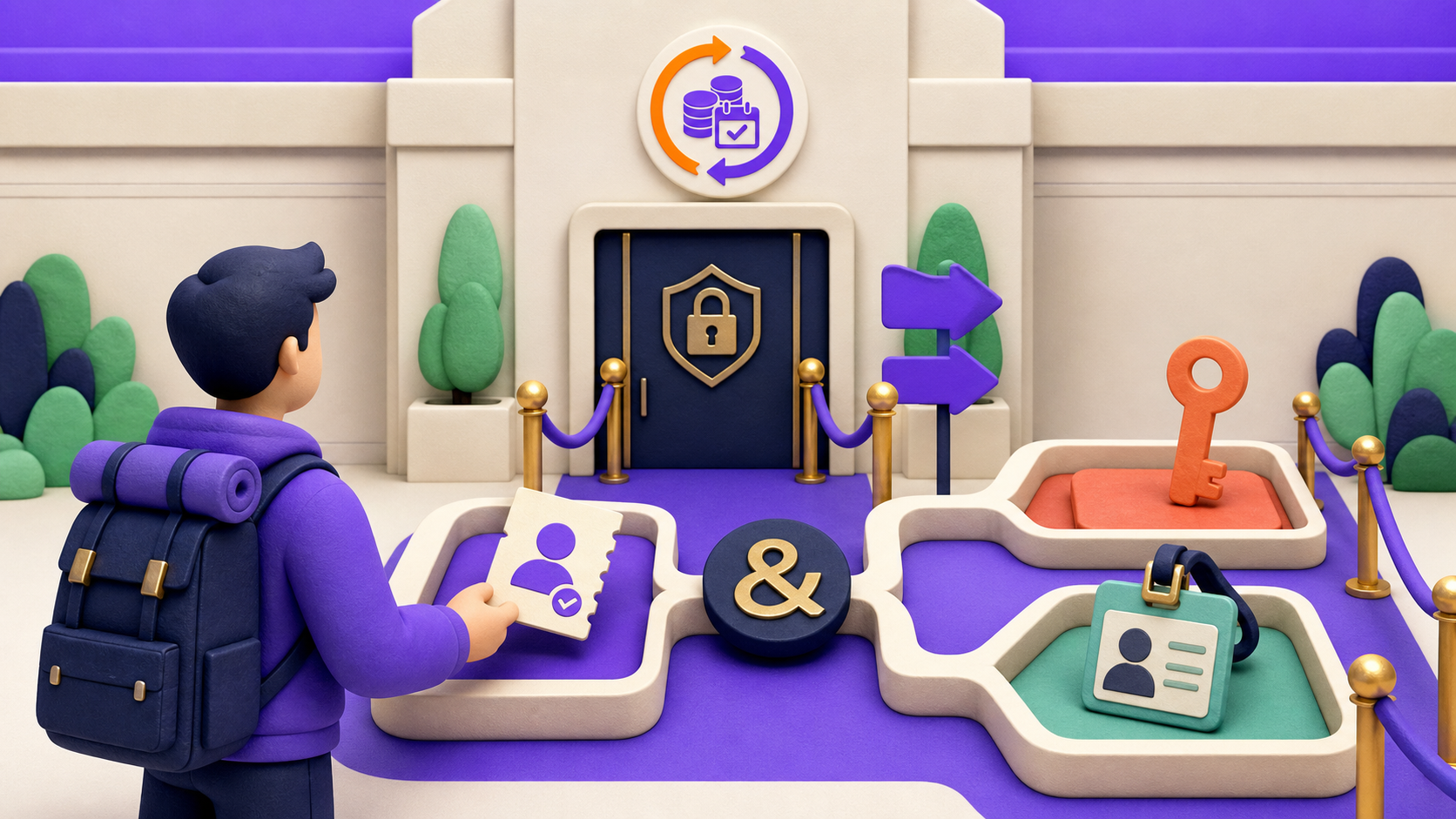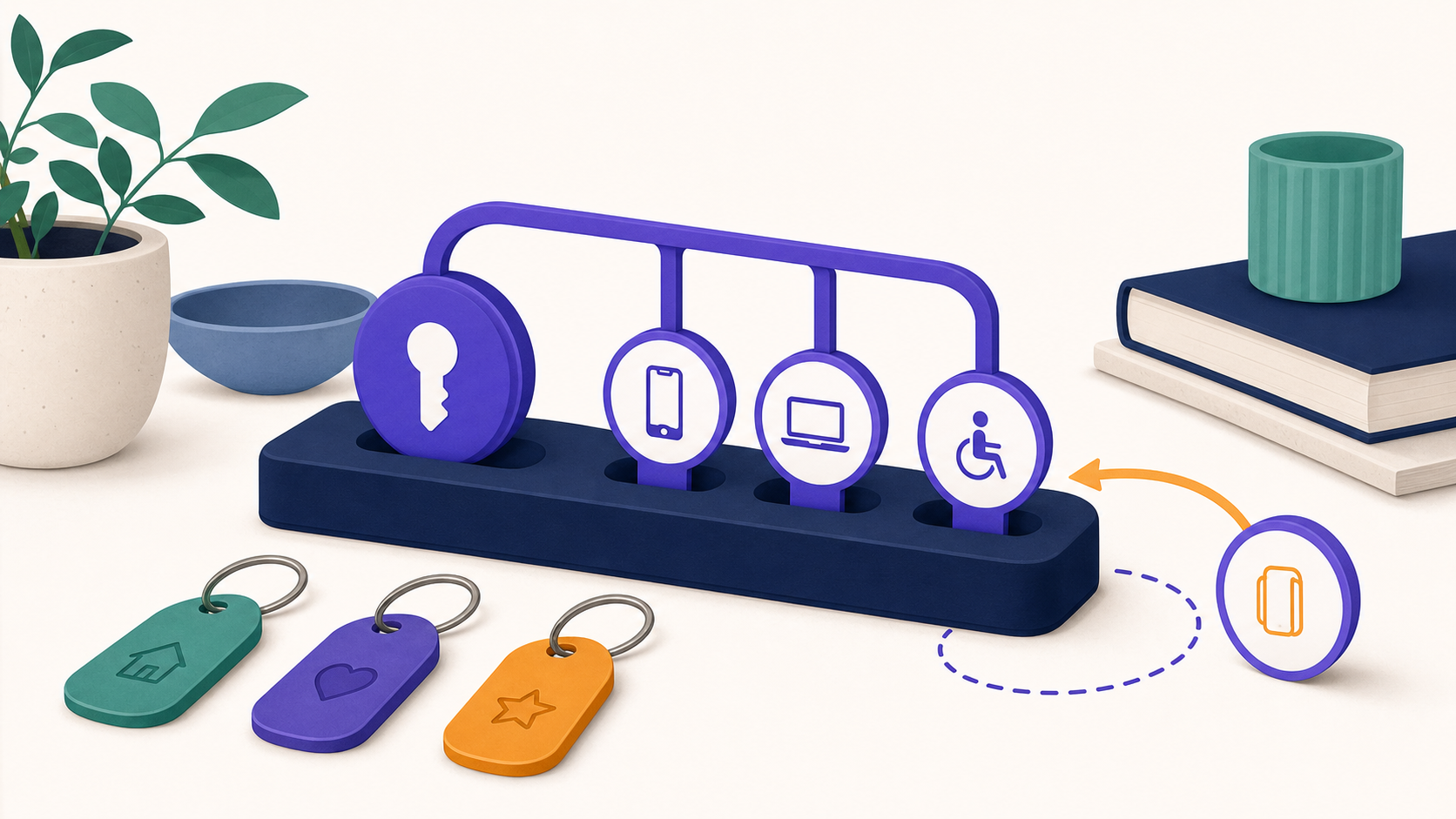
To prevent shared membership accounts without blocking legitimate households, limit concurrent sessions rather than every device ever used, set allowances by plan, publish the rule before purchase, and provide a fast recovery path. Give families and teams separate-account plans when identity, privacy, progress, or billing belongs to individuals, and review repeated patterns before penalizing anyone.
The objective is not to make normal membership use irritating. It is to make casual, unlimited credential sharing less useful while keeping the policy understandable, proportionate, and recoverable.
Key takeaways
- A concurrent-session limit can deter simultaneous sharing, but it does not identify a person, physical device, household, or intent.
- A family or team plan should normally give people separate accounts or seats instead of one shared password with a higher cap.
- Multi-device use, travel, assistive technology, caregiver help, and stale sessions are not proof of abuse.
- ArraySubs Pro limits eligible WordPress sessions, supports conditional allowances, keeps the newest login, and invalidates the oldest eligible session.
- Fair enforcement needs clear terms, recovery, human review, and an appeal path—not an automatic accusation based on one ambiguous signal.
What counts as account sharing—and what only looks similar?
Account sharing means more than “the same account appeared twice.” A member can remain signed in on a laptop, open a lesson on a phone, use a separate browser for accessibility tools, or receive help from a caregiver. Each browser profile can create a separate authenticated session even when one person controls them all.
WordPress describes sessions through its per-user WP_Session_Tokens system. A session represents continuing authenticated browser state; it is not a durable device identity or evidence that a second person used the account. WordPress can store fields such as expiration, login time, IP address, and user agent with a session, but the existence of those fields does not make an IP address a household or a browser string a person (WordPress session-token source, WP_Session_Tokens::create()).
Use the following table as a triage tool, not as a verdict engine.
| Observed pattern | Plausible legitimate explanation | Plausible risk | Proportionate first response |
|---|---|---|---|
| Laptop and phone both signed in | Normal personal use | Password shared with another person | Allow within a published baseline; do not accuse |
| A new browser session appears | Cookie clearing, private browsing, a new profile, or a replacement device | Another active user | Count sessions consistently and explain displacement |
| Login follows a network change | Travel, mobile handoff, work network, or VPN | Stolen credentials | Offer reauthentication or support; do not treat location as conclusive |
| Several sessions remain open | Forgotten logouts, family use, caregiver help, or many work devices | One paid account serving a group | Offer a legitimate group route and review repeated evidence |
| Many people use one account sequentially | Family or staff rotation | Sharing designed to evade a concurrency cap | A session cap alone will not solve this; change the account model |
| One phone receives several login codes | Shared family phone or accessibility support | Central control of several accounts | Do not block merely because the authenticator is shared |
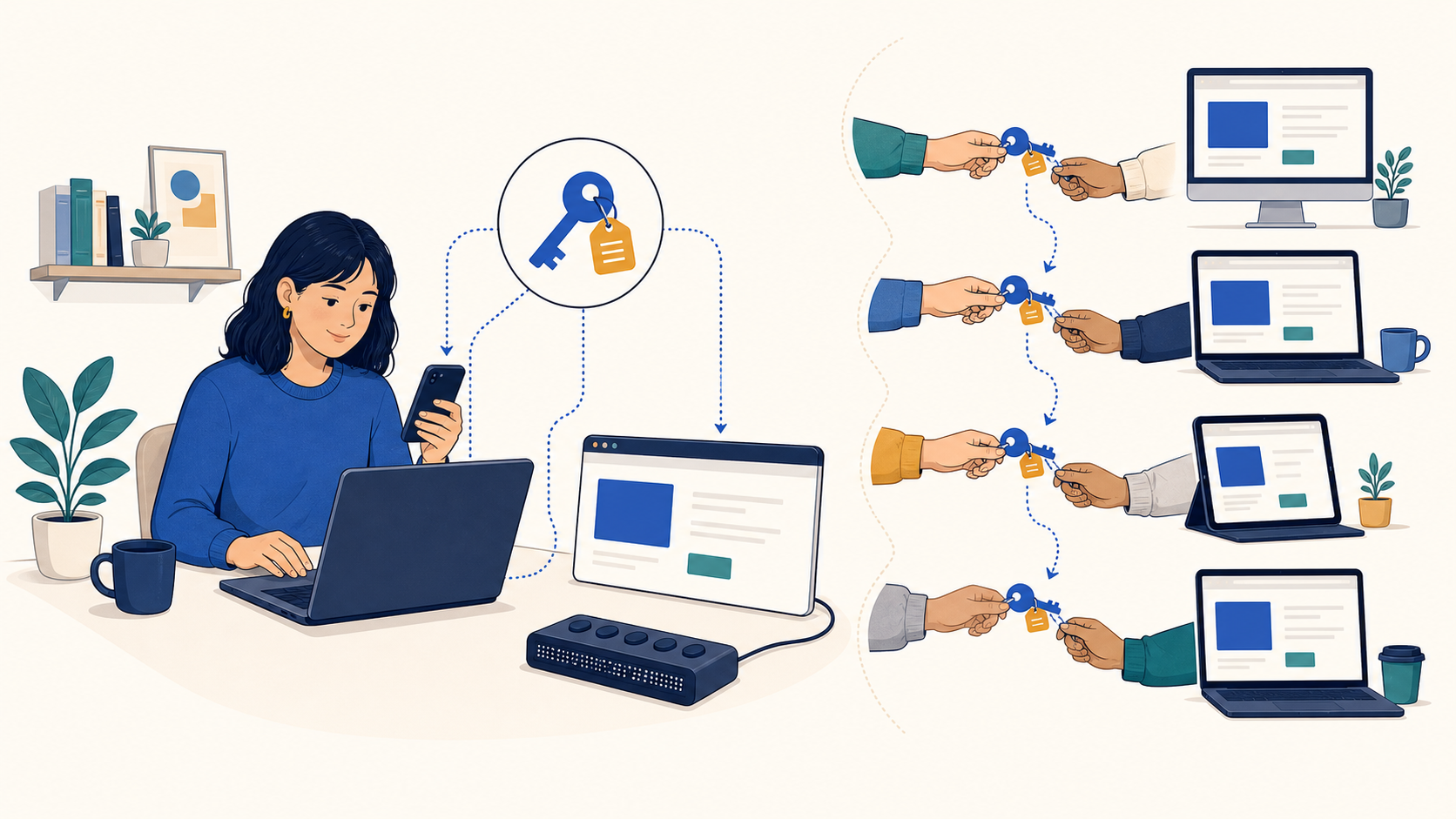
NIST's current authentication guidance explicitly recognizes that a family phone may be shared as an authenticator and says public-facing systems should not automatically prevent a device from being registered to multiple subscribers solely for that reason, while still allowing controls against large-scale fraud (NIST SP 800-63B-4). That is a useful design principle even when a membership site is not required to follow NIST: one shared tool is a signal that needs context, not proof of misconduct.
What is the difference between a session, device, location, and risk signal?
These terms are often collapsed into “multi-login prevention,” but they describe different controls.
| Control model | What it measures | Where it helps | Main fairness or privacy risk | Current ArraySubs support |
|---|---|---|---|---|
| Concurrent sessions | Still-valid authenticated sessions | Deters casual simultaneous use; easy to explain | Can displace a legitimate stale session; misses sequential sharing | Yes, Pro |
| Registered devices | Persistent browser or device identifiers | Lets a service name or remove remembered endpoints | Cookie resets, shared computers, replacement devices, and fingerprinting concerns | No verified support |
| Location or household | Address, IP, device, or activity-based inference | Can support a same-household commercial promise | Travel, VPNs, mobile networks, separated families, and shared networks create false positives | No verified support |
| Risk-based enforcement | Several signals plus history or anomaly scoring | Focuses review on unusual patterns | Opaque scoring, surveillance, bias, retention, and appeal burden | No verified support |
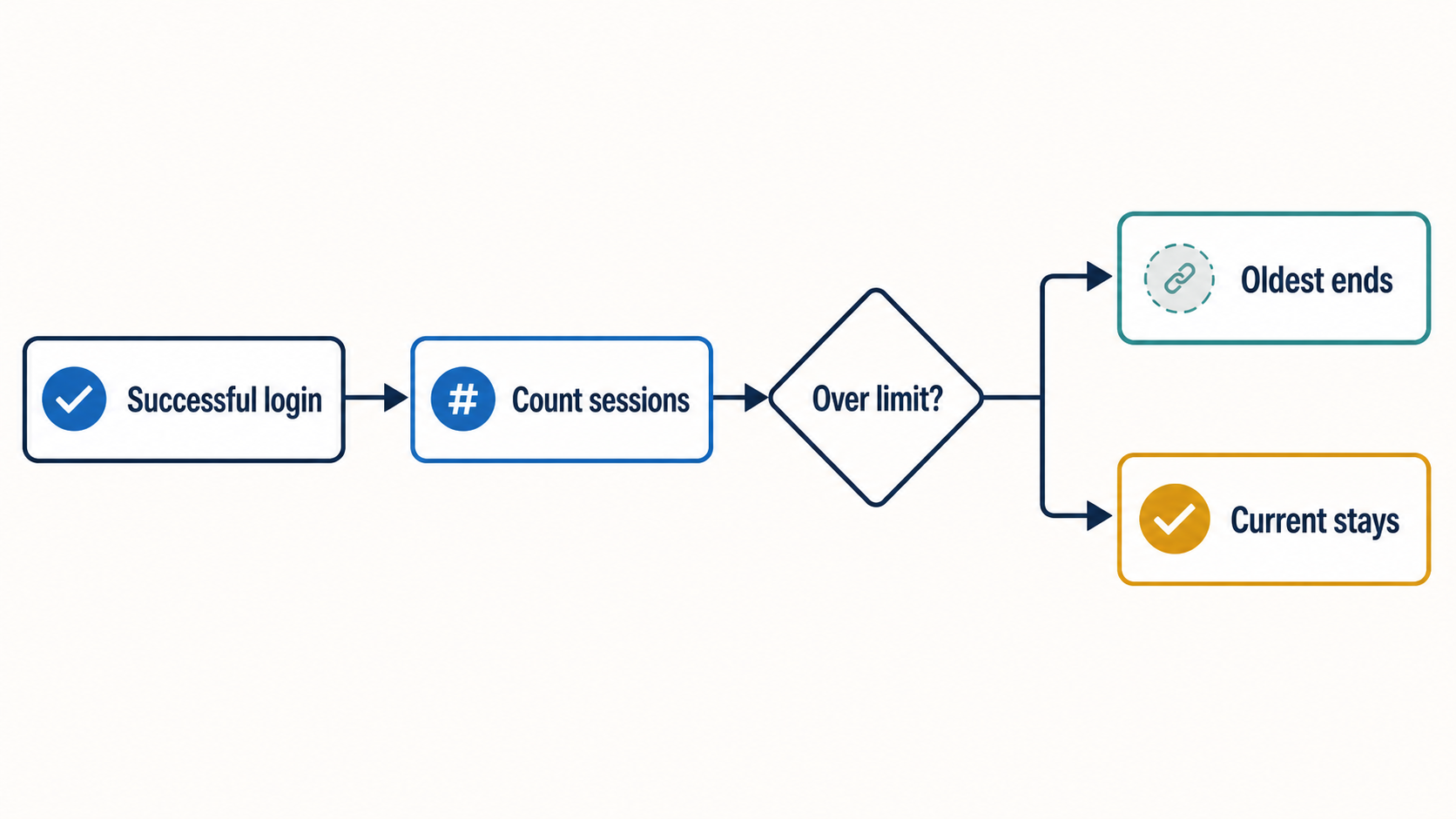
A concurrent-session cap is usually the least intrusive starting point when the actual problem is several people consuming a limited membership simultaneously. It uses the authentication state WordPress already manages and can be described in one sentence: “This plan allows up to N active sessions at once.”
It is not the answer when the promise depends on named individuals, purchased seats, child profiles, per-person progress, legal identity, or high-assurance fraud detection. Those requirements need an identity and account architecture, not merely stricter session counting.
The lowest-data control that meets the stated purpose is usually easier to explain and support. If an operator considers persistent device or location data, it should document the purpose, minimise the data collected, define retention, and assess unexpected adverse effects. The UK Information Commissioner's Office frames those duties through data minimisation, fairness and transparency, and storage limitation (ICO data minimisation, fairness and transparency, storage limitation). This is general operational guidance, not legal advice.
Use the SHARE framework before choosing a limit
Do not begin with “one session sounds secure.” Begin with the product promise. The SHARE framework turns an anti-sharing idea into an operating policy that sales, support, engineering, and customers can understand.
| Step | Operator question | Required output | Failure to avoid |
|---|---|---|---|
| S — Specify the unit sold | Is access for one named person, one household, a number of screens, a number of seats, or an organization? | One entitlement sentence in pricing and account terms | Enforcing one session after vaguely selling “family access” |
| H — Honor legitimate access | Which browsers, assistive tools, caregivers, travel, and shared-authenticator cases should work? | Normal-use scenarios and documented exceptions | Treating inconvenience as evidence the control works |
| A — Apply the least intrusive control | Can a session limit meet the purpose before tracking devices or location? | Allowance by offer, data map, retention rule, and customer message | Collecting more data because it might be useful later |
| R — Respond proportionately | What happens after a first, repeated, and reviewed event? | Explanation, recovery, human review, restriction, and appeal | Immediate suspension from one ambiguous observation |
| E — Evaluate outcomes | Does the control reduce misuse without raising support, churn, or accessibility failures? | Metric definitions, review cadence, rollback threshold, and change log | Reporting blocked accounts as success without false-positive evidence |
How should you select a concurrent-session allowance?
There is no universal “correct” limit for WordPress memberships. A defensible decision record looks like this:
effective allowance
= normal simultaneous personal use
+ documented accessibility or caregiver need
+ purchased family or team entitlement
- sessions replaced through normal expiry or logout
Then answer eight practical questions:
- Does the member normally move between phone and computer while completing one task?
- Is the product sold to a person, household, screen, seat, or organization?
- Can a video, live event, download, or learning workflow reasonably remain open in two places?
- Can the member see or end stale sessions with the wider authentication stack?
- What happens to unsaved work when an old session becomes invalid?
- Can a locked-out member still reach password reset, billing, and support?
- Which customer groups are likely to experience the rule differently?
- Is a higher tier a genuine entitlement or merely a fee to restore ordinary use?
For an individual reading membership, two concurrent sessions may be more honest than one if phone-plus-laptop use is normal. A streamed event with licensed “screens” may use a different policy. A corporate learning product should price named seats instead of allowing twenty sessions on one shared credential.
How should individual, family, team, and assisted access differ?
The account model should follow the identity model.
| Offer | Identity model | Billing model | Session-policy role | What operations must own |
|---|---|---|---|---|
| Individual | One named member account | One payer/account | Permit documented normal use; deter unlimited simultaneous access | Clear terms, oldest-session behavior, and recovery |
| Family | Separate account or profile per eligible person | One organizer or payer | Apply a per-person cap after members exist | Eligibility, invites/removal, children, privacy, and household exceptions |
| Team | Named account per purchased seat | Owner/company pays for a team or seats | Per-user cap complements, but does not replace, seat count | Manager roles, join/leave flow, offboarding, and auditability |
| Assisted access | Member plus authorized support method | Member or organization pays | Use an exception or delegated access instead of a shared master password | Scope, accessibility, consent, revocation, and support |
| Institution or kiosk | Managed identities or defined shared endpoint | Organization contract | Design sessions for the actual deployment | Logout hygiene, local data privacy, and managed-device rules |
Why a family plan should not mean a shared password
One payer and several separate identities preserve progress, preferences, privacy, support history, and recovery. Apple makes the principle explicit by recommending a unique Apple Account for each family member while Family Sharing carries the shared commercial benefit (Apple Family Sharing guidance). WooCommerce Teams for Memberships similarly illustrates a group-commerce architecture in which an owner manages billing while members receive their own accounts, roles, invitations, and seats (WooCommerce Teams for Memberships).
These are examples, not templates every store must copy. The transferable lesson is that a group entitlement and a shared credential are different designs.

A co-parenting family, a student away from home, or a caregiver may not fit a single-address test. Write whether eligibility follows people, residence, payer, or another relationship, and define a humane exception route. Do not advertise “family access” and later infer the family solely from one IP address.
Why a team plan needs seats
A business account needs to know who joined, who left, who owns billing, and whose access should be revoked when employment changes. Raising a shared login to ten simultaneous sessions preserves none of that accountability. Use named accounts and a seat lifecycle. A per-user session cap can remain as a security or licensing guardrail after seats exist.
If family subaccounts, seat invitations, linked billing, child profiles, or organization managers are essential, design the membership architecture before configuration. ArraySubs Multi-Login Prevention alone is not a family- or team-account system.
What does ArraySubs Pro Multi-Login Prevention actually do?
ArraySubs Pro uses WordPress sessions as the enforcement unit. Current source shows the following behavior:
- The feature is Pro-only and runs only when Multi-Login Prevention is enabled.
- A global maximum supplies the fallback for users who match no conditional rule.
- Login Limit rules can use current membership evidence such as active subscription, purchase, variation, role, lifetime spend, or a Pro Feature Manager value.
- If several enabled rules match, the highest maximum wins. This most-permissive resolution helps an account with overlapping entitlements retain its larger valid allowance.
- A successful new login remains active. When the account is over the effective cap, the oldest eligible WordPress session is invalidated.
- Administrators are exempt by default unless the operator deliberately includes them.
- ArraySubs Login as User impersonation sessions are excluded from counting and eviction, so a support session does not consume the customer's allowance.
That behavior connects recurring billing and member access without pretending they are the same record. If your policy depends on the member's commercial state, first separate subscription billing from membership access and document which lifecycle states qualify.
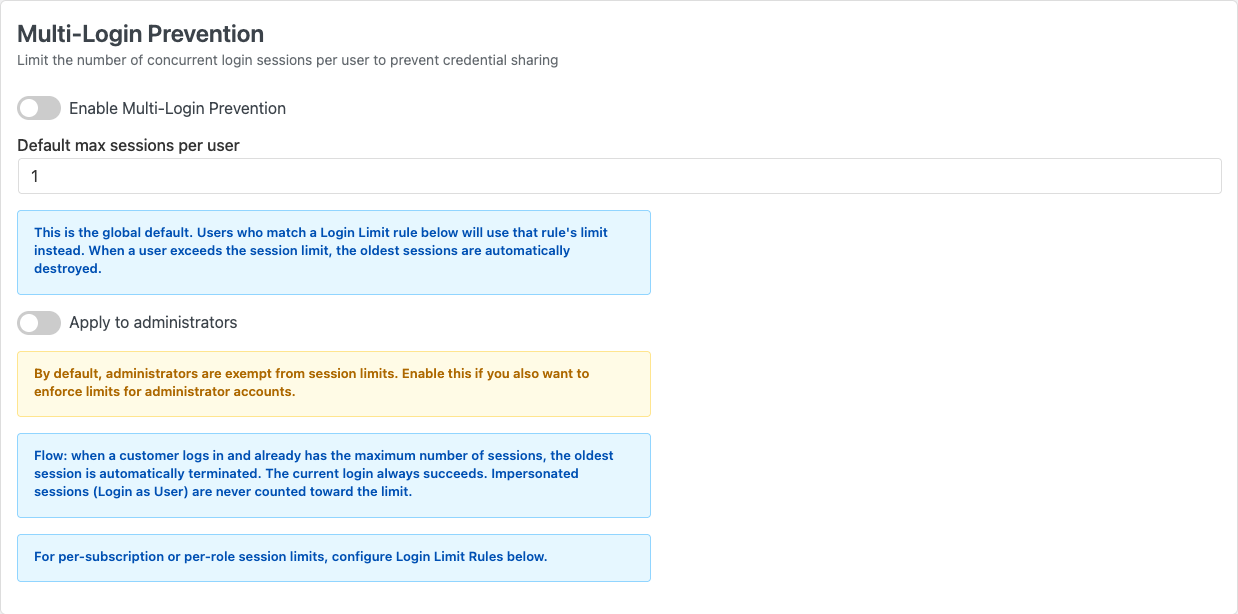
The global panel under Member Access → Login Limit makes the fallback explicit. Users who do not match a conditional rule receive the default maximum; administrators remain exempt unless the operator opts them in. The interface also states the displacement rule directly: the current login succeeds, the oldest eligible session ends, and ArraySubs Login as User sessions do not count.
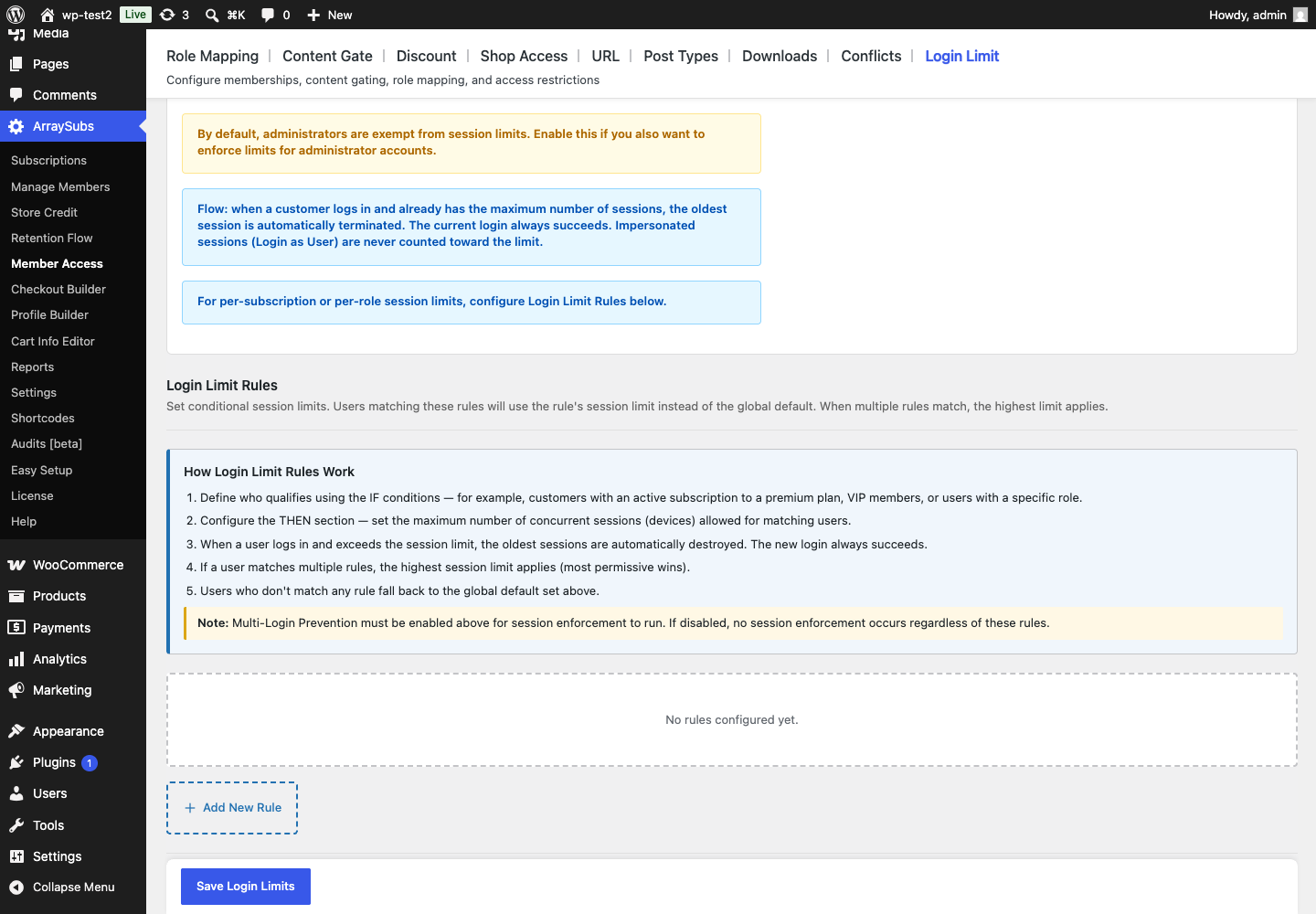
The rule guidance is unusually important for fair family and team offers. A rule does not identify a household. It maps existing membership evidence to a different simultaneous-session allowance. When several enabled rules match, the highest allowance wins, while a member who matches none returns to the global fallback.
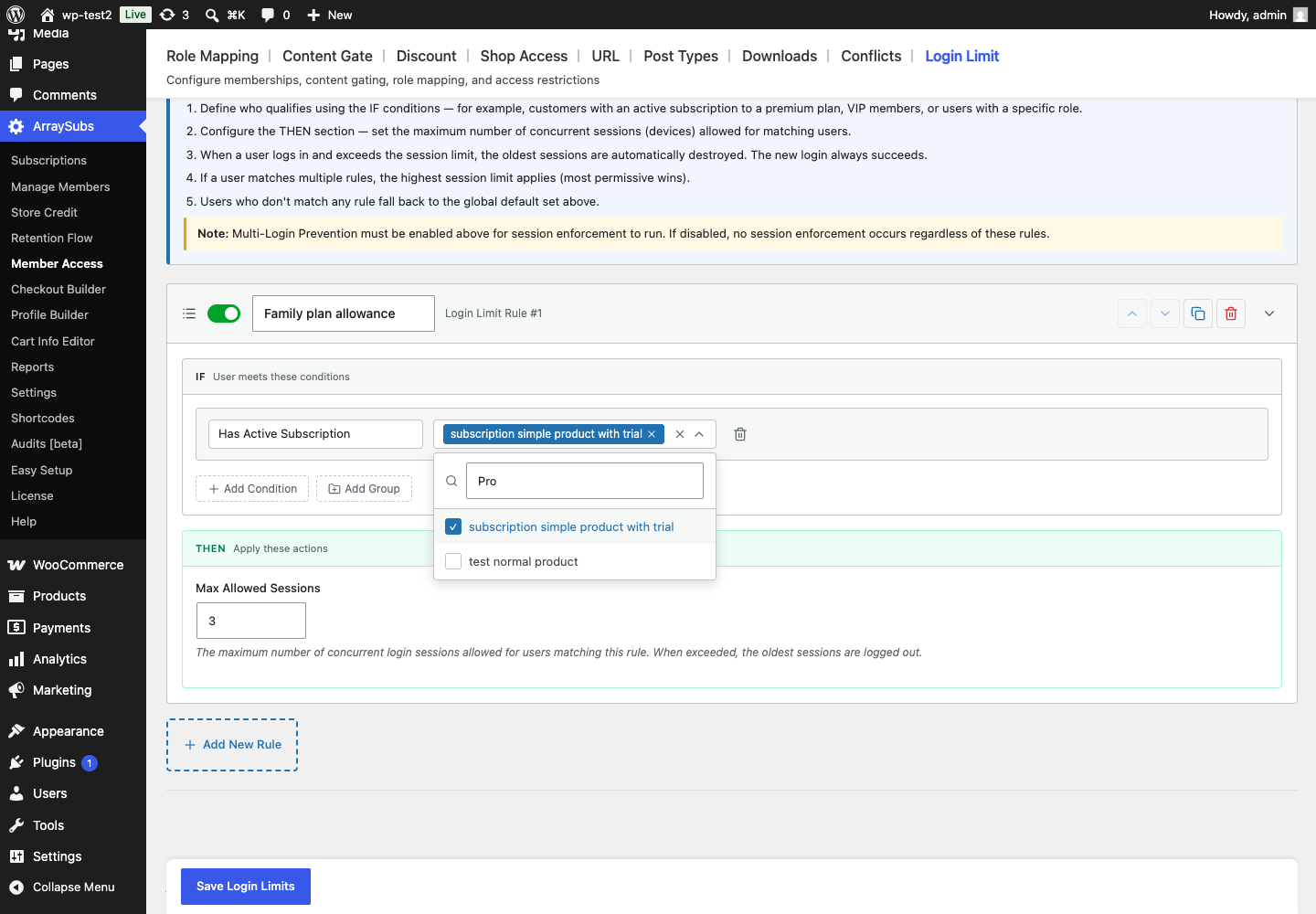
The example above was assembled only to document the available controls and was not saved. A production rule should use the real product or entitlement that represents the published offer, a plain-language name that support can recognize, and a maximum justified by the plan's promised use—not an arbitrary number copied from a screenshot.
These three screenshots were captured on July 20, 2026 from the user-supplied local staging site running ArraySubs 1.8.11 and ArraySubs Pro 1.1.2. Pro was temporarily activated to expose the feature, no Login Limit setting was saved, and the plugin was restored to its original inactive state after capture. A separate read-only mirror still redirected the same route to Role Mapping, which demonstrates why documentation should record the verified version and environment.
What ArraySubs does not detect
No current support was found for:
- device fingerprints, trusted-device lists, or named-device management;
- IP, GPS, household, travel, or VPN enforcement;
- fraud scoring, behavior analysis, or impossible-travel detection;
- family subaccounts, team seats, invitations, or linked-member billing;
- a customer-facing active-session list or per-session remote logout control;
- a warning before eviction, a user choice of which session survives, or an appeal workflow;
- stopping sequential sharing, copied files, screen capture, or redistribution.
This boundary matters. “Maximum sessions” is accurate. “Maximum devices,” “same household,” and “account-sharing detection” would overstate the implementation.
The current source contains a server-side WordPress Heartbeat response for session checks, but a repository-wide search did not find its client sender. The safest verified promise is that an invalidated old session will fail on refresh or its next authenticated request. Do not promise a particular redirect time, warning toast, or cooldown until the real deployed flow proves it.
For the narrow setup sequence, use the ArraySubs Pro concurrent-login recipe. For different allowances by membership, see the plan-specific session-limit recipe. This guide owns the policy decision; those pages own configuration.
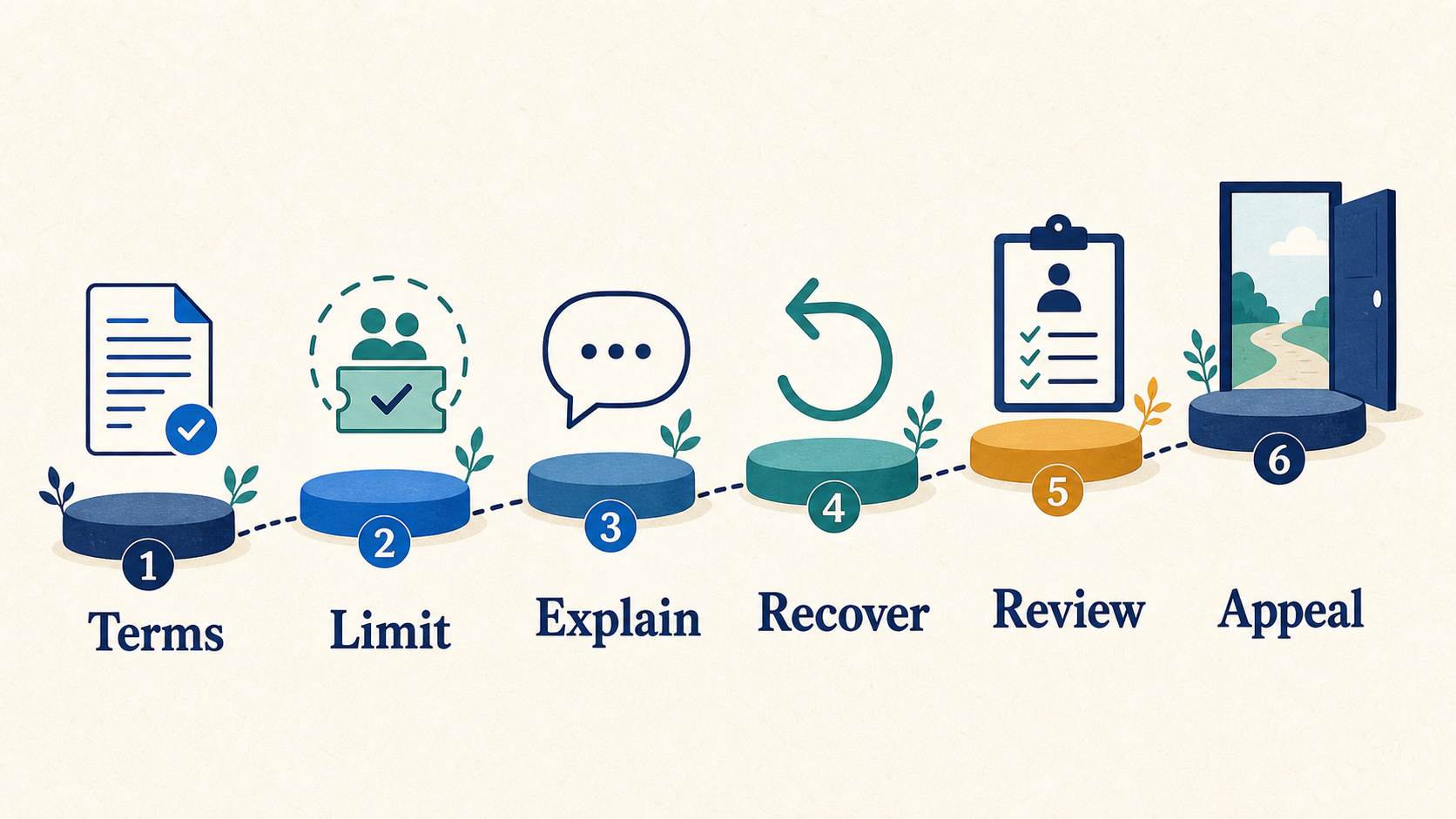
How should a fair enforcement and recovery flow work?
An enforcement system is not complete when it ends a session. It is complete when a legitimate member can understand what happened, protect the account, recover access, and challenge a wrong decision.
- State the rule before purchase. Put the access unit and session allowance on the pricing page, checkout terms, and account policy.
- Prevent accidental sharing. Encourage unique credentials and password managers. Do not disable paste or autofill.
- Explain the event. State that an older session ended, show the allowance, and say what to do if the new login was not recognized.
- Keep recovery available. Password reset, logout-all, billing, support, and the return-to-content path must remain usable.
- Route legitimate group use. Offer family, team, or extra-seat products where the business can support them.
- Review repeated patterns. Use more than one ambiguous observation; document evidence and counterexamples.
- Apply a proportionate restriction. Prefer a temporary and explained control before cancellation where risk, policy, and law permit.
- Provide appeal and redress. Make the route visible, accessible, staffed, and measurable.
- Roll back when harm outweighs value. Rising support contacts, accessibility incidents, overturned decisions, or post-event churn are policy signals.
NIST recommends accessible redress mechanisms for authentication problems in the contexts its standard covers. OWASP also recommends mature session-management features such as active-session visibility, concurrent-login alerts, remote termination, and account activity review (OWASP Session Management Cheat Sheet). Treat those as a roadmap for the wider account experience, not as current ArraySubs feature claims.
Keep authentication accessible
An anti-sharing rule must not make login harder by blocking password managers, copy and paste, or accessible alternatives. WCAG 2.2's Accessible Authentication guidance explains how autofill, password managers, and copy/paste can reduce cognitive burden, and it applies across every step in a multi-step authentication flow (W3C Understanding SC 3.3.8).
Practical requirements include:
- keyboard- and screen-reader-operable messages and recovery controls;
- plain language that does not accuse the member of fraud;
- preservation of the intended return destination after login;
- a support route independent of the login step that failed;
- caregiver or assistant workflows that do not require unnecessary disclosure of disability;
- testing with password managers, autofill, assistive input, private browsing, and shared authenticators.
Membership account-sharing policy template
Adapt this with product, support, privacy, and legal owners:
Who may use the plan:
[one named member / eligible household members / up to N named seats]

Identity:
Each person who receives an individual seat should use their own account.

Concurrent access:
This plan allows up to [N] active sessions per account. When a successful
login exceeds that allowance, [the oldest session is signed out].

Normal use and exceptions:
You may use your account on your supported devices and while traveling,
subject to the concurrent limit. [Describe family, caregiver, workplace,
classroom, and accessibility cases.]

Security and recovery:
Do not publish or sell credentials. If you do not recognize a login or are
repeatedly signed out, reset the password and contact [support route].

Review and appeal:
We do not treat one session event as conclusive proof of misuse. If access is
restricted, we explain why and provide [review route and response target].

Data:
We use [session count and timestamps / exact listed signals] for [purpose],
retain them for [period], and explain choices in [privacy notice].
Do not paste unsupported product behavior into the policy. With current ArraySubs Pro, “the oldest session is signed out” is supported by source. A session chooser, device naming, household verification, challenge flow, and appeal case management require other systems or manual operations.
Three worked membership scenarios
1. Independent paid publisher
Promise: one named reader with ordinary use on personal devices.
Risk: the same credentials are posted in a chat or circulated across a group.
Policy: allow realistic phone-plus-computer use, preserve the newest login, explain old-session displacement, keep password recovery visible, and review repeat support cases. Start with sessions; do not add device fingerprinting without evidence, privacy review, and support capacity.
ArraySubs fit: strong for the concurrent-session layer and a larger allowance for a premium plan. It cannot stop a member from copying an article, recording a screen, or redistributing a downloaded file.
2. Family learning membership
Promise: a parent pays while family members need separate progress, history, and accessible logins.
Policy: create a separate identity for each eligible member. Document whether eligibility follows a household, relationship, payer, or child and how travel or co-parenting works. Apply a reasonable per-account cap only after the family-account structure exists.
ArraySubs fit: can cap the resulting WordPress accounts through conditional rules. It does not provision children, link subaccounts to one payer, or transfer entitlement among family profiles in the inspected module.
3. Corporate course or association
Promise: an organization buys named access for staff or members who change over time.
Policy: the owner manages billing and invitations; every learner has an account; seat additions, removals, and offboarding are auditable. Never solve the requirement by increasing one department password to twenty sessions.
ArraySubs fit: plan- and role-aware caps can be one layer. Seat commerce, invitations, team managers, and linked billing need a dedicated team-account architecture. Connect recurring billing to member entitlements before adding enforcement.
How do you measure deterrence without rewarding false positives?
Do not report “sessions evicted” as revenue recovered. An eviction can represent an unauthorized sharer, the paying member's stale laptop, or a support failure. Define a window, denominator, and outcome for every measure.
limit-event account rate = accounts with an eviction / active member accountsrepeat-event rate = accounts with another eviction in the window / accounts with a first eventsupport-contact rate = event-related support contacts / accounts with an eventpost-event cancellation rate = affected accounts cancelling in the window / affected accountsappeal-overturn rate = restrictions reversed after review / reviewed restrictionsgroup-plan conversion rate = affected eligible accounts buying a legitimate group plan / eligible affected accounts shown the optionsecurity-recovery rate = affected accounts completing password reset or logout-all / affected accounts reporting an unknown login
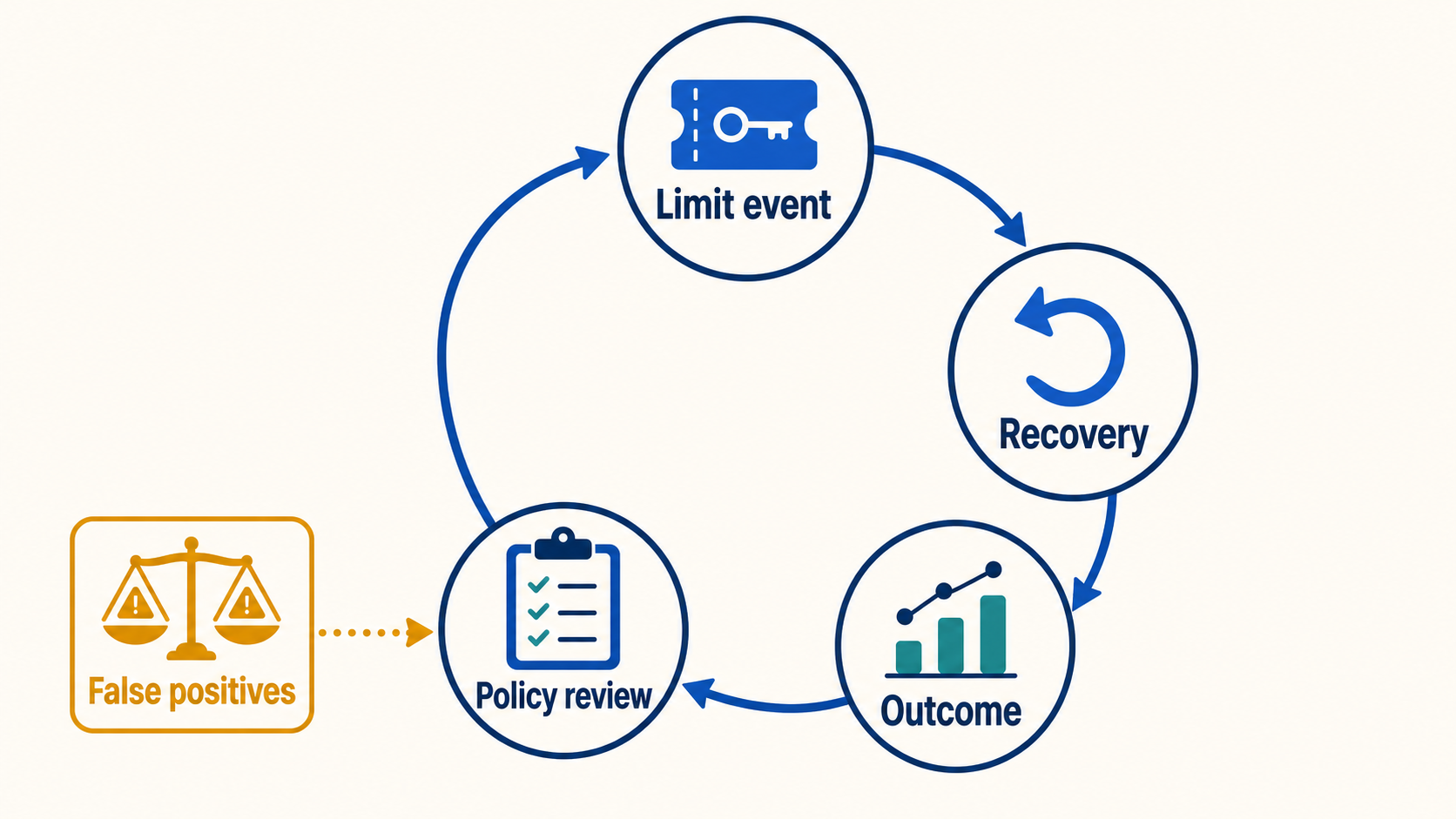
Review guardrails beside those rates:
- login completion and password-reset success;
- accessibility complaints and authentication failures;
- support response and resolution time;
- refunds, chargebacks, cancellations, and downgrades after events;
- appeal outcomes and counterexamples;
- mobile, travel, VPN, caregiver, shared-authenticator, and assistive-technology test results.
Do not collect disability, precise location, or family relationship data merely to improve an anti-sharing dashboard. Prefer voluntary support feedback and privacy-reviewed aggregate measures.
End-to-end implementation and test checklist
Promise and policy
- State whether the unit sold is a person, household, screen, seat, or organization.
- Show the concurrent allowance before purchase and in account terms.
- Define family, team, travel, caregiver, classroom, and accessibility cases.
- Separate credential sharing, account compromise, and ordinary multi-device use.
- Document the data purpose, exact signals, retention, and privacy notice.
- Make recovery, complaint, and appeal routes visible and accessible.
ArraySubs configuration
- Confirm ArraySubs Pro is active and record the current location of Login Limit controls in the deployed build.
- Enable the global setting deliberately and record the fallback allowance.
- Decide deliberately whether administrators are included.
- Give each conditional rule a plain-language owner and purpose.
- Test overlapping rules and confirm the intended highest allowance wins.
- Do not describe a rule as a device, IP, location, household, or fingerprint rule.
- Keep the step-by-step configuration in the narrow recipe rather than duplicating it here.
Browser verification
- One session below the limit remains active.
- Exactly the allowed number of isolated browser sessions remain active.
- A successful over-limit login remains active.
- The oldest eligible session is unauthenticated after refresh or its next request.
- Surviving sessions remain authenticated.
- Administrator exemption or inclusion matches the saved setting.
- Login as User does not consume or lose a customer session.
- A user matching no conditional rule receives the global fallback.
- Several matching rules choose the highest allowance.
- Password reset, logout, My Account, payment recovery, checkout, and support remain reachable.
- Mobile, private browsing, cookie clearing, travel/VPN, shared authenticator, assistive technology, and caregiver cases are documented.
- No timing, cooldown, warning, or redirect claim is published without observed evidence.
The July 20, 2026 review verified the real global and conditional controls in a browser, but it did not complete the three-browser eviction flow with a disposable customer account. That boundary is a reason to withhold an unverified timing or redirect claim, not a reason to replace the test with a mock.
When is ArraySubs not enough?
Choose or build a broader identity product when the requirement includes:
- linked family accounts, child profiles, or one-payer/many-member billing;
- paid seat inventory, invitations, team owners, and offboarding;
- customer-managed active-device or active-session lists;
- identity verification, SSO policy, adaptive authentication, or risk scoring;
- high-assurance anomaly detection and a staffed investigation workflow;
- digital-rights management, watermarking, or redistribution controls;
- regulated or high-risk decisions that require specialist security, privacy, accessibility, and legal review.
ArraySubs is a good fit when a WooCommerce membership needs an explainable concurrent-session boundary attached to current WordPress user and membership evidence. It is not the right standalone answer when the commercial product is truly a family, team, or identity-verification system.
Final recommendation
Sell the access unit first, then enforce it. Use a concurrent-session allowance when simultaneous credential sharing is the problem, make the number realistic for normal multi-device use, and keep the newest login plus a clear recovery path. Give families and teams separate identities, review repeated patterns before sanctions, and measure support, appeals, accessibility, and churn alongside limit events.
After the policy, account model, and browser test pass, review ArraySubs member-experience features, then view ArraySubs Pro pricing.
Frequently asked questions
Can WordPress prevent simultaneous logins?
Yes. WordPress maintains per-user session tokens, and an enforcement layer such as ArraySubs Pro can count eligible sessions and invalidate older ones. WooCommerce membership access by itself does not necessarily impose a concurrent-session limit; WooCommerce Memberships says memberships are tied to user accounts but it does not manage the login process (WooCommerce Memberships FAQ).
Does a concurrent-session limit identify a device?
No. A session is authenticated browser state, not a stable physical-device identity. One machine can create several sessions, and one person can legitimately use several devices.
Will a session cap stop all account sharing?
No. It deters simultaneous sharing. It cannot detect people taking turns on one credential, and it cannot prevent copied files, screen capture, or redistribution.
What is a fair session limit for a family plan?
There is no universal number. The better family design is usually separate eligible member accounts plus a documented per-account allowance. Choose the number from the experience and entitlement you actually sell.
Does ArraySubs use device fingerprinting, IP rules, or GPS?
No such capability was found in the inspected current code or product data. ArraySubs Pro counts eligible WordPress sessions. Do not describe that as device, location, or household detection.
What happens when an ArraySubs session limit is exceeded?
The successful current login remains active. ArraySubs invalidates enough of the oldest eligible sessions to return the account to its effective maximum. An old session should lose authentication on refresh or its next authenticated request.
Can different ArraySubs plans receive different limits?
Yes. Conditional Login Limit rules can match current supported membership, purchase, role, spend, or Pro feature evidence. When several rules match, the highest allowance wins; otherwise the global default applies.
Is ArraySubs Multi-Login Prevention included in the free plugin?
No. It is an ArraySubs Pro module. The free core still provides the shared membership and restriction systems used by other access rules, but concurrent-session enforcement is Pro-only.
Author, technical review, and verification environment
Author: Emran, ArrayHash — product and editorial work across WooCommerce subscriptions, membership architecture, access policy, and technical SEO.
Technical reviewer: ArraySubs Engineering Team — review scope includes WordPress session handling, effective-limit resolution, conditional rules, oldest-session invalidation, admin and impersonation behavior, and product boundaries.
Verification environment: Source review of current local ArraySubs and ArraySubs Pro on July 20, 2026; browser review of Member Access → Login Limit on the user-supplied local staging site with ArraySubs 1.8.11 and ArraySubs Pro 1.1.2; and a read-only mirror comparison. Pro was temporarily activated for the local screenshots, the example rule was not saved, and Pro was restored to inactive afterward. No end-to-end session-eviction timing claim was made.
Disclosure, limitations, and update log
- Commercial disclosure: ArraySubs is an ArrayHash product. This guide separates inspected product behavior from general policy recommendations and third-party examples.
- Limitations: Session limits deter simultaneous sharing; they do not identify people, recover revenue automatically, or prevent redistribution. Privacy, accessibility, employment, consumer, family, and child-account requirements vary by jurisdiction and implementation.
- July 20, 2026: First publication. Verified current source behavior, Pro boundary, global and conditional controls, highest-limit resolution, oldest-session handling, admin and impersonation treatment, staging-versus-mirror route variance, policy framework, fairness guidance, measurement formulas, and test checklist.
Continue from strategy to setup
Use a recipe when the model is settled
These articles own the decision and operating model. The ArraySubs feature map and recipes cover the exact product, billing, and customer-workflow configuration.
Written by
Emran // ArrayHash
Research and practical guidance for WooCommerce subscription operators and implementation teams.
Technical review
ArraySubs Engineering Team
Reviewed against current ArraySubs code, product documentation, and the linked primary platform sources.