
In AND/OR membership access rules, AND means every condition must pass, while OR means any condition can pass. Parentheses define which facts belong together: A AND (B OR C) requires A plus either B or C. Current ArraySubs supports a top-level ALL/ANY operator and one nested group level, covering most practical subscription, purchase, role, spend, and feature policies.
Write the policy in plain language before opening the builder. Logic errors usually begin when someone adds conditions first and decides what they meant afterward.
Key takeaways
- AND narrows access; OR broadens it; parentheses change the outcome.
- ArraySubs labels AND as ALL and OR as ANY in the condition builder.
- The current visual builder supports one nested group level, not unlimited visual nesting.
- Several selected IDs inside one condition usually mean any selected item—not all of them.
- An empty condition list evaluates as allowed in current code, so prepublish QA must catch accidental open rules.
AND and OR in plain language
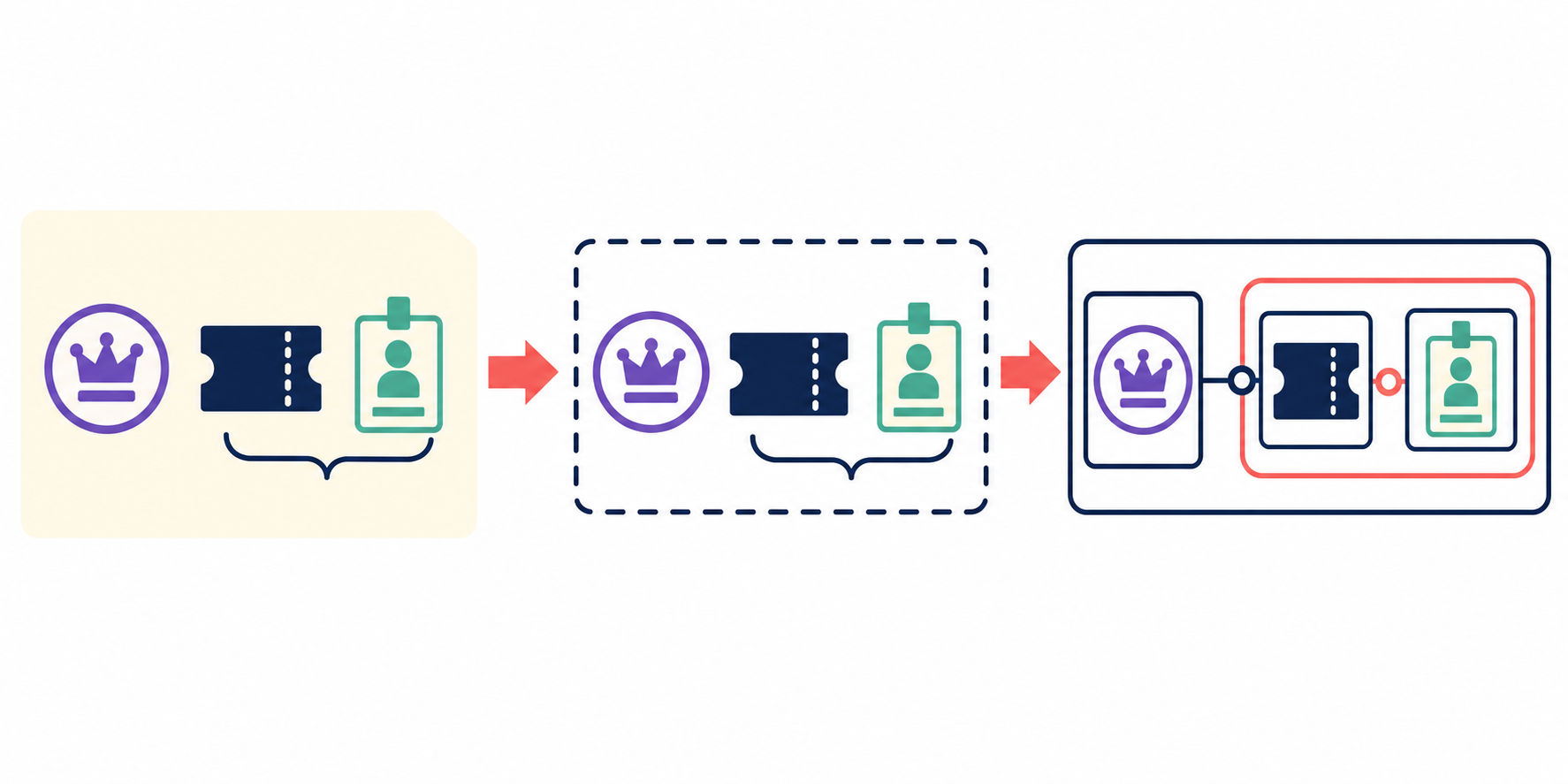
Imagine a workshop door:
- AND: the attendee needs a valid event ticket and an identity badge.
- OR: the attendee may use a valid event ticket or a staff credential.
- Grouped logic: the attendee needs a valid ticket and either an identity badge or a staff credential.

Translate those facts into variables:
A = active Pro subscription
B = purchased Certification course
C = Instructor role
Then write:
A AND (B OR C)
The parentheses make clear that B and C are alternative ways to satisfy the second requirement. Without explicit grouping, different readers may interpret the sentence differently.
Basic truth table
| A | B | A AND B | A OR B |
|---|---|---|---|
| False | False | False | False |
| False | True | False | True |
| True | False | False | True |
| True | True | True | True |
AND requires every fact. OR requires at least one. ArraySubs short-circuits evaluation: an AND group can stop at its first false child, while an OR group can stop at its first true child. This is efficient, but the policy outcome should never depend on which condition happens to run first.
How ArraySubs maps ALL, ANY, and groups
The current shared visual builder provides:
- top-level ALL for AND;
- top-level ANY for OR;
- individual condition rows;
- an added group with its own ALL/ANY operator;
- one nested group level in the UI.
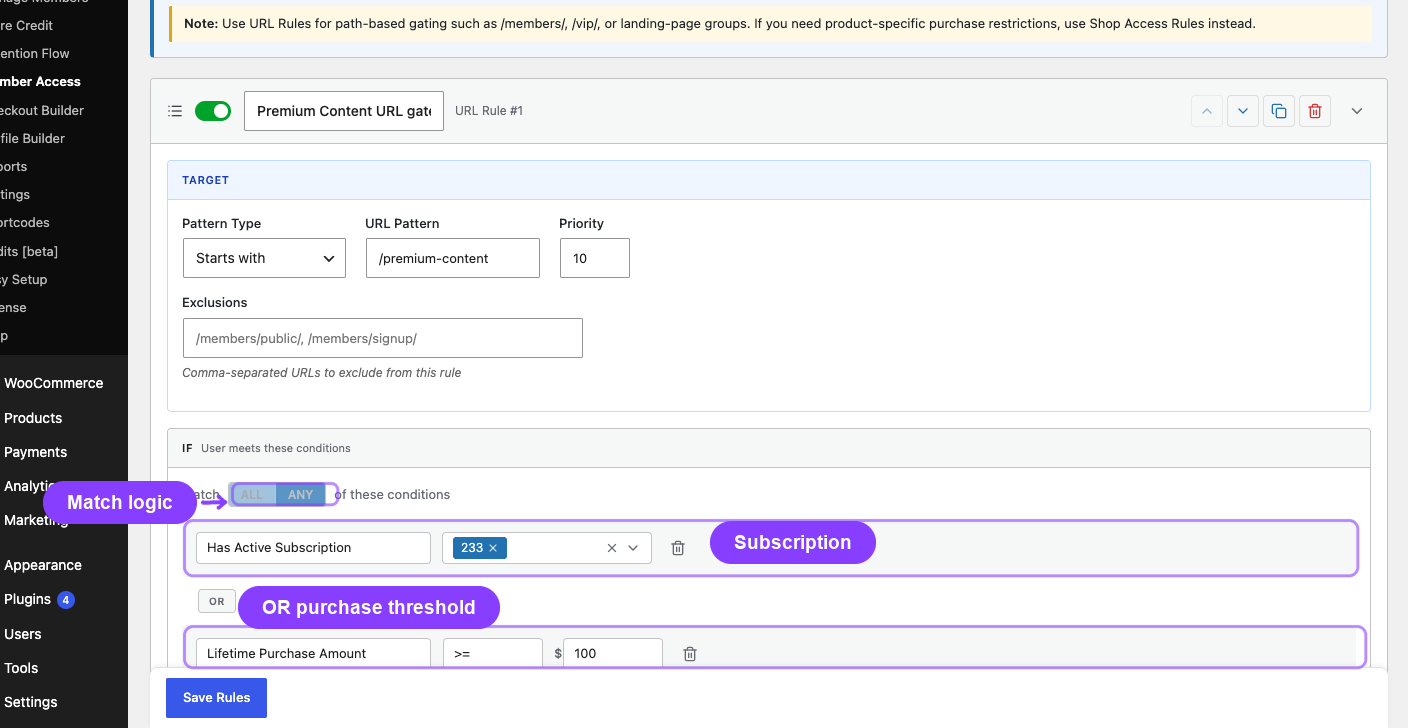
This can express:
A AND B
A OR B OR C
A AND (B OR C)
A OR (B AND C)
The React builder does not currently offer an Add Group control inside an already nested group. Do not promise unlimited UI expressions such as:
A AND (B OR (C AND D))
Backend evaluation is recursive, but an editor-facing guide must describe the visual interface people can actually use.
Which condition types are available?
The inspected shared builder includes:
- lifetime spend comparison;
- purchased product;
- purchased variation;
- purchased from a taxonomy/category/tag;
- active subscription, optionally for selected products;
- subscription variation;
- WordPress user role;
- feature-value condition when ArraySubs Pro Feature Manager is available.
The backend also recognizes a subscription-status condition used through some code/shortcode paths, but it is not a default row in the current shared visual-builder list. Do not invent condition types in screenshots or recipes.
The multi-select trap: one row often means internal OR
A single condition containing several selected items usually passes when any selected item matches:
- purchased Product A, B, or C;
- active subscription to Standard or Pro;
- role Customer or Pro Member.
If the policy requires Product A and Product B, create two purchased-product conditions under top-level ALL.

This distinction causes real errors because the interface may show several selected values in one row. Selection count does not determine Boolean meaning; the condition implementation does.
A three-step translation method
Step 1: identify subjects and facts
Example facts:
- current user has an active Academy subscription;
- user purchased Course A;
- user has the Instructor role.
Step 2: write one policy sentence
Allow users who have an active Academy subscription and either purchased Course A or have the Instructor role.
Step 3: add variables and parentheses
Active Academy
AND (
  Purchased Course A
  OR Role Instructor
)
Only then reproduce the expression in ArraySubs with top-level ALL plus a nested ANY group.
Five worked membership policies
1. One of several plans may enter
Sentence: Allow active Standard or Pro subscribers.
Expression:
Active Standard OR Active Pro
Use one active-subscription condition selecting both products when its internal-any behavior matches the policy. Use two OR rows if separate branches improve testing or audit clarity.
2. Base membership and prerequisite purchase are both required
Sentence: Allow an active Academy subscriber who purchased the prerequisite course.
Expression:
Active Academy
AND Purchased Prerequisite
Use top-level ALL with two conditions.
3. Paid plan or staff override
Sentence: Allow an active Pro subscriber or a support-team role.
Expression:
Active Pro OR Role Support
Use a narrow, controlled custom role. Never use Administrator, Shop Manager, or another powerful role as a casual content override.
4. Base plan plus one of two pathways
Sentence: Allow active Pro members who purchased Certification or have the Instructor role.
Expression:
Active Pro
AND (
  Purchased Certification
  OR Role Instructor
)
This is the canonical nested-group example.
5. Subscription plus numeric feature value
Sentence: Allow active Agency subscribers whose resolved seat entitlement is at least 10.
Expression:
Active Agency
AND Feature team_seats >= 10
This feature-value condition depends on ArraySubs Pro Feature Manager. The result also depends on the feature's configured aggregation behavior. A numeric entitlement is not automatically a usage counter.
Truth table for A AND (B OR C)
Let:
- A = active Pro subscription;
- B = purchased Advanced Course;
- C = Instructor role.
| A | B | C | Result | Explanation |
|---|---|---|---|---|
| No | No | No | Deny | required subscription missing |
| No | Yes | Yes | Deny | B/C cannot replace A |
| Yes | No | No | Deny | neither alternative passes |
| Yes | Yes | No | Allow | A and B pass |
| Yes | No | Yes | Allow | A and C pass |
| Yes | Yes | Yes | Allow | A plus at least one alternative passes |

Give the table to whoever performs QA. It is more useful than telling them to “test the rule.”
What happens with empty or unknown conditions?
In the current evaluator:
- an empty condition list evaluates as allowed;
- an unknown condition type evaluates false;
- group children use the group's own ALL/ANY operator;
- schedules are evaluated separately from the Boolean condition chips.
An empty rule being open avoids silently locking content when a builder has no condition, but it is also a publishing risk. Add a prepublish check that no intended restriction is saved without a real condition.
Unknown or deleted products, variations, roles, and feature keys should fail safely and surface in an operational audit. Do not rely on a missing item to create a permanent denial policy; repair or retire the rule.
Schedules are not another AND/OR chip
Conceptually, a scheduled restriction often means:
condition expression passes
AND release time has arrived
But the current subsystems apply schedules separately from the shared condition tree. Test time boundaries, reference dates, timezone, renewal/reset behavior, and lifecycle state explicitly. Do not place a fake “date condition” in a diagram when the current builder represents scheduling elsewhere.
Rule precedence is subsystem-specific
AND/OR explains conditions inside one rule. It does not define how every list of rules combines.
- URL rules use the first matching, non-excluded route rule.
- Shop rules use the first rule matching the product scope.
- Pricing/discount systems can have their own selection or combination behavior.
- Content-type restrictions may evaluate applicable rules differently.
Read the relevant subsystem's precedence rules. For URL behavior, see URL-Based Content Restriction. Never assume a later “allow” rule rescues an earlier denial.
Reusable policy worksheet
Resource:
Who should always qualify?
Which facts are mandatory?
Which facts are alternatives?
Are staff/admin overrides required?
What lifecycle states count as active?
What should happen when access fails?
Plain-language sentence:
Boolean expression with parentheses:
Expected test personas:
Store this worksheet beside the rule owner and change history. It makes future edits reviewable without reverse-engineering UI chips.
Test and governance checklist
- Policy is approved in plain language before configuration.
- Every “and” and “or” maps to the intended operator/group.
- Multi-selected IDs are not mistaken for AND semantics.
- No empty condition list unintentionally leaves access open.
- Unknown/deleted products, roles, variations, and feature keys fail safely.
- Guest and logged-in nonqualifying user are denied as expected.
- Each qualifying OR branch is tested independently.
- All qualifying branches together are tested.
- Active, trial, pending, on-hold, cancelled, expired, and switched states are covered as applicable.
- Overlapping subscriptions and purchases are covered.
- Staff override uses least privilege.
- Schedule boundaries are tested separately.
- Multiple-rule precedence is tested in the actual subsystem.
- Cache behavior changes correctly after entitlement updates.
OWASP recommends least privilege, deny-safe policy, validation on every request, and explicit authorization tests (OWASP Authorization Cheat Sheet). NIST's attribute-based access-control material provides conceptual grounding for policies based on subject and resource attributes; this is not a certification claim.
Final recommendation
Write the access sentence, identify mandatory and alternative facts, add parentheses, then build it with ALL, ANY, and at most one nested group. Treat multi-select rows carefully, reject accidental empty policies, and turn every Boolean branch into a test persona. Simple logic written precisely is safer than clever rules no one can explain.
Use the combined-conditions recipe for the product workflow. After the policy and QA sheet are approved, review ArraySubs Pro pricing and member-experience features.
Frequently asked questions
What is the difference between ALL and ANY in ArraySubs?
ALL is AND: every child must pass. ANY is OR: at least one child must pass.
Can ArraySubs create nested access groups?
The current visual builder supports one nested group level with its own ALL/ANY operator. It does not expose unlimited nested groups.
If I select two products in one purchased-product condition, must the user own both?
Usually no. The multi-select in that one condition uses internal-any behavior. Use two conditions under ALL when both purchases are mandatory.
Does an empty condition deny everyone?
No. In the current evaluator, an empty condition set is allowed. Treat an unintended empty rule as a prepublish defect.
Is a schedule part of the condition group?
It contributes to the access outcome but is evaluated separately by the subsystem, not as another shared Boolean condition chip.
Do all ArraySubs rule lists use the same precedence?
No. URL, shop, content, download, and pricing subsystems can differ. Check each subsystem's documented ordering and combination behavior.
Author, technical review, and verification environment
Author: Emran, ArrayHash — product and editorial work across WooCommerce membership architecture, access policy, and technical education.
Technical reviewer: ArraySubs Engineering Team — review scope includes shared condition evaluation, builder nesting, condition types, multi-select behavior, schedules, and subsystem precedence.
Verification environment: Source and read-only live UI review of ArraySubs 1.8.11 and ArraySubs Pro 1.1.2 on July 16, 2026. The screenshot used unsaved UI state; no access rule or member data was changed.
Disclosure, limitations, and update log
- Commercial disclosure: ArraySubs is an ArrayHash product. Logic examples are educational and must be tested against the exact resource and lifecycle policy.
- Limitations: Custom conditions, third-party roles, caches, and subsystem precedence vary. Feature-value examples require ArraySubs Pro configuration.
- July 16, 2026: First publication. Verified ALL/ANY evaluation, visual nesting depth, condition inventory, multi-select semantics, empty-rule behavior, worked examples, and test checklist.
Continue from strategy to setup
Use a recipe when the model is settled
These articles own the decision and operating model. The ArraySubs feature map and recipes cover the exact product, billing, and customer-workflow configuration.
Written by
Emran // ArrayHash
Research and practical guidance for WooCommerce subscription operators and implementation teams.
Technical review
ArraySubs Engineering Team
Reviewed against current ArraySubs code, product documentation, and the linked primary platform sources.