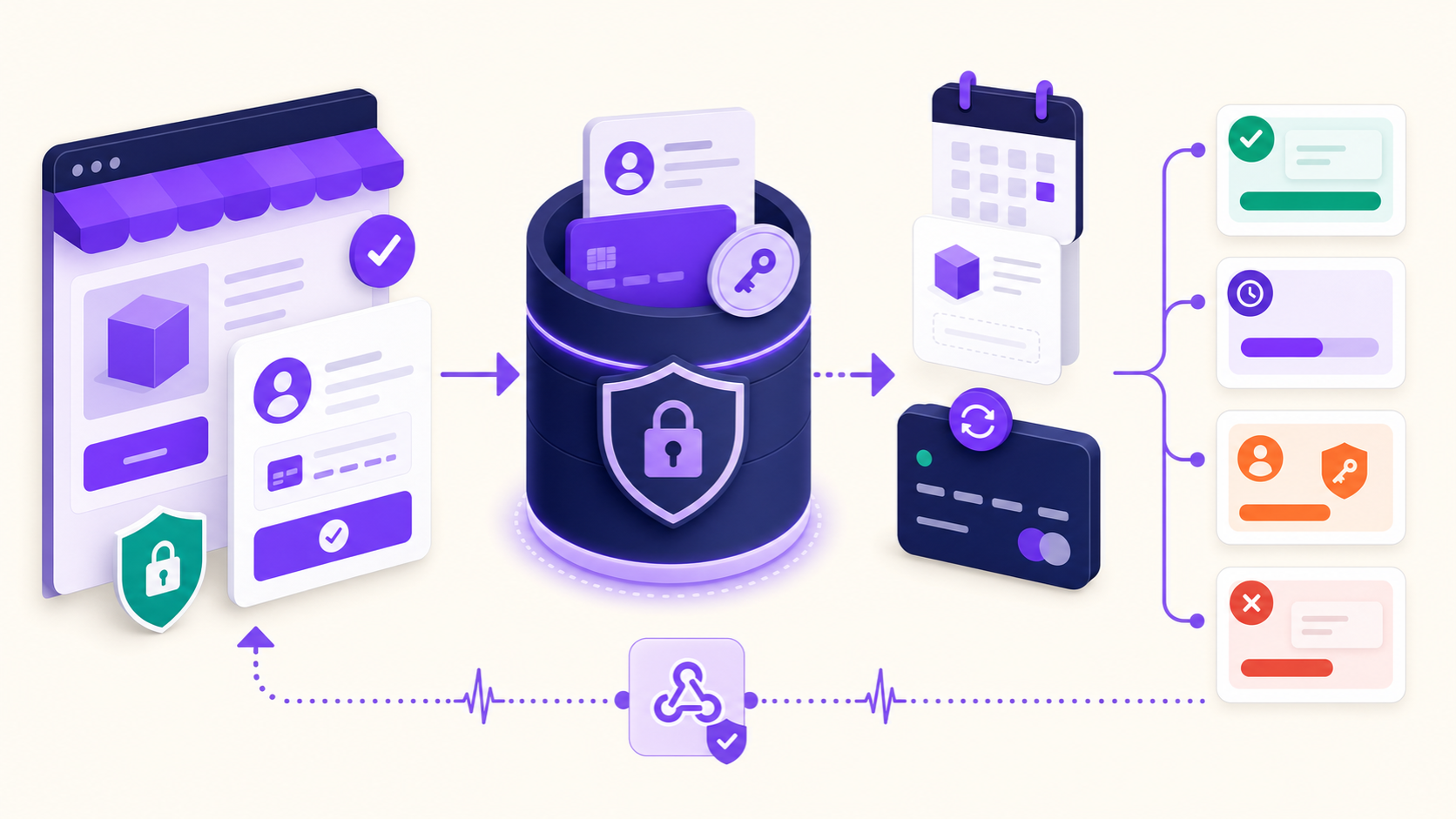
Stripe recurring payments for WooCommerce work when checkout creates reusable payment authority, WooCommerce stores a safe payment token, ArraySubs schedules a renewal order, and ArraySubs Pro confirms a new off-session Stripe PaymentIntent when that renewal becomes due. Stripe moves the money, but the WordPress store—not Stripe Billing—owns the subscription schedule in this architecture.
That distinction matters. A successful first payment proves that the customer can pay while present. It does not prove that a later off-session charge can find the correct token, survive Strong Customer Authentication, recover from an ambiguous timeout, receive a signed webhook, or finish the correct WooCommerce renewal order exactly once. A production launch therefore needs lifecycle testing, not just a green checkout.
Key takeaways
- ArraySubs uses the official WooCommerce Stripe Gateway for checkout, tokenization, the first payment, and standard refund handling. ArraySubs adds the subscription schedule and renewal lifecycle; ArraySubs Pro adds the automatic Stripe renewal bridge.
- The recurring object in Stripe is a new PaymentIntent for each payment. ArraySubs does not create Stripe Price, Subscription, or Invoice objects for this integration.
- A WooCommerce payment token is a local reference to a Stripe PaymentMethod. Raw card data does not belong in WordPress.
succeeded,processing,requires_action, and hard failure are materially different renewal outcomes. Treating all non-success responses as “declined” creates duplicate-charge and recovery risks.- Webhook-event deduplication and payment-request idempotency solve different problems. You need both layers of thinking, plus local scheduler locks and post-timeout reconciliation.
- A customer’s default card changing in Stripe does not automatically prove that the exact ArraySubs subscription now points to that method. Test the complete update-and-renew path.
- Test mode needs a publicly reachable HTTPS webhook endpoint for real provider callbacks. A browser-accessible localhost site cannot receive Stripe’s internet-originated webhook deliveries without a tunnel or public staging URL.
The shortest accurate architecture
The official WooCommerce Stripe extension and ArraySubs divide responsibility instead of duplicating it.
| Layer | Primary responsibility |
|---|---|
| WooCommerce | Cart, checkout, customer, order, taxes, shipping, totals, and the local payment-token vault interface |
| Official WooCommerce Stripe Gateway | Stripe Elements/payment UI, Stripe Customer and PaymentMethod handling, first PaymentIntent, saved method, core Stripe webhook, and standard refund request |
| ArraySubs Free | Subscription product rules, local subscription record, renewal dates, renewal-order lifecycle, manual renewal path, customer portal, and shared scheduling/retry systems |
| ArraySubs Pro Stripe integration | Automatic-renewal capability, off-session PaymentIntent confirmation, Stripe-specific reconciliation, SCA recovery context, and secondary subscription webhook handling |
| Stripe | Payment-method vault, authentication signals, PaymentIntent processing, Charge/refund/dispute records, and authoritative payment events |
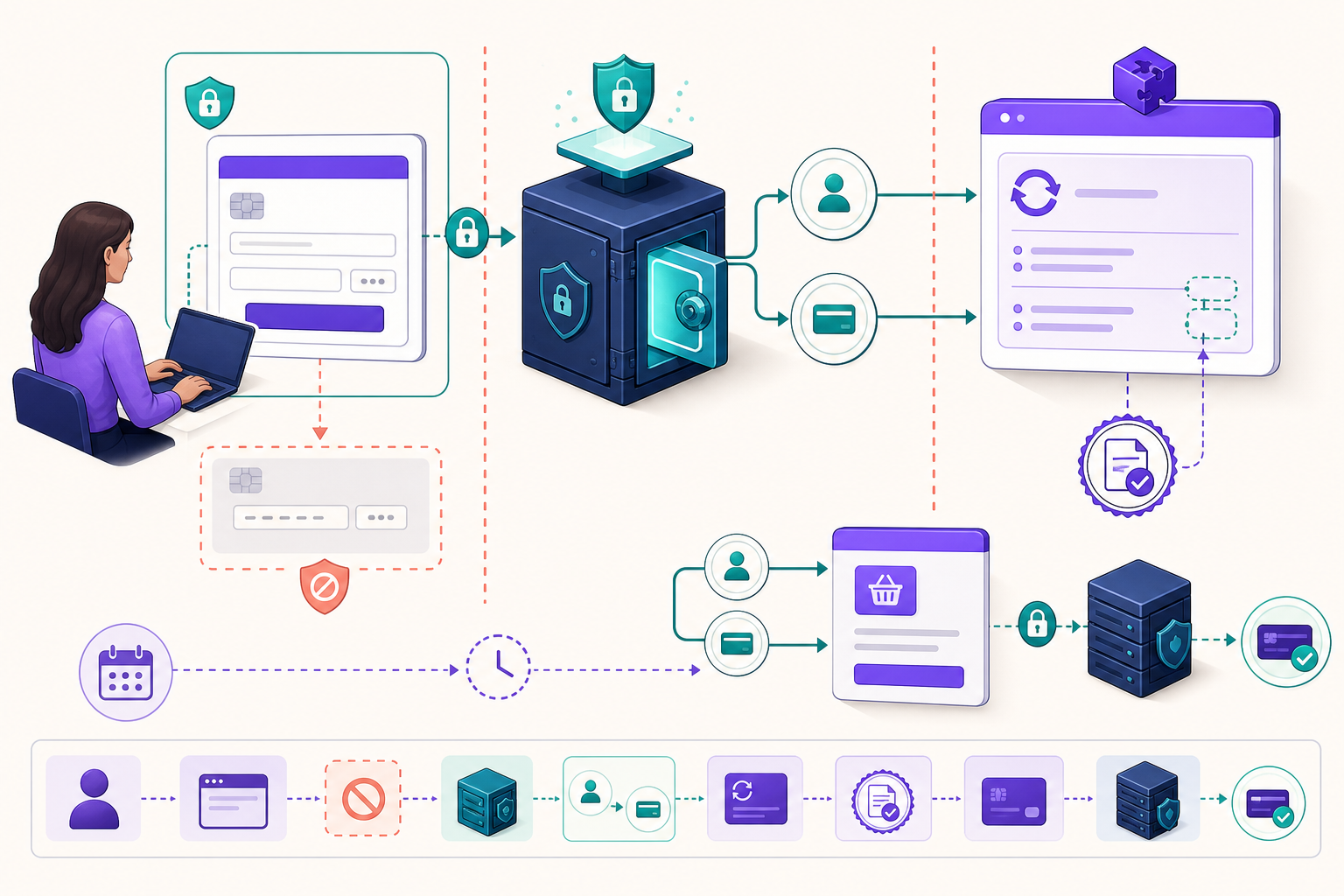
The operational sequence is:
customer checks out
→ official Stripe gateway
  creates/reuses Stripe Customer
→ payment method is prepared
  for future off-session use
→ WooCommerce stores
  a token reference
→ ArraySubs creates
  the local subscription
  and schedules renewal actions
→ renewal order is generated
  at the precise invoice time
→ due-time processor acquires
  a subscription lock
→ ArraySubs Pro confirms
  an off-session PaymentIntent
→ local records respond
  to the PaymentIntent state
→ signed webhook reconciles
  asynchronous/delayed results
This is not Stripe Billing. You should not expect to find a Stripe Subscription, Stripe Price, or Stripe Invoice that controls the cadence. The schedule lives in ArraySubs, and WooCommerce renewal orders are the local commercial records. Stripe PaymentIntents and their Charges are the provider-side money-movement records.
That local-control model is why Stripe is the most flexible current automatic gateway in ArraySubs Pro. It can support mixed regular and subscription items, multiple subscription products, and different billing cycles in one checkout. Read the broader Stripe vs PayPal vs Paddle comparison before assuming those cart capabilities apply to every provider.
The objects you must be able to trace
Recurring-payment incidents become much easier when support, engineering, and finance use the same object map.
| Object | Lives in | What it represents | Typical relationship |
|---|---|---|---|
| Parent/initial order | WooCommerce | The customer’s checkout and first payment | Creates or anchors the subscription |
| ArraySubs subscription | WordPress | Terms, status, next renewal, customer, gateway, and stored gateway context | Produces many renewal orders |
| Renewal order | WooCommerce | One billable renewal attempt/period | Points to one or more provider attempts over recovery time |
| WooCommerce payment token | WordPress | Safe local pointer to a reusable provider method | References a Stripe PaymentMethod and customer |
| Stripe Customer | Stripe | Provider-side customer container | Owns reusable PaymentMethods |
| Stripe PaymentMethod | Stripe | Tokenized card or supported reusable method | Used by checkout and later PaymentIntents |
| Stripe SetupIntent | Stripe | Setup/authorization workflow when no immediate payment collects | Establishes future-use readiness where applicable |
| Stripe PaymentIntent | Stripe | One payment lifecycle with a state machine | A new one is confirmed for each renewal payment |
| Stripe Charge | Stripe | Successful or attempted funds movement created beneath a PaymentIntent | Used in settlement, refund, dispute, and reconciliation views |
| Stripe Mandate | Stripe | Customer authorization record for methods that require it | May be associated with reusable payment authority |
Never ask support to search only by email. Start with the Woo order number and ArraySubs subscription ID, then locate the stored Stripe Customer, PaymentMethod, PaymentIntent, and Charge references. Record the webhook event ID when an asynchronous event is involved.
An efficient incident note looks like this:
subscription: 1842
renewal order: 7913
Stripe customer: cus_...
Stripe method: pm_...
Stripe PaymentIntent: pi_...
provider status:
  requires_action
webhook event: evt_...
scheduled action: ID ...
recovery URL issued: yes
That vocabulary prevents a common mistake: calling every Stripe object a “transaction” and then updating the wrong local record.
Step 1: configure the official Stripe gateway first
ArraySubs Pro’s Stripe integration depends on the official WooCommerce Stripe Gateway. It does not replace the provider connection, checkout fields, saved-method interface, or the gateway’s core webhook.
The staged WooCommerce settings screen below shows the correct starting point: connect a Stripe account in test mode before treating recurring behavior as configured.
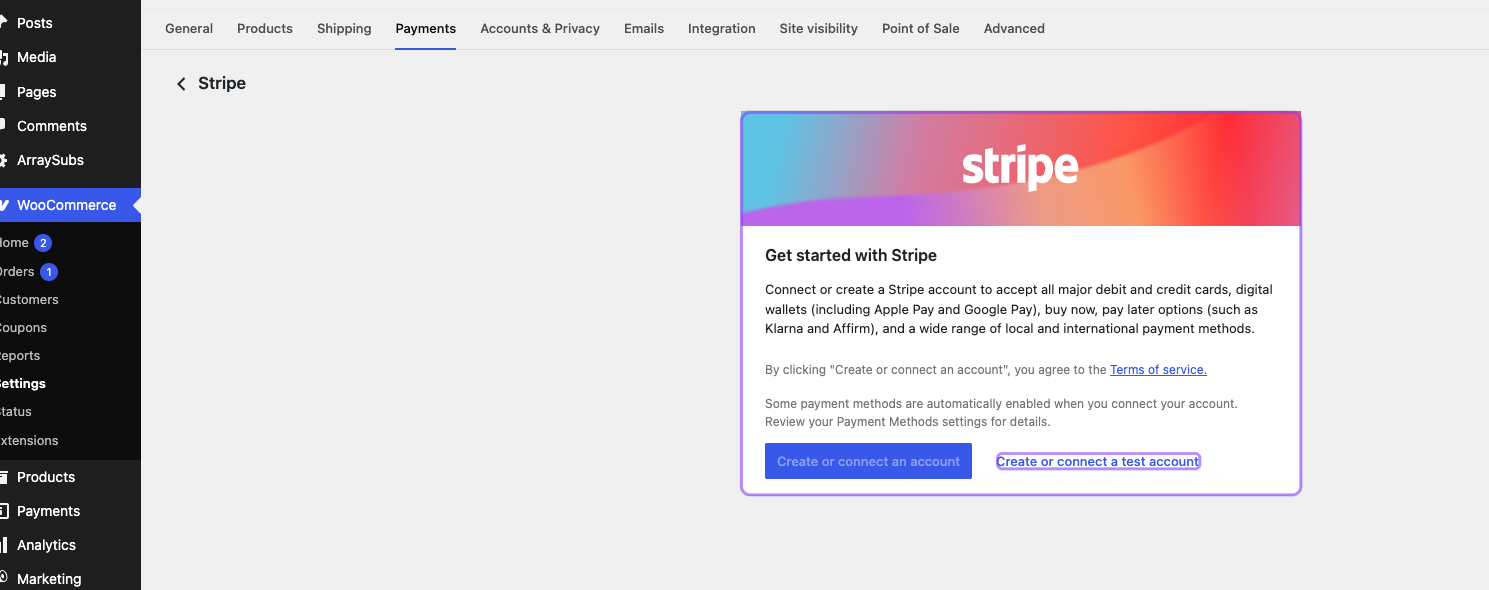
Use the official extension’s supported connection flow. Do not paste keys copied from an unrelated Stripe account, mix test and live credentials, or point the webhook at a site whose credentials belong to another environment. Test and live modes have separate objects, endpoints, signing secrets, customers, methods, payments, and event histories.
At minimum, confirm:
- WooCommerce recognizes the Stripe account as connected.
- Test mode is visibly enabled during QA.
- The Stripe payment method is enabled for checkout.
- Saved-payment behavior is enabled where the recurring method requires it.
- The official WooCommerce Stripe webhook shows a healthy recent delivery.
- ArraySubs Pro recognizes the installed Stripe extension version.
- The ArraySubs secondary Stripe webhook is registered with its own signing secret.
- Live credentials are not present in screenshots, support tickets, logs, or test notes.
ArraySubs Pro currently requires the official WooCommerce Stripe extension at version 9.8 or newer and declares compatibility testing through a particular known version. The staging environment used for this guide runs a newer 10.8.4 build. That is a reason to run regression tests, not a reason to assume incompatibility. Version constraints indicate the supported floor; only lifecycle QA proves the installed combination.
Step 2: expose Stripe as an automatic subscription method
WooCommerce can enable Stripe for ordinary purchases while the subscription engine still considers it unavailable for unattended renewals. Automatic subscription support is an explicit ArraySubs Pro integration capability.
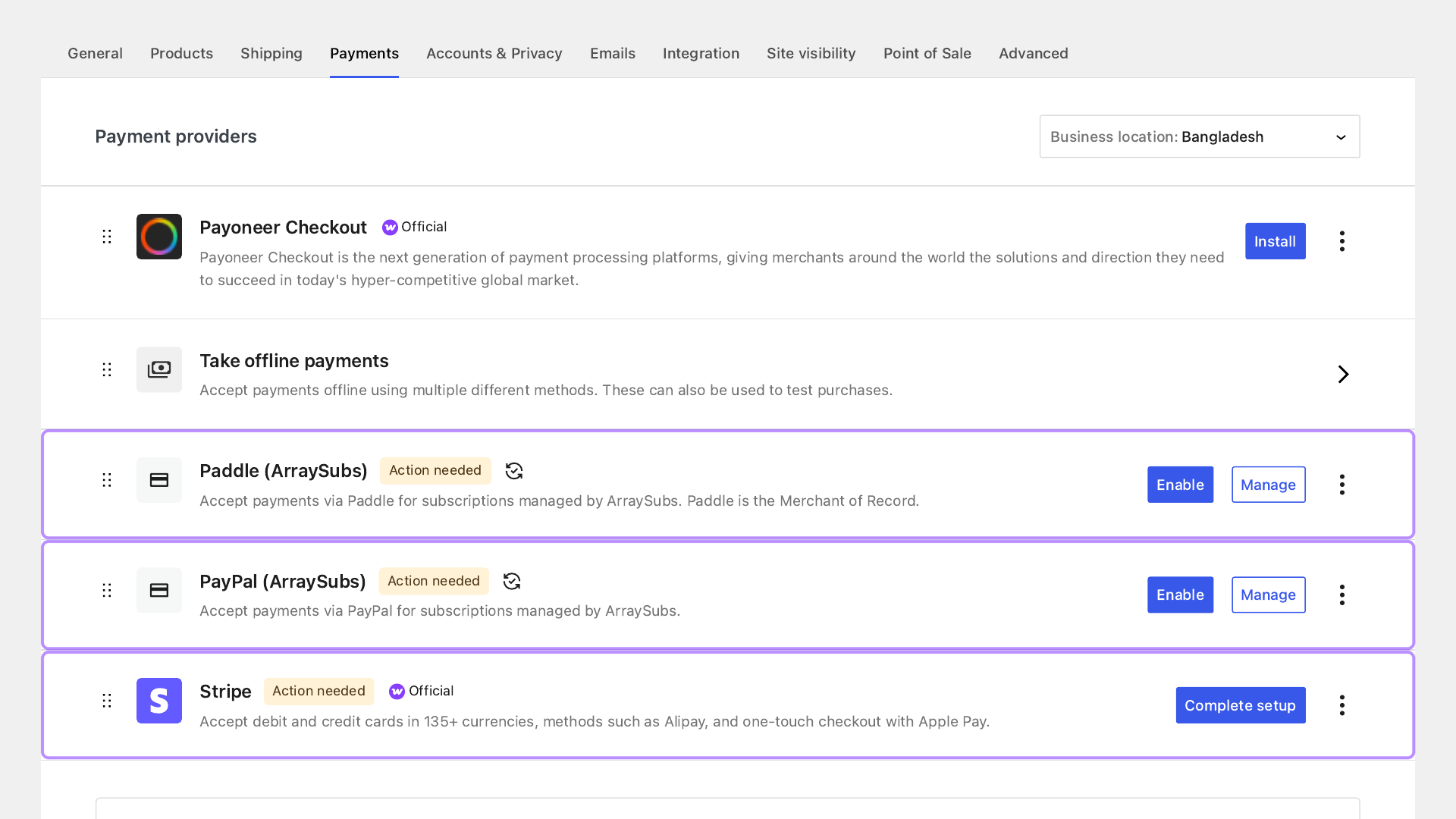
This distinction protects stores from false assumptions. A gateway that can take one checkout payment does not necessarily support:
- reusable off-session authorization;
- a reliable stored-method reference;
- issuer challenges after the customer leaves;
- renewal-order reconciliation;
- refund and dispute mapping;
- safe retry behavior;
- payment-source updates; or
- the specific cart shape allowed by the subscription plugin.
ArraySubs Free can still use compatible gateways for manual renewals. In that model, a renewal invoice asks the customer to return and pay. Automatic renewal with Stripe is different: the site attempts the charge while the customer is absent. If you are choosing between those models, read Manual vs Automatic Subscription Renewals.
Step 3: establish future-use authority at checkout
The first checkout has two jobs:
- collect the initial amount, if one is due; and
- prepare the selected payment method for future off-session renewal.
Stripe uses intent metadata and authentication context to distinguish those jobs. When an initial payment is collected, the PaymentIntent should be configured for future off-session use. When no money is due—for example, a free trial—a SetupIntent or equivalent setup path may establish the reusable method without charging it.
The important business rule is consent, not just an API parameter. The customer should see the amount due today, billing interval, future amount or pricing basis, trial end, renewal behavior, cancellation method, and the fact that the method can be charged while they are not present. Stripe’s technical setup cannot repair missing commercial disclosure.
The official WooCommerce Stripe extension keeps raw card details out of WordPress. WooCommerce stores a token object containing safe provider references. ArraySubs stores the relevant customer and method context on the subscription so the Pro integration can make the future request.
Do not manually copy a PaymentMethod ID from one customer to another. Stripe attaches reusable methods to customer context, and mismatched customer/method pairs should fail. That failure is a safety property.
Test both paid checkout and zero-due checkout
Teams often test a normal paid signup and assume the free-trial path is identical. It is not.
For a paid signup, verify:
- the first Woo order completes exactly once;
- a Stripe Customer is created or reused as intended;
- a reusable PaymentMethod is attached;
- the initial PaymentIntent has the expected successful state;
- the local Woo token references the method;
- the ArraySubs subscription stores the correct gateway context; and
- renewal actions are scheduled.
For a zero-due trial, verify:
- checkout does not create an accidental charge;
- a reusable method is still collected if the product requires one;
- setup authentication completes;
- the subscription records the correct trial end and first paid renewal;
- future scheduled actions exist; and
- the first post-trial renewal can charge the method off session.
Also test a trial that does not require a card if your catalog allows that. Its conversion flow becomes a manual payment-method acquisition problem before the first paid renewal; do not describe it as already authorized automatic billing.
Step 4: understand the two-action renewal clock
ArraySubs separates precise renewal-order generation from due-time payment processing. This avoids making a single background event responsible for every lifecycle transition.
The conceptual clock is:
renewal invoice action
→ generate Woo renewal order
  at the intended invoice point

renewal processing action
→ at due time,
  lock the subscription
→ verify renewal is payable
→ invoke automatic gateway
→ interpret result and update
  lifecycle state
The centralized Action Scheduler layer uses defined hook and group contracts. Each handler uses a lock so overlapping workers cannot deliberately process the same subscription at the same moment. When a renewal date changes, both the invoice-generation and due-time actions must remain aligned.
This is why “WP-Cron is enabled” is an inadequate launch check. Inspect the scheduled action queue and prove that actions become due, are claimed by a runner, complete, and do not accumulate failures. A low-traffic store may need a real server-side cron trigger. A high-traffic store may need worker capacity and queue monitoring.
For the broader lifecycle from subscription schedule to renewal order, see WooCommerce Renewal Synchronization Explained.
Step 5: confirm a new off-session PaymentIntent
At due time, ArraySubs Pro sends Stripe a renewal request using the stored customer and PaymentMethod. The request is confirmed off session because the customer is not actively completing checkout.
The request needs enough metadata to trace the provider object back to the WordPress records. A useful metadata set includes the renewal order, subscription, and gateway context. The exact fields can evolve, so operations should validate the installed version rather than building fragile reports around undocumented assumptions.
The outcome is not merely pass/fail.
| PaymentIntent result | Meaning | Local response |
|---|---|---|
succeeded | Stripe confirms the payment | Complete the renewal order and advance the subscription once |
processing | The method is asynchronous or Stripe has not reached a final state | Keep the order pending/on hold as appropriate; await webhook reconciliation |
requires_action | The issuer/customer must complete authentication | Store the intent context, expose a safe Pay-for-Order recovery URL, notify the customer, and avoid blind duplicate requests |
requires_payment_method or a hard failure | The method cannot complete this attempt | Record a useful failure, enter retry/grace handling, and direct the customer to recovery |
| Network timeout/unknown client result | The store does not know whether Stripe received or processed the request | Reconcile remotely before creating another payment attempt |
The processing row is especially important for non-card methods. A local HTTP request can finish before the provider payment does. Marking the order paid too early grants access before money is confirmed; marking it failed too early can trigger a second attempt while the first still processes.
SCA: the first payment and renewal are different moments
Strong Customer Authentication is not a one-time checkbox. The initial checkout usually has the customer present and can show a challenge. A renewal happens off session, where the issuer may apply an exemption, approve frictionlessly, or require the customer to return.
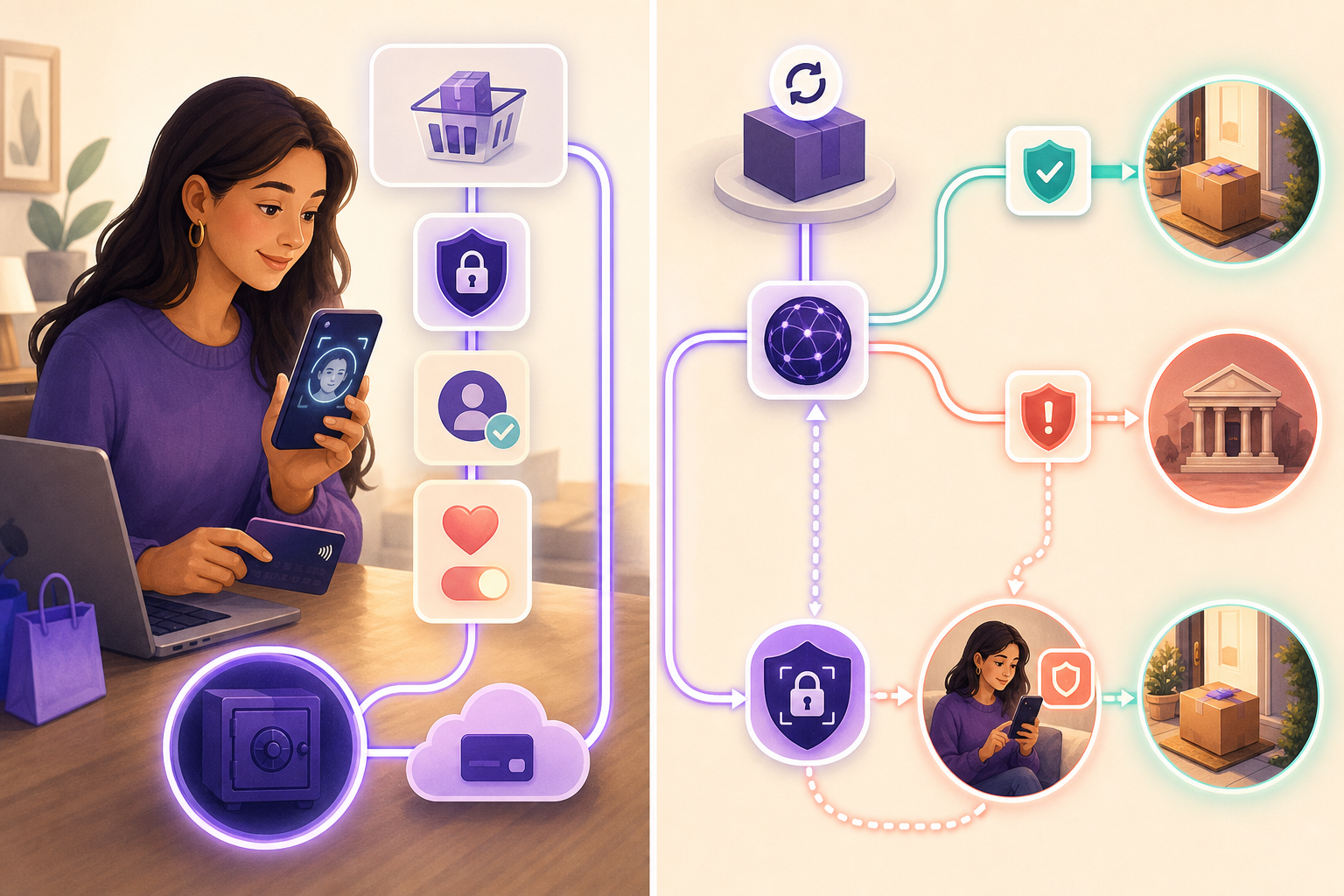
The correct recovery loop is:
off-session PaymentIntent
requires customer action
→ do not mark the renewal paid
→ preserve the same
  provider payment context
→ place local records into
  the configured recovery state
→ send an authenticated
  Pay-for-Order path
→ customer completes action
→ signed event and return flow
  reconcile the order
→ subscription advances once
The exact access effect depends on the store’s retry and grace-period policy. A membership business may preserve access for a few days; a shipment business may hold fulfillment immediately. Define that policy in ArraySubs rather than letting a generic Woo order status accidentally decide entitlement.
Test at least these SCA scenarios in Stripe’s test environment:
- authentication required at initial checkout;
- authentication succeeds;
- authentication is abandoned;
- initial setup succeeds but renewal later requires action;
- customer follows the recovery link while logged out;
- recovery link is expired or opened by the wrong account;
- successful recovery event arrives before the browser return;
- browser return arrives before the webhook;
- the same successful event is delivered more than once.
The pass condition is not just “the challenge appeared.” It is one completed renewal order, one advanced subscription, one receipt, and no duplicate payment.
Two webhook paths must stay healthy
The integration has two relevant event paths:
- the official WooCommerce Stripe webhook, which supports the official extension’s payment lifecycle; and
- an ArraySubs secondary Stripe endpoint for subscription-specific reconciliation.
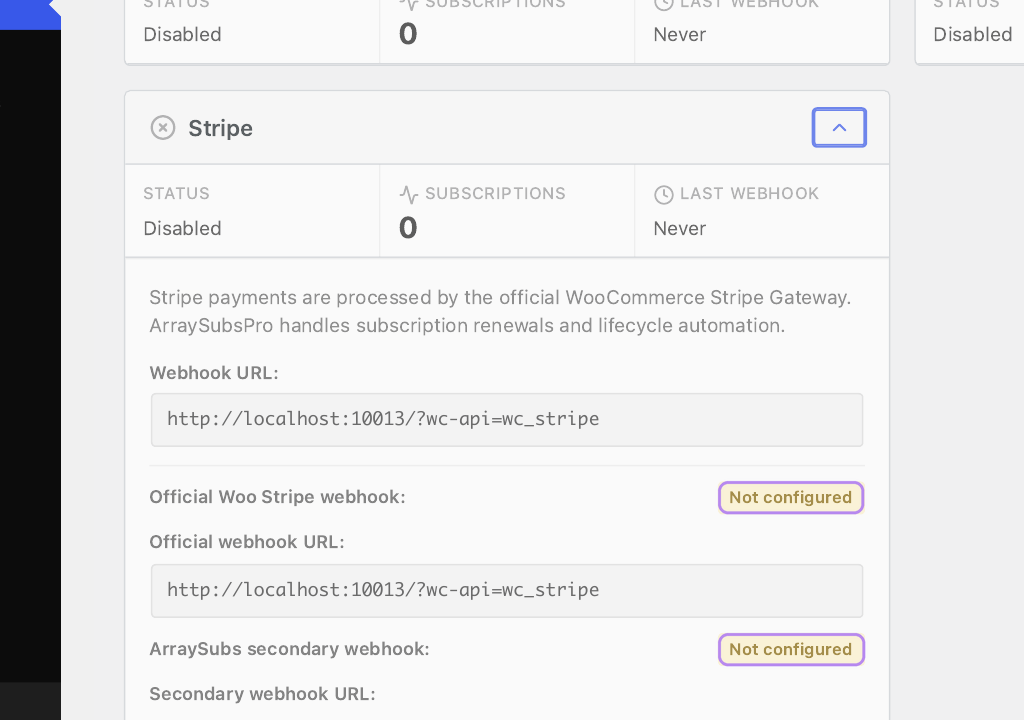
The Gateway Health view helps operators see which layer needs attention.
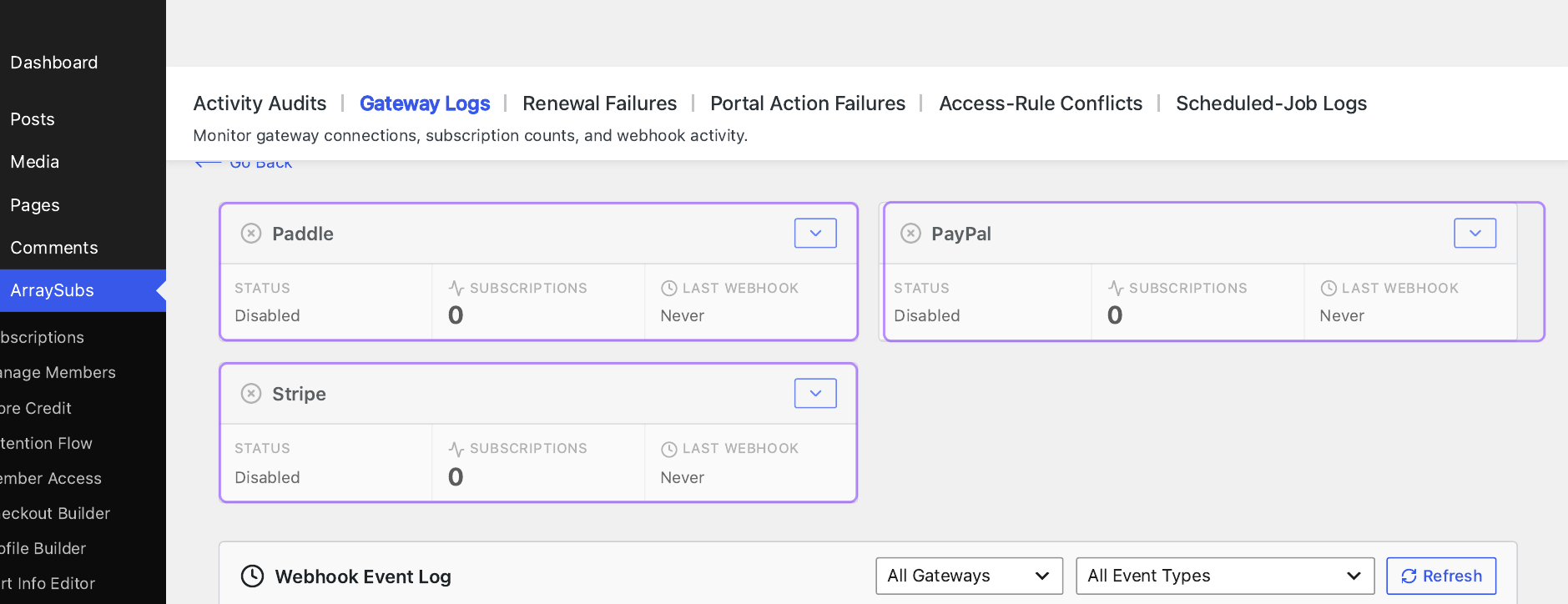
A valid webhook handler should:
- read the raw request body before it is altered;
- verify the Stripe signature using the endpoint’s correct signing secret;
- reject invalid signatures;
- recognize live/test mode separation;
- deduplicate by Stripe event ID;
- locate the correct order/subscription using verified metadata or stored provider references;
- tolerate events arriving out of order;
- make state transitions idempotent;
- return an appropriate HTTP response promptly; and
- move slow secondary work into a durable job when needed.

Webhook deduplication is not charge idempotency
These mechanisms are related but not interchangeable.
Webhook event deduplication prevents the same evt_... delivery from applying its local effect twice. Stripe retries webhooks, so duplicate delivery is normal.
Payment request idempotency asks Stripe to treat repeated creation requests with the same operation key as one logical request. It protects the provider side when the client retries after a lost response.
Local scheduler locking prevents two WordPress workers from intentionally entering the same renewal handler concurrently.
Remote reconciliation asks Stripe whether an apparently failed or timed-out attempt already created a PaymentIntent or Charge before the store tries again.
You need all four concepts because they address different failure points.
In the implementation verified for this guide, the official Stripe request layer generates a fresh UUID idempotency key for each POST rather than a deterministic key derived from the renewal order. Therefore, do not claim that repeated renewal calls are guaranteed to collapse at Stripe solely because “Stripe supports idempotency.” Current safety relies on the local subscription lock, stored PaymentIntent context, event deduplication, and pre-retry search/reconciliation. This deserves a deliberate ambiguous-response test in every launch plan.
The most dangerous failure: an ambiguous timeout
Suppose WordPress submits an off-session PaymentIntent request. Stripe receives it, creates and even succeeds the payment, but the connection drops before the response reaches WordPress. Locally, the request looks failed. Remotely, money moved.
If the retry worker immediately sends a new POST with a new idempotency key, it could create another intent. The safe sequence is to search the known stored intent and recent Stripe PaymentIntents tagged to the subscription/order before issuing a new charge.

Test this intentionally:
- Create a renewal order in Stripe test mode.
- Introduce a controlled timeout or interrupt the local response after provider submission.
- Confirm the provider-side PaymentIntent state.
- Run the renewal processor again.
- Verify it finds/reuses/reconciles the prior context rather than charging blindly.
- Deliver the related webhook more than once.
- Confirm one paid renewal order, one subscription advance, and one customer receipt.
This test is more valuable than dozens of ordinary successful renewals because it exercises the boundary where duplicate money movement happens.
Failures, retries, grace, and stop rules
The Stripe adapter exposes a default retry shape of three attempts separated by one day, but that is not a universal business strategy. The shared ArraySubs lifecycle, current settings, gateway result, and store policy determine what customers experience.
Build retry policy from the product:
| Product type | Likely operational priority |
|---|---|
| Digital membership | Preserve access briefly while prompting a quick payment update |
| Physical shipment | Hold fulfillment immediately; do not ship against an unconfirmed renewal |
| High-value B2B service | Alert account owner and allow assisted recovery before cancellation |
| Consumable replenishment | Give enough time to update an expired card without creating duplicate fulfillment |
| Compliance-sensitive access | Follow contractual stop rules and maintain an auditable notice trail |
A retry should never be a silent loop. For each attempt, record:
- when it was scheduled and executed;
- which renewal order it targeted;
- the previous known PaymentIntent state;
- whether remote reconciliation ran;
- whether a new request was actually created;
- customer-facing message and recovery URL;
- access or fulfillment effect; and
- the next retry or stop condition.
Useful customer messages explain the next action without exposing raw decline details. “Update your card to keep access” is clearer than “PaymentIntent requires_payment_method.” Issuer decline reasons can be sensitive or inaccurate; do not tell a customer their bank suspected fraud unless the provider response safely supports that conclusion.
For a full operational sequence, use the Subscription Dunning Strategy guide and What Happens When a Subscription Payment Fails.
Payment-method updates need an end-to-end proof
ArraySubs Pro can open a Stripe Billing Portal session for customer payment management. That is convenient, but “the customer changed their default card in Stripe” is not the same assertion as “this existing ArraySubs subscription now stores and will use that exact method.”
The subscription can retain a specific _gateway_payment_method_id. Stripe also has customer-level default settings, and the official WooCommerce token vault has its own local representation. A portal update may change provider state without updating every local pointer your next renewal uses. The secondary event set reviewed for this article does not include every possible payment-method attachment, detachment, or customer-default-change event.
Therefore, test this workflow literally:
- Start a subscription with payment method A.
- Record the subscription’s stored method reference and Woo token.
- Open the customer update-payment path.
- Add method B and make it the intended recurring method.
- Return to the customer portal and admin subscription view.
- Confirm which local token/reference changed.
- Trigger a renewal.
- Verify the PaymentIntent used method B.
- Remove or detach method A only after the new renewal succeeds.
- Test the failure path where method B requires authentication.
Until that passes on the installed versions, document the portal as a provider payment-management path—not as proof that every existing subscription automatically migrates.
Refunds, disputes, and provider truth
ArraySubs delegates a normal Stripe refund to the official WooCommerce Stripe Gateway. For older renewal references, it can normalize a PaymentIntent reference to the underlying Charge expected by the refund path. That keeps the standard WooCommerce order-refund experience central.
Test:
- full refund of the initial order;
- partial refund of the initial order;
- full and partial refund of a renewal order;
- refund after a prior failed attempt on the same renewal order;
- provider-side refund arriving through webhook;
- duplicate refund event delivery;
- refund in a different settlement/presentment context; and
- subscription status after refund, because refund and cancellation are different decisions.
The current event mapping uses charge-level refund signals for important synchronization. Do not assume every granular refund.* event path has the same local behavior without testing the installed combination.
Disputes also need their own policy. A dispute-created signal can pause or flag a subscription, but a finance team must still reconcile evidence deadlines, provisional debits, dispute fees, final outcome, and access/fulfillment. Closing a dispute in Stripe does not automatically answer whether the customer should regain service.
A serious pre-launch test matrix
Do not run these cases against one product and one card. Create a repeatable test catalog with known prices, cycles, trials, tax classes, shipping behavior, and expected next-renewal dates.

Configuration and dependency tests
- ArraySubs works correctly with ArraySubs Pro inactive; manual renewals remain available.
- Activating Pro exposes Stripe automatic capability only when the official extension and version requirement are satisfied.
- Disabling the official Stripe gateway removes or blocks the automatic checkout path safely.
- Test and live credentials cannot be confused.
- Both webhook endpoints have distinct correct secrets.
- Gateway Health reports useful remediation when either event path is broken.
- Updating the official Stripe extension does not break checkout, token lookup, refund normalization, or webhook hooks.
Cart and checkout tests
- simple subscription;
- variable subscription variation;
- subscription plus a regular one-time item;
- multiple subscription products with the same cycle;
- multiple subscription products with different cycles;
- signup fee plus recurring amount;
- free trial with a saved payment method;
- free trial without an initial charge;
- coupons affecting only first payment versus recurring totals;
- tax-inclusive and tax-exclusive pricing;
- taxable shipping for a physical renewal;
- guest/customer-account behavior according to store policy;
- returning customer with one saved Stripe method;
- returning customer with several methods; and
- declined or abandoned authentication at checkout.
For every case, assert displayed recurring terms, initial order totals, subscription items, next renewal, customer ownership, stored gateway, provider references, and scheduled actions.
Renewal-state tests
- immediate
succeededrenewal; processingfollowed by success webhook;processingfollowed by failure webhook;requires_actionfollowed by successful customer recovery;requires_actionabandoned until the retry/stop rule;- hard decline with updated-payment recovery;
- expired card;
- detached or unavailable PaymentMethod;
- customer/method mismatch;
- invalid API credentials;
- rate limit or provider 5xx response;
- outbound network timeout after request submission;
- webhook delayed by minutes;
- webhook delivered before the request handler finishes;
- webhook delivered twice;
- two renewal workers trying the same subscription; and
- manual operator retry while a scheduled retry exists.
Date and scheduler tests
- site timezone differs from UTC;
- renewal near midnight in the site timezone;
- daylight-saving boundary for stores in affected zones;
- monthly renewals around the 28th–31st;
- renewal date changed before invoice generation;
- renewal date changed after an order exists;
- pause, resume, cancel-now, and cancel-at-period-end interactions;
- early renewal or manually paid renewal prevents another automatic charge; and
- failed actions are visible and recoverable in Action Scheduler.
Customer recovery tests
- recovery email goes to the subscription owner;
- Pay-for-Order requires appropriate authentication/ownership;
- successful challenge updates one renewal order;
- payment method A to B update is used by the next renewal;
- multiple saved methods do not cause an arbitrary selection;
- expired recovery link fails safely;
- cancellation during grace prevents later scheduled retry; and
- access restoration happens once after successful recovery.
Refund, dispute, and finance tests
- partial and full refunds;
- external dashboard refund sync;
- chargeback created and resolved;
- payout reconciliation for initial and renewal payments;
- fee and currency conversion recording;
- Woo order total equals the intended Stripe amount in the smallest currency unit;
- zero-decimal and supported non-default currencies; and
- finance can trace order → subscription → PaymentIntent → Charge → refund/dispute → payout.
Notifications and observability tests
- first-payment receipt is not duplicated;
- renewal receipt is not duplicated by webhook replay;
- failure message contains a working recovery link;
- admin alert identifies the order and subscription;
- logs redact keys, secrets, signatures, and sensitive payment data;
- event IDs and provider object IDs remain searchable;
- queue age and failed-action count are monitored; and
- webhook delivery failures page the right owner before a backlog becomes churn.
How to run a time-compressed renewal test
Waiting a month is not QA. In a controlled staging environment:
- Create a test product with a clearly documented billing schedule.
- Purchase it using an official Stripe test payment method.
- Save the initial order, subscription, customer, method, intent, and scheduled-action IDs.
- Move the next renewal to a near-future test time using the supported ArraySubs admin workflow.
- Confirm both renewal actions align with the new date.
- Let the actual scheduler runner execute rather than calling only a payment API.
- Watch Action Scheduler, Woo order notes/status, ArraySubs subscription status, Stripe test events, and both webhook histories.
- Repeat for success, processing, requires-action, hard failure, and ambiguous timeout.
- Restore or delete only the disposable test records after evidence is captured.
Do not edit database dates blindly. Renewal scheduling has more than one action, and changing one timestamp can manufacture a false pass. The goal is to prove the production pathway from scheduler through lifecycle handler, not only that Stripe accepts a hand-crafted request.
Monitoring after launch
A Stripe subscription system can degrade gradually while new checkouts still succeed. Monitor leading indicators, not just revenue.
| Signal | Why it matters |
|---|---|
| Oldest pending/failed scheduled action | Shows whether the renewal clock is falling behind |
| Renewals due vs renewal orders generated | Detects invoice-generation gaps |
| Renewal orders generated vs paid | Separates scheduler success from payment success |
requires_action recovery rate | Measures whether SCA recovery UX works |
| Hard decline rate by safe reason family | Finds issuer, method, or cohort problems without exposing sensitive details |
| Webhook delivery success and age | Detects broken secrets, firewalls, routing, or application errors |
| Duplicate event suppression count | Confirms expected retry handling and reveals event storms |
| Ambiguous payment reconciliations | Highlights network/runtime reliability risk |
| Token/customer mismatch failures | Finds broken migrations or update-payment gaps |
| Refund and dispute backlog | Protects customer experience and finance deadlines |
Set operational owners. Engineering owns runtime, handlers, and queue health. Finance owns settlement, refunds, and disputes. Support owns recovery communication. Product owns access/grace policy. Security owns secrets and incident response. “The Stripe plugin handles it” is not an ownership model.
Common implementation mistakes
Mistake 1: expecting Stripe Dashboard subscriptions
This integration creates local ArraySubs subscriptions and individual Stripe PaymentIntents. Do not build operations around missing Stripe Billing Subscription/Invoice objects.
Mistake 2: testing only the first checkout
Checkout success proves customer-present payment. It does not prove off-session renewal, SCA recovery, webhooks, retries, or reconciliation.
Mistake 3: treating the default card as a universal pointer
Stripe customer defaults, WooCommerce tokens, and subscription-specific stored method IDs can diverge. Prove which reference the renewal uses.
Mistake 4: retrying every timeout as a new payment
A lost response can hide a successful provider payment. Search and reconcile before creating a new attempt.
Mistake 5: equating duplicate event protection with charge protection
Deduplicating evt_... stops duplicate local event application. It does not necessarily prevent two separately created PaymentIntents.
Mistake 6: making localhost your webhook test
Stripe cannot deliver an internet webhook to an unexposed local hostname. Use public HTTPS staging or a correctly secured tunnel, then verify signatures and replay behavior.
Mistake 7: cancelling on the first soft failure
Temporary issuer/network failures and authentication-required outcomes need different recovery policies. Use retry and grace intentionally.
Mistake 8: logging too much
Provider IDs and safe reason codes are useful. API secret keys, webhook signing secrets, raw authorization headers, and card data are not.
Production readiness checklist
Architecture
- Team understands that ArraySubs owns the schedule and Stripe processes each PaymentIntent.
- No operational process depends on a nonexistent Stripe Billing Subscription.
- Order, subscription, token, Customer, PaymentMethod, PaymentIntent, and Charge IDs are traceable.
Configuration
- Official WooCommerce Stripe Gateway meets the ArraySubs Pro minimum version.
- Test and live accounts are unmistakably separated.
- Stripe automatic renewal is enabled intentionally.
- Both webhook endpoints and secrets are correct.
- Public HTTPS delivery succeeds through CDN/WAF rules.
Checkout and authority
- Terms disclose renewal amount/basis, cadence, trial, cancellation, and future charging.
- Paid signup stores reusable authority.
- Zero-due trial setup stores reusable authority when required.
- Mixed carts and multiple/different-cycle subscriptions match the configured gateway set.
Renewal and recovery
- Invoice-generation and due-time actions execute through the real scheduler.
-
succeeded,processing,requires_action, hard failure, and timeout paths are tested. - Subscription locks prevent concurrent local processing.
- Ambiguous responses reconcile remotely before retry.
- Payment-method update is proven through the next renewal.
- Retry, grace, access, fulfillment, and cancellation rules are documented.
Events and finance
- Duplicate and out-of-order webhooks are harmless.
- Full/partial initial and renewal refunds are tested.
- Dispute creation and resolution have an owner.
- Finance can reconcile payments, fees, FX, refunds, disputes, and payouts.
- Logs and screenshots contain no credentials or sensitive payment data.
Final recommendation
Use Stripe with ArraySubs when you want WooCommerce to remain the subscription control plane and your cart needs the flexibility of local scheduling. It is a strong fit for physical subscriptions, memberships, courses, SaaS, and mixed catalogs—but that flexibility assigns real operational responsibility to your store.
The reliable implementation is not “install Stripe and enable renewals.” It is a chain of evidence: customer consent, reusable payment authority, correct token references, aligned scheduled actions, locked renewal processing, state-aware PaymentIntent handling, SCA recovery, two healthy webhook paths, remote reconciliation before retry, and finance-grade traceability.
ArraySubs provides the local subscription, renewal-order, scheduling, retry, customer-portal, and gateway-health foundations. ArraySubs Pro connects those foundations to Stripe’s off-session payment lifecycle. Your launch is ready only when the failure paths work as deliberately as the happy path.
Next, review SCA and 3D Secure for Subscription Renewals for the authentication layer, and Subscription Webhooks: Events Every WooCommerce Store Should Monitor for the event operations layer.
Continue from strategy to setup
Use a recipe when the model is settled
These articles own the decision and operating model. The ArraySubs feature map and recipes cover the exact product, billing, and customer-workflow configuration.
Written by
Emran // ArrayHash
Research and practical guidance for WooCommerce subscription operators and implementation teams.
Technical review
ArraySubs Engineering Team
Reviewed against current ArraySubs code, product documentation, and the linked primary platform sources.