To add subscriptions to WooCommerce, install a subscription engine, choose what recurs and when it ends, configure the product's price and billing schedule, connect a compatible payment gateway, define taxes, shipping, access, and self-service, then test both signup and a renewal order in a sandbox. WooCommerce alone does not manage that full lifecycle.
That is the short answer. The important part is that a subscription is not one checkbox or one scheduled card charge. It is a coordinated system for billing, access, fulfillment, and customer service. This guide shows how to design that system before configuring it.
Key takeaways
- Choose the commercial model before opening product settings.
- Treat billing, access, fulfillment, and recovery as separate clocks.
- Verify the exact gateway extension and payment method, not only the gateway brand.
- A successful first checkout is not a subscription launch test; prove at least one renewal and one failure path.
- Make the amount due today, future amount, cancellation rule, and end condition clear before checkout.
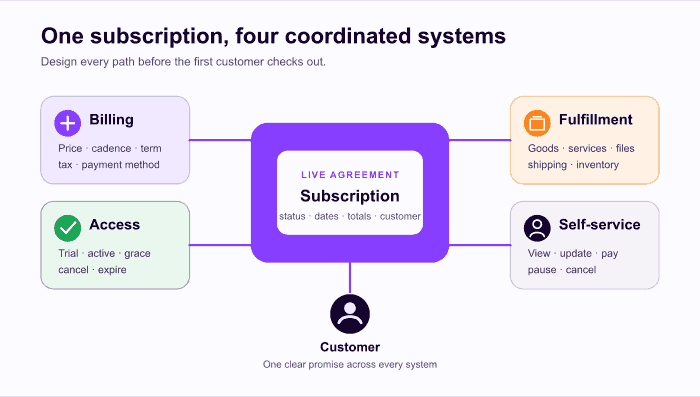
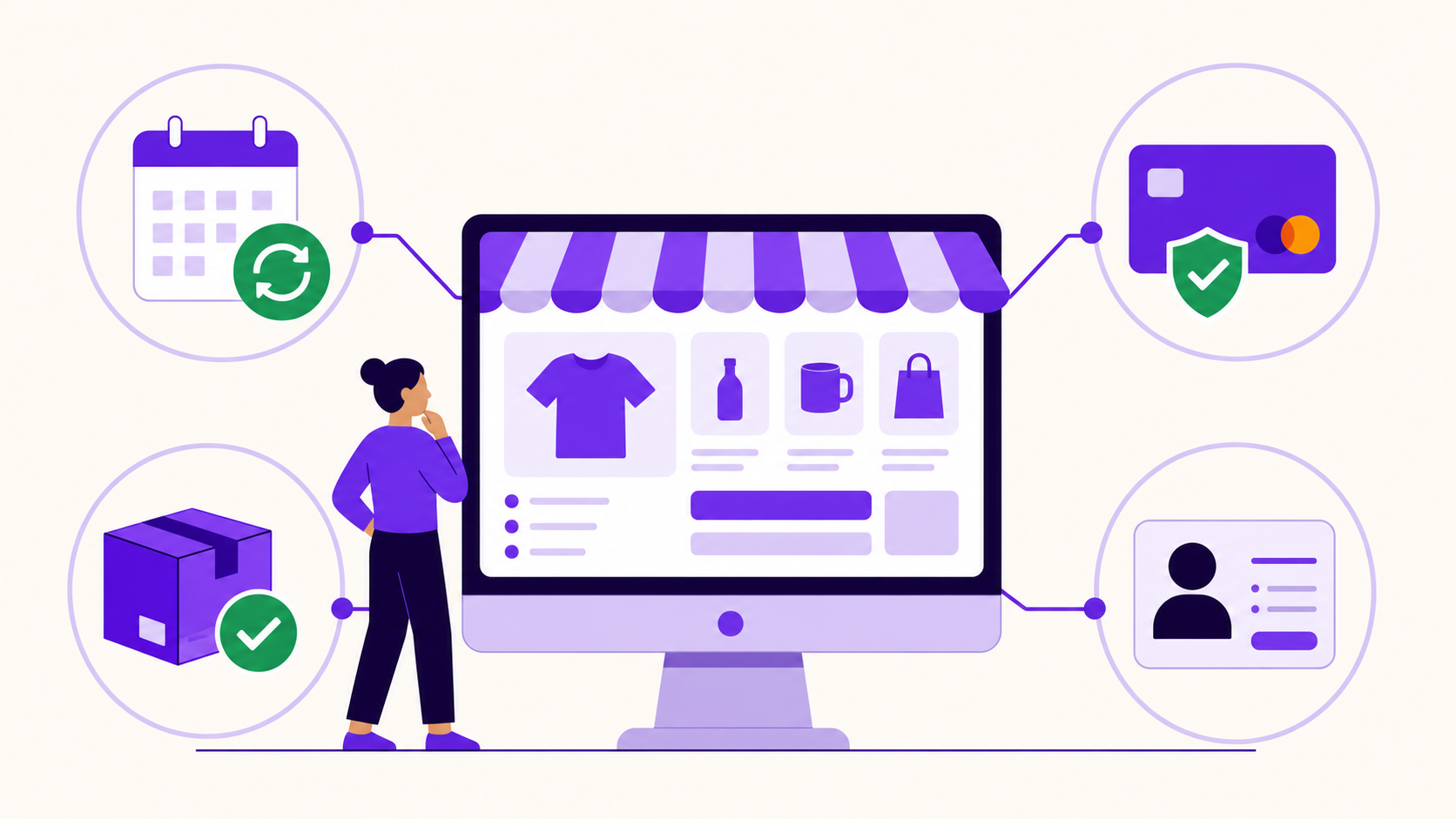
The four systems every subscription offer must coordinate.
What WooCommerce needs before it can sell subscriptions
WooCommerce supplies the catalog, cart, checkout, order, tax, shipping, and payment-gateway foundation. A subscription extension or plugin adds the continuing agreement: billing schedules, subscription statuses, renewal-order creation, scheduled work, and customer-management actions. WordPress documents the standard install-and-activate plugin flow, while WooCommerce maintains a separate subscriptions documentation area because recurring lifecycle behavior is an extension rather than a core catalog feature (WordPress plugin management, WooCommerce Subscriptions documentation).
The engine you choose must keep four kinds of records or responsibilities understandable:
| Layer | What it controls | The question it must answer |
|---|---|---|
| Offer | Price, interval, term, trial, sign-up fee, variations | What can a new customer buy? |
| Agreement | Customer, status, next payment, end date, payment context | What should happen next for this subscriber? |
| Transactions | Parent order, renewal orders, tax, shipping, refunds | What happened at signup or renewal? |
| Operations | Scheduled actions, retries, webhooks, portal, emails, logs | Can the store execute and explain the lifecycle? |
Do not merge these concepts. The product is a reusable offer; the subscription is one customer's live agreement; orders record individual transactions. Woo's official order documentation makes the same distinction and explains that one subscription can accumulate many renewal orders over its life (subscription order relationships).
If you want the deeper entity model first, read What Is a WooCommerce Subscription?.
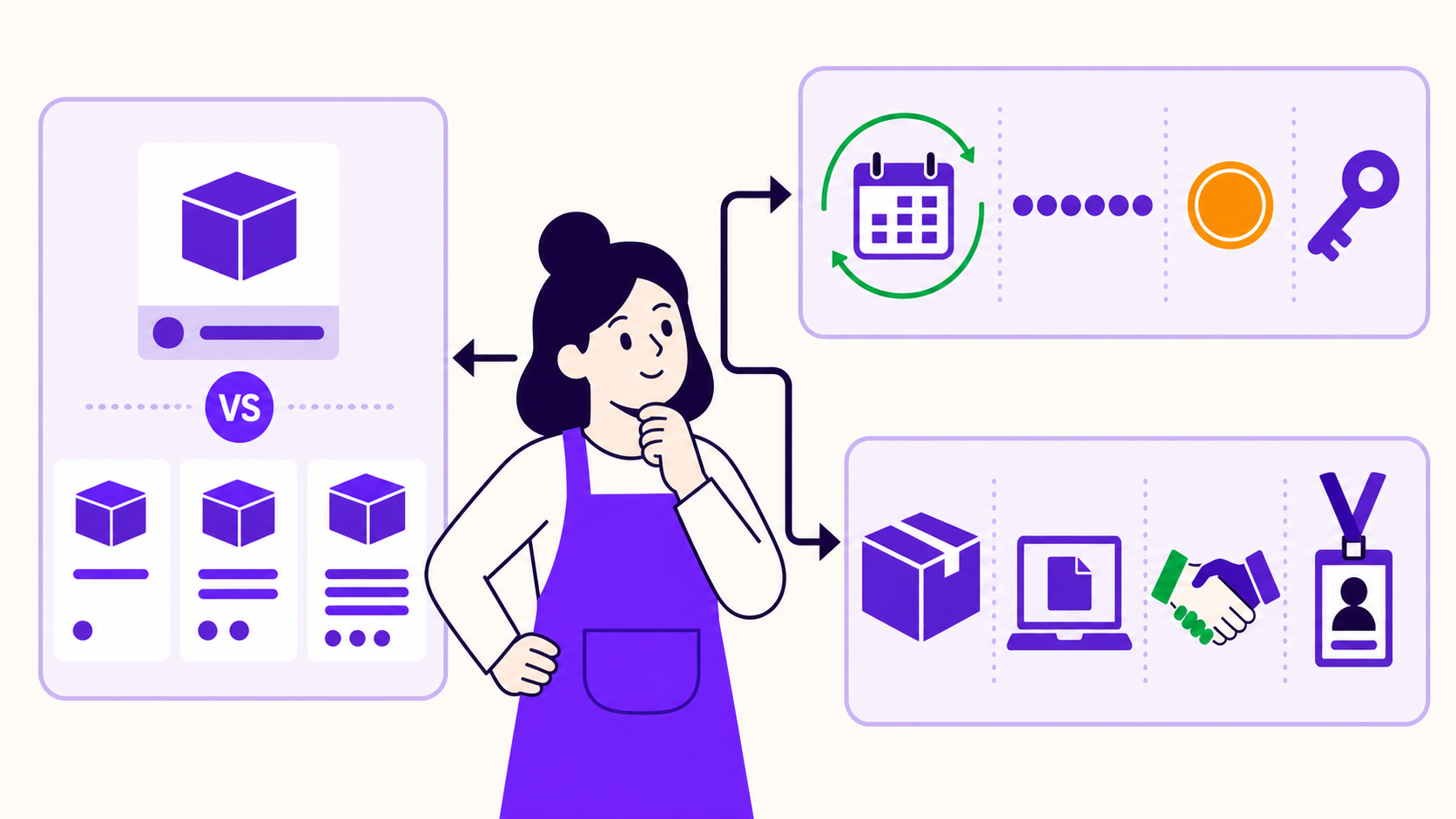
Step 1: choose the commercial model
The first question is not “monthly or yearly?” It is “will the customer be charged again, and what ends the agreement?” The answer determines the customer promise, cash timing, refund exposure, failed-payment workflow, and fulfillment process.
| Model | How money is collected | How it ends | Typical use |
|---|---|---|---|
| Open-ended recurring | Every period until cancellation | Customer or store cancels | Membership, replenishment, software access |
| Fixed-term recurring | Every period for a known number of charges | Expires after the final term | Cohort course, six-box series |
| Prepaid term | Full term collected upfront | Ends or renews after prepaid access/delivery | Annual access, prepaid shipments |
| Installment plan | Fixed total split across payments | Ends when balance is paid | Tuition, financed purchase |
| Lifetime entitlement | One payment, no renewal | Continues under the published lifetime definition | Course or launch deal |
“Prepaid,” “fixed-term,” and “installment” are not interchangeable. Six future $40 charges are fixed-term recurring payments. One $240 charge followed by six monthly shipments is prepaid. Both total $240 before tax and fees, but their payment risk and recovery work are completely different.
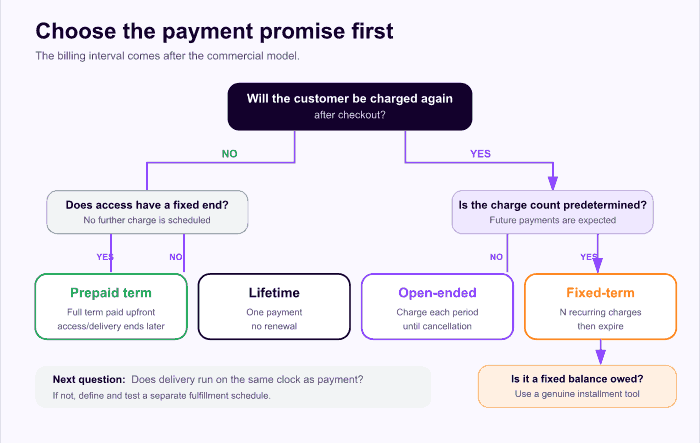
Start with whether another charge will occur, then decide whether the number of charges is predetermined.
For a practical implementation, compare the monthly-versus-annual variable recipe, the fixed-cycle recipe, and the lifetime-deal recipe. The fixed-cycle recipe uses multiple scheduled charges; it is not the same as collecting the full term upfront.
A hypothetical cash-timing comparison
The next chart uses simple illustrative arithmetic, not store performance data. Both examples total $240 before tax, refunds, processing fees, and failed payments.
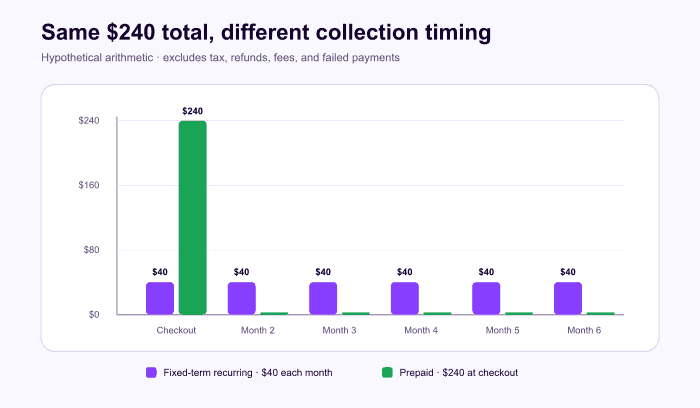
Illustrative cash timing: the same stated total collected in two different ways. This is not a benchmark.
The collection schedule changes more than cash flow. With six future charges, the store needs renewal payment handling for every period. With one prepaid charge and six deliveries, the store instead needs a fulfillment schedule that keeps running without a monthly renewal order.
Make the first charge explainable
A sign-up fee, trial, tax, and shipping can make the amount due today different from the recurring amount. Put those numbers together wherever the customer makes a decision. WooCommerce's product-creation documentation describes recurring prices, intervals, total-payment limits, trials, sign-up fees, shipping, and stock behavior for its Subscriptions extension (creating subscription products). Your selected engine may label or count these fields differently.
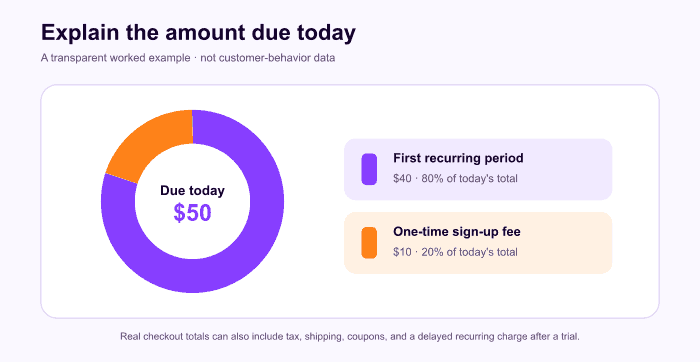
Illustrative arithmetic only: $50 due today = $40 for the first recurring period + a $10 sign-up fee.
Step 2: map the four subscription clocks
A recurring offer often contains more than one schedule. Write all four before configuring the product:
- Billing clock: when money is due and how many times.
- Access clock: when entitlement starts, pauses, resumes, and ends.
- Fulfillment clock: when goods or services are delivered and whether shipping repeats.
- Recovery clock: retry dates, grace period, reminders, and the final stop condition.
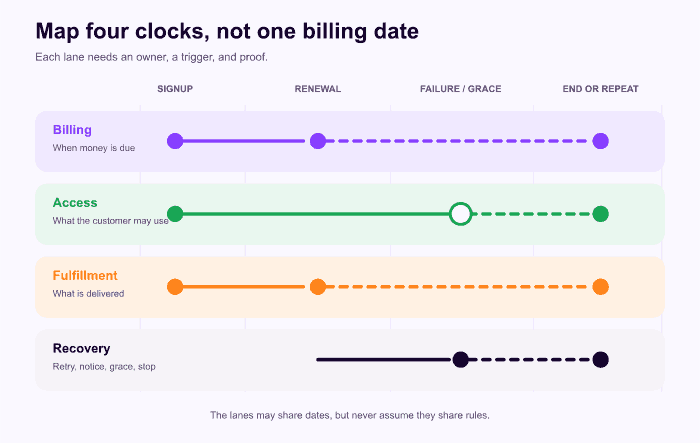
One subscription can contain four clocks. They should agree, but they do not have to tick on the same dates.
Use a worksheet before setup:
| Area | Decide this | Proof to collect |
|---|---|---|
| Initial charge | Amount today, fee, trial, tax, first shipping | Product, cart, and checkout show the same promise |
| Renewal | Amount, interval, automatic/manual mode, coupon treatment | Renewal order has the intended items and total |
| Access | Which states grant access; grace and cancellation timing | Entitlement changes at the intended lifecycle event |
| Fulfillment | Delivery cadence, address cutoff, stock, recurring shipping | Every intended delivery has an operational work item |
| Self-service | View, pay, update, pause, skip, switch, cancel | A customer account can complete every allowed action |
| Failure | Retry, notice, grace, stop, support handoff | A controlled decline follows the documented path |
This exercise catches a common design error: assuming the billing order is also the delivery schedule. Woo's own FAQ notes that its standard Subscriptions model does not natively express every “charge on one cadence, ship on another” combination (Subscriptions FAQ). Treat that as one engine-specific example of a broader rule: if the clocks differ, confirm what will drive the second schedule.
Step 3: choose a subscription engine
Once the offer and clocks are clear, compare engines against the lifecycle you actually need. A useful evaluation list is:
- product models and term rules;
- simple and variable product support;
- manual and automatic renewal behavior;
- gateway and payment-method compatibility;
- customer payment, address, pause, switch, and cancellation controls;
- tax and recurring-shipping behavior;
- scheduled-action visibility, logging, and retry controls;
- membership or external access hooks;
- export, migration, and support ownership;
- staging safeguards and recovery from missed webhooks.
Do not buy a long feature list and hope it contains your specific path. Write two or three representative scenarios—signup, successful renewal, and failure recovery—and ask whether the engine can execute each one visibly.
ArraySubs is the product discussed on this site, so this section is first-party. The current code review on July 13, 2026 found simple and variable subscription fields, day/week/month/year and lifetime periods, interval and term controls, trials, sign-up fees, manual renewal fallback, a customer portal, centralized scheduled actions, and Pro automatic-payment paths for Stripe, PayPal, and Paddle. See the ArraySubs feature map and commercial overview for the current scope.
ArraySubs may not fit a non-WooCommerce store, a store requiring an automatic gateway outside the currently implemented paths, a usage-metered billing model, or a launch dependent on a workflow still marked “coming soon,” such as native split-payment installments. A hosted platform may also be a better operational match if your team does not want to own WordPress updates, cron, payment integrations, and logs.
Step 4: create the subscription product
The labels vary by subscription engine and version, but the setup sequence is stable.
- Back up the store and work in a controlled environment. WordPress recommends a current backup before plugin changes (manage plugins).
- Install and activate the subscription extension.
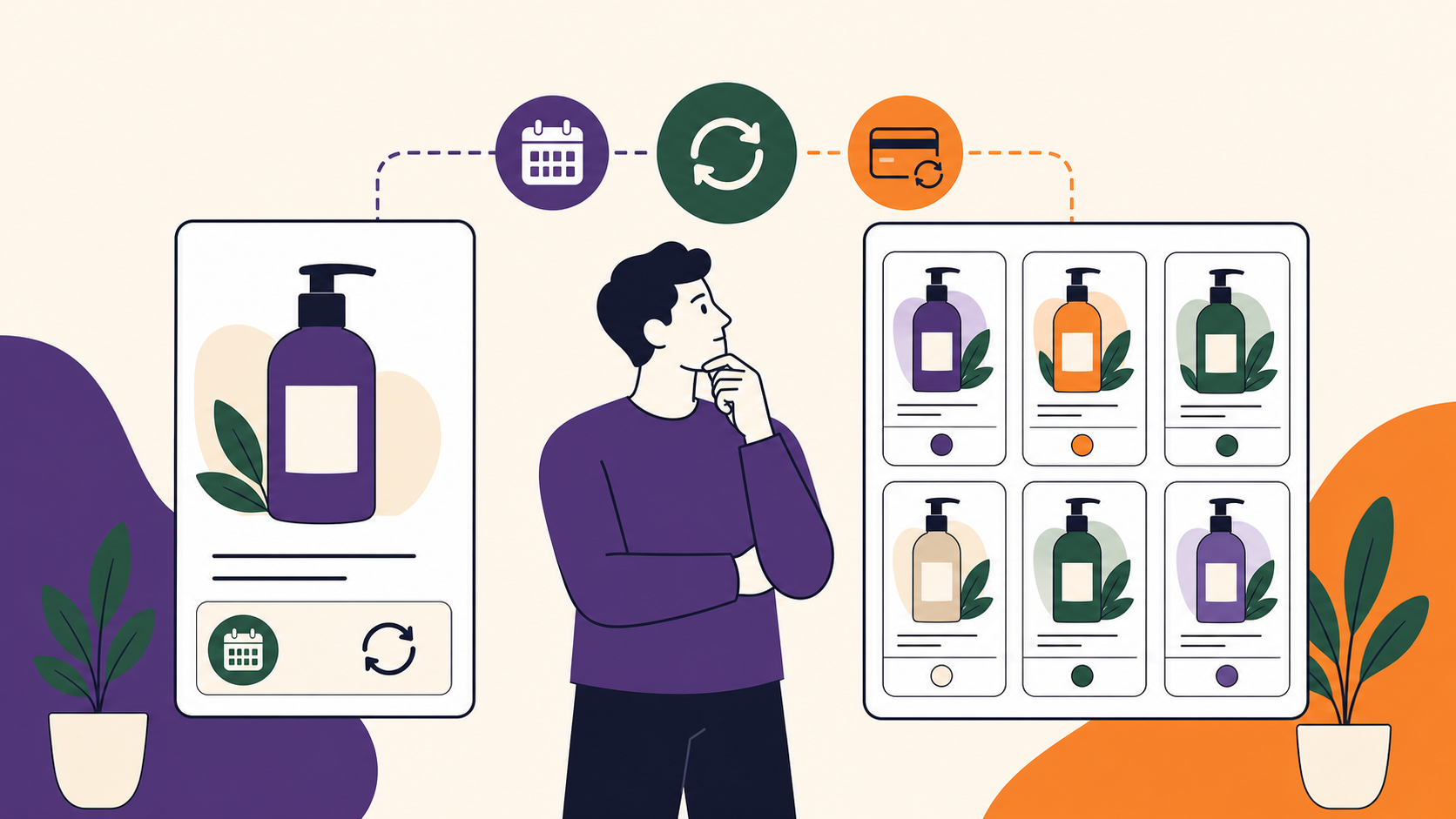
- Choose a simple offer for one fixed plan or a variable product when customers need a meaningful choice such as monthly versus annual.
- Enter the recurring price, billing period, interval, and term.
- Add a trial or sign-up fee only when the offer and checkout can explain it clearly.
- Configure tax status, shipping behavior, inventory, and access rules.
- Write product-page copy that states the amount due today, future amount and cadence, trial end, total-payment or end condition, and cancellation timing.
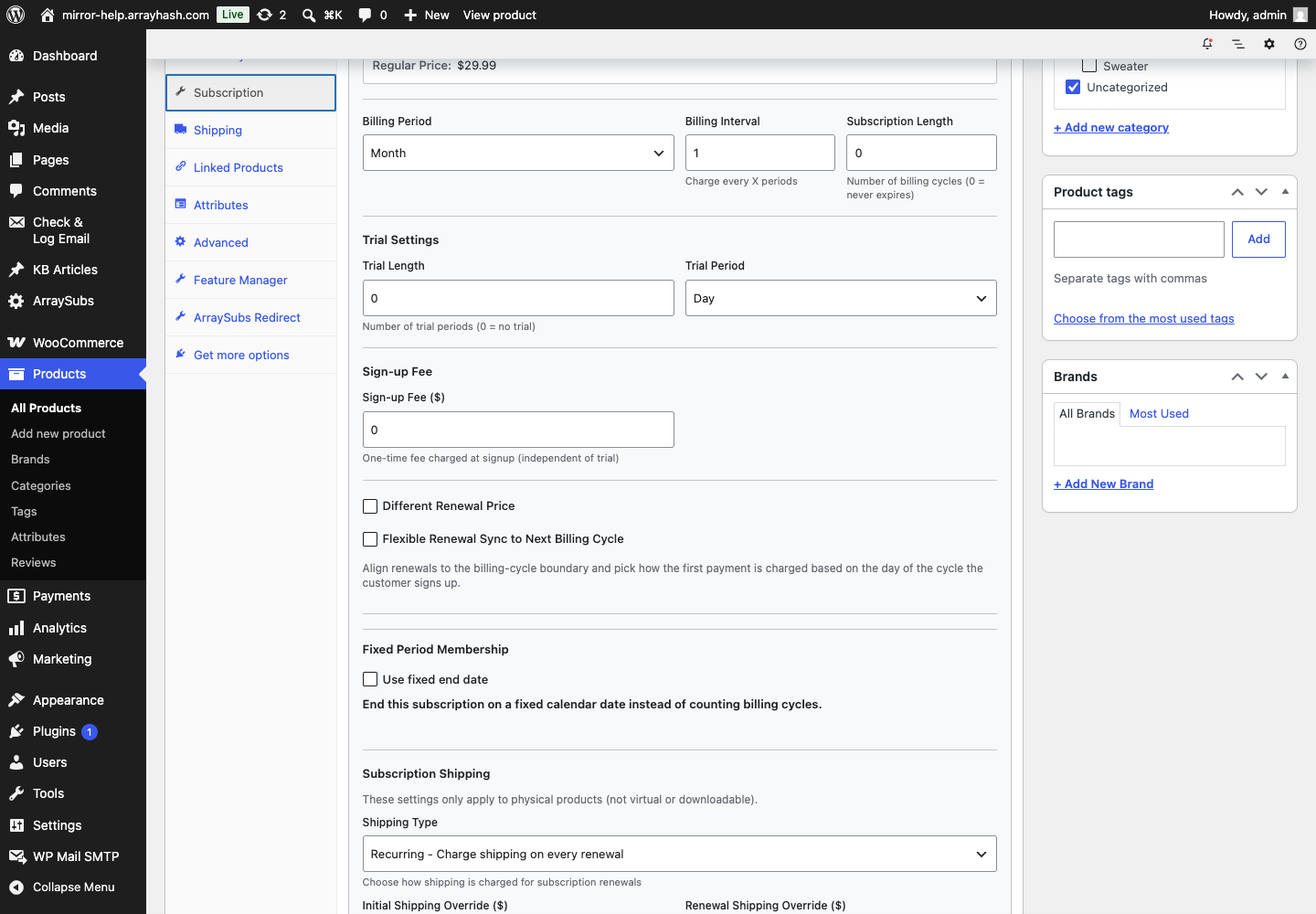
Current ArraySubs and ArraySubs Pro product controls, captured on the live test store on July 13, 2026. The screenshot proves the implementation surface; the commercial model should still be decided first.
Use the simplest catalog shape that communicates the offer. Variations are valuable when they represent a real customer choice, but every variation becomes another path to test and support. WooCommerce Subscription Product Types Explained helps with that decision.
Product-page disclosure checklist
- What will be charged today?
- What will be charged later, and how often?
- Is the plan open-ended or finite?
- Does a free trial collect a payment method?
- Is there a one-time fee or first-shipment charge?
- Are tax and shipping included, estimated, or calculated at checkout?
- When can the customer cancel, and when does access or delivery stop?
These are editorial and operational questions, not legal advice. Jurisdiction-specific renewal notices, consent, cancellation, tax, and refund rules should be reviewed by qualified professionals.
Step 5: configure the payment gateway
“Stripe supports subscriptions” is not precise enough. Automatic renewal depends on the exact WooCommerce gateway extension, payment method, country, currency, installed version, token behavior, and subscription-engine integration. Woo's official compatibility documentation explicitly lists capabilities by gateway integration and warns that third-party extensions or older versions may behave differently (payment gateway feature table).
Verify these points before promising automatic renewal:
| Capability | What to verify |
|---|---|
| Renewal mode | Automatic charge or customer-paid manual invoice |
| Payment method | Card, wallet, bank debit, or other exact checkout option |
| Token/update path | How the method is stored and how a customer replaces it |
| Subscription changes | Cancel, suspend, reactivate, change dates/amounts, multiple subscriptions |
| Schedule ownership | Site/plugin schedules token charges, or gateway owns a remote agreement |
| Webhooks | Setup, signature verification, retries, reconciliation, idempotency |
| Testability | Sandbox credentials and a documented off-session renewal test |
| Constraints | Country, currency, SCA/3DS, minimum amount, refund limits |
Woo distinguishes automatic renewals, which normally require no customer action, from manual renewals, where the customer returns to checkout to pay the generated renewal order (renewal process). Manual renewal expands payment choice but adds action every period, so it is usually a poor default for high-frequency billing.
Step 6: define taxes, shipping, access, and self-service
Payment is only one branch of the lifecycle.
Taxes
Configure tax rules before the renewal test. Check initial and renewal totals for representative addresses and verify how a later address update affects future transactions. Woo documents different calculation timing for automatic and manual renewals in its own extension, so do not assume one universal behavior across engines (renewal tax behavior). This guide is general information, not tax advice.
Shipping and stock
Decide whether shipping is due once or at every renewal, which address a renewal uses, whether stock is reduced at renewal, and what happens when inventory is unavailable. For prepaid products, create a separate, observable fulfillment schedule when a monthly renewal order will not exist.
Access and entitlements
Map trial, active, grace/on-hold, pending-cancellation, cancelled, and expired states to the content, service, role, download, or external account the customer receives. Billing software does not decide your entitlement policy for you.
Customer self-service
At minimum, decide whether customers can see their dates and totals, pay a manual or failed renewal, change payment and address details, cancel, and understand when cancellation takes effect. Woo's subscriber-view documentation shows how its extension surfaces status, dates, totals, payment details, addresses, order history, and supported actions (subscriber view). Confirm the equivalent in your engine.
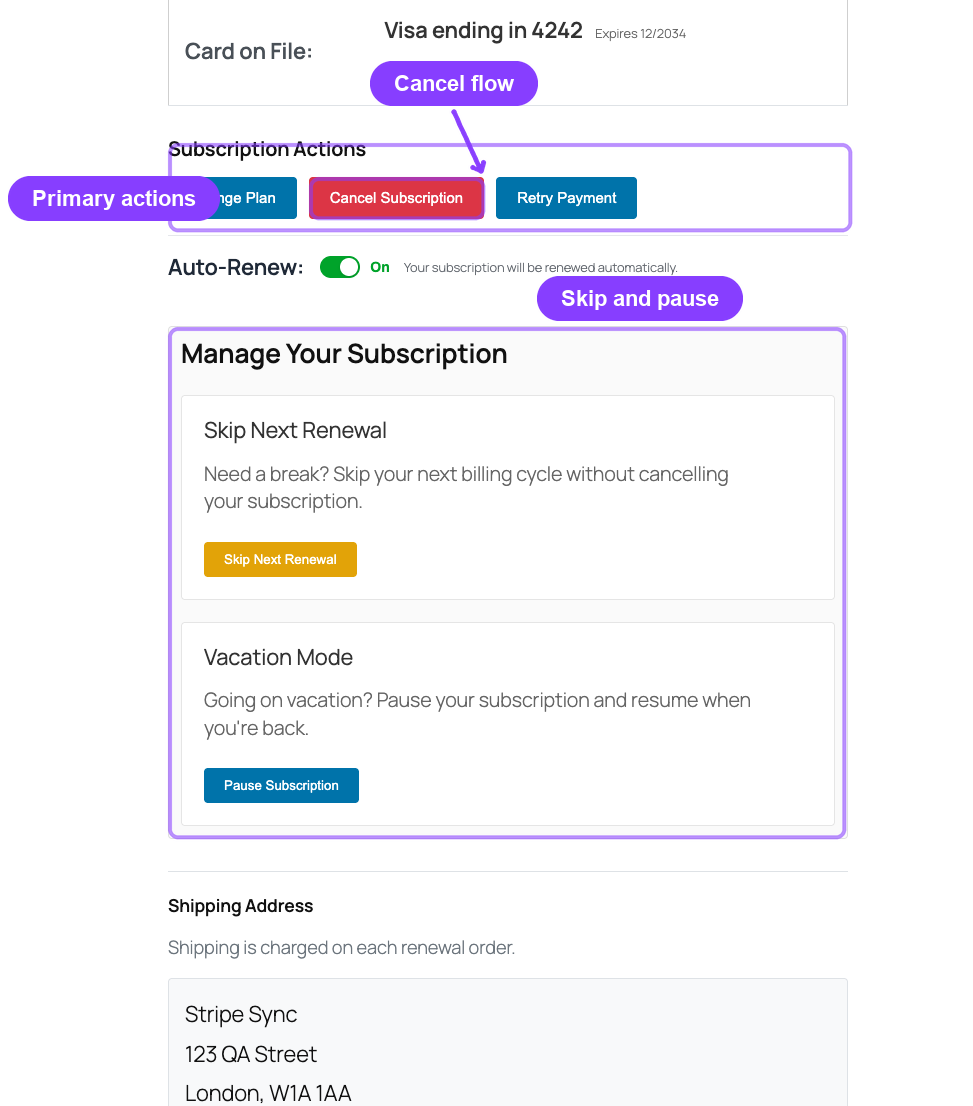
ArraySubs customer self-service captured in the project user manual. Available actions still depend on product, gateway, settings, and subscription state.
Step 7: understand the renewal lifecycle
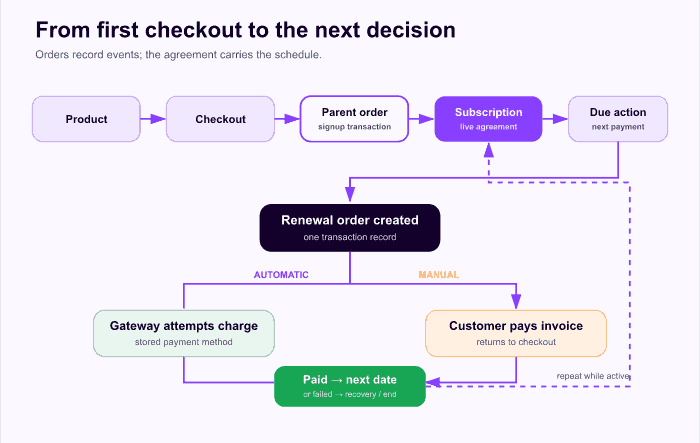
A successful checkout is the beginning of the lifecycle, not the end of implementation.
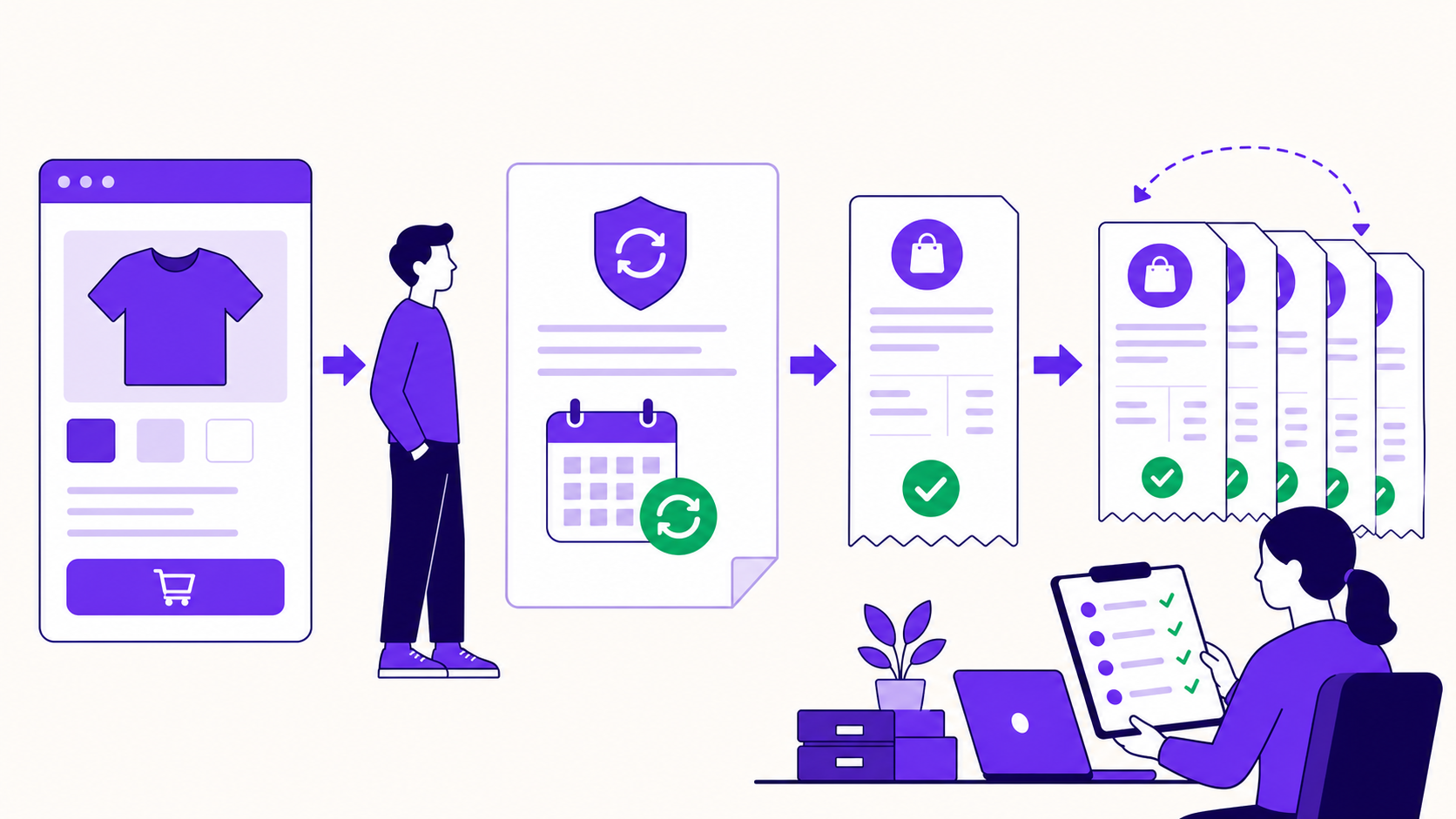
A typical sequence looks like this:
- The customer selects a subscription product and checks out.
- WooCommerce records the initial transaction in a parent order.
- The subscription engine creates the customer agreement and schedules its next event.
- When payment becomes due, it creates a renewal order.
- An automatic gateway attempts an off-session charge, or a manual invoice asks the customer to pay.
- Success records the paid renewal, keeps the subscription active, and schedules the next date.
- Failure moves into a documented retry, grace, or on-hold path.
- A fixed term expires, or cancellation takes effect according to the paid-through rule.
Exact status labels vary. WooCommerce Subscriptions currently documents Pending, Active, On-Hold, Pending Cancellation, Cancelled, and Expired. Pending Cancellation preserves a paid-through term before cancellation, while Expired means a defined term reached its end (status guide). Do not use cancellation and expiration as synonyms.
Step 8: design payment-failure recovery
Write the failure policy before the first real decline. It should answer:
- Which failures are retryable?
- How many retries occur, and when?
- Does access continue during grace?
- Which email or portal action helps the customer fix payment?
- Can a successful but delayed webhook be reconciled before another charge?
- What status ends the recovery path?
- When does support take over?
WooCommerce Subscriptions has its own optional failed-payment retry system and recorded retry states (failed-payment retry documentation). Other engines have different defaults and gateway-owned behaviors. The general requirement is an explicit and observable recovery path, not a universal retry schedule.
Step 9: test signup, renewal, and exceptions
Use sandbox credentials and isolated test data. A test order can still send email or trigger connected systems, so separate it from production analytics and fulfillment (WooCommerce test-order guidance). Never assume a copied production site is safe to run: clones can duplicate scheduled work unless the subscription engine and gateway provide staging protection.
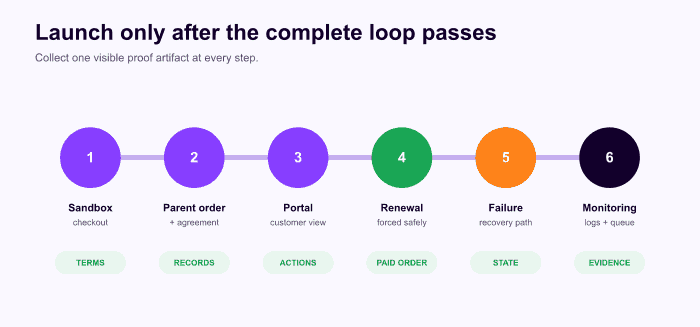
Collect proof at every stage instead of relying on a “payment succeeded” screen.
| Test | Expected proof | Where to inspect |
|---|---|---|
| Product display | Amount today, recurring cadence, trial/fee/end are unambiguous | Product, cart, checkout |
| Signup | One parent order and one linked subscription with correct dates | Orders and subscription admin |
| Portal | Customer sees schedule, total, payment, addresses, allowed actions | My Account |
| Renewal action | One due action creates one renewal order | Scheduled Actions and related orders |
| Automatic renewal | Sandbox charge succeeds and next date advances | Gateway sandbox, order notes, subscription |
| Manual renewal | Invoice/payment link works and reactivates the agreement | Email and customer checkout |
| Failure | Decline produces intended status, notice, retry, and grace | Notes, logs, email, access |
| Payment update | New method is used by the next renewal | Portal, gateway, subscription |
| Address/shipping | Future renewal uses intended address and shipping | Renewal order |
| Cancellation | Immediate or period-end behavior matches the promise | Portal, status, access, scheduled work |
| Fixed-term expiry | No extra charge remains after the final cycle | Dates and Scheduled Actions |
| Staging safety | Clone cannot charge or email real customers | Gateway mode, queue, environment controls |
The official Woo renewal-testing guide recommends inspecting related orders, order notes, gateway logs, and scheduled actions—not only the storefront result (testing renewal payments).
Step 10: launch with an operations dashboard
For the first real renewal cohort, review scheduled actions, gateway/webhook logs, failed renewals, customer emails, portal errors, and support messages daily. Action Scheduler provides a queue and logs, but it still needs a functioning runner. Woo's scheduled-event documentation explains that low traffic or broken cron can delay subscription actions (scheduled events guide).
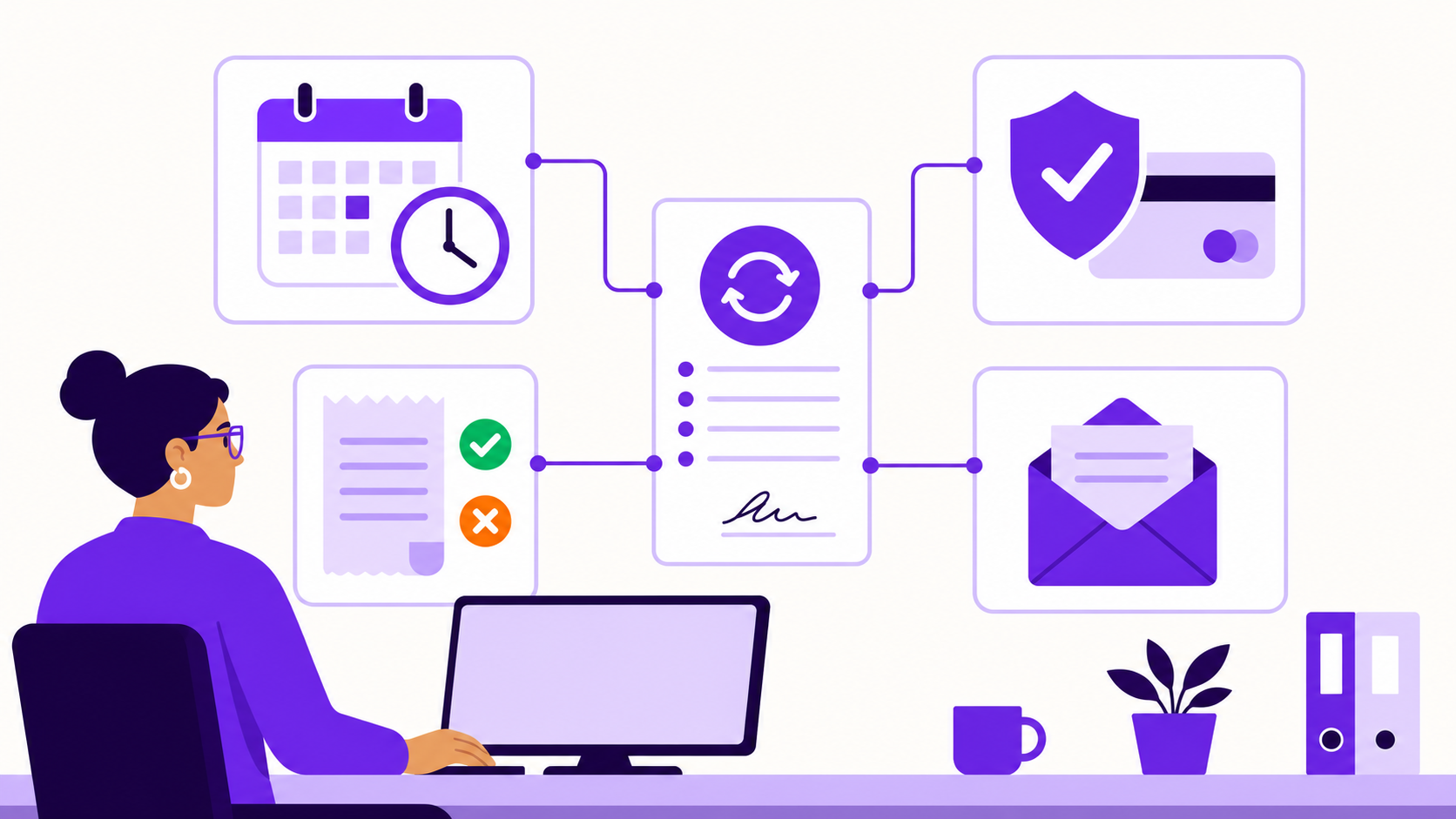
Monitor the operational proof: due work, gateway results, customer communication, and the agreement's next state.
Create a short weekly review:
- overdue and failed scheduled actions;
- renewal orders with unclear or mismatched statuses;
- gateway events without matching order notes;
- failed-payment volume by actionable reason;
- cancellation and access complaints;
- manual renewals waiting for customer action;
- product-page terms that generated support questions.
Do not invent success-rate targets before you have clean data. Establish your baseline, separate automatic from manual payments, distinguish retryable from permanent failures, and measure the complete recovery result.
A practical launch checklist
- The commercial model is named correctly: open-ended, fixed-term recurring, prepaid, installment, or lifetime.
- Billing, access, fulfillment, and recovery schedules are written separately.
- The exact gateway extension and payment method support the promised renewal path.
- Product, cart, and checkout state the amount today and future terms.
- Tax, shipping, stock, entitlement, portal, email, and cancellation rules are configured.
- Signup creates one correct parent order and subscription.
- A sandbox renewal creates one correct renewal order and advances the schedule.
- A controlled decline follows the documented retry/grace/stop path.
- Payment and address updates affect future renewals as intended.
- Fixed terms expire without an extra scheduled charge.
- Staging or cloned environments cannot contact real customers or charge real methods.
- Scheduled actions and gateway events have an owner and monitoring routine.
Frequently asked questions
Can WooCommerce do subscriptions by itself?
WooCommerce provides the store and order foundation, but a subscription extension or plugin provides the continuing billing agreement, schedule, lifecycle, and renewal behavior. Choose the engine based on the full lifecycle rather than the product editor alone.
Do I need automatic payments?
Not always. Manual renewals can work for low-frequency or invoice-led relationships, but every renewal requires customer action. Frequent consumer subscriptions usually benefit from a properly integrated automatic-payment method.
Is a lifetime deal a subscription?
It is a product model that a subscription system may manage, but it is not recurring billing because no future payment is scheduled. Define what “lifetime” means in the customer terms and account for ongoing service obligations.
Does changing the product price update current subscribers?
Do not assume it does. The live subscription agreement commonly carries the recurring total captured when the customer joined. Verify the selected engine's explicit price-change or migration workflow before changing existing agreements.
How many renewal orders does a 12-payment plan create?
If the first payment occurs at signup and the plan is defined as 12 total payments, the parent order records payment one and 11 renewal orders record the remaining payments. Check the engine's counting convention and run a finite-term test before launch.
Final recommendation
The reliable way to add subscriptions to WooCommerce is to design the business model and lifecycle first, configure the engine second, and prove the complete loop before launch. If you can explain each clock, each record, and every success or failure transition, the system is ready to operate—not merely ready to accept a first order.
ArraySubs is built around that WooCommerce workflow, with a free core for subscription products and manual renewals and Pro automation for supported gateways and deeper operations. Review ArraySubs pricing only after you have mapped the model and gateway your store needs.
Editorial disclosure: ArraySubs is an ArrayHash product and this guide is published on the ArraySubs site. Educational claims use linked official WordPress and WooCommerce sources; first-party feature statements were checked against ArraySubs 1.8.9 and ArraySubs Pro 1.1.0 code on July 13, 2026.
Verification note: This research pass reviewed current documentation and source code but did not run a live signup, renewal, failure, refund, or gateway transaction. Validate every version-specific behavior in your own sandbox before launch.
Update log: July 2026 — Initial publication; terminology, gateway framework, ArraySubs 1.8.9/Pro 1.1.0 code, and official WooCommerce and WordPress documentation verified.
Continue from strategy to setup
Use a recipe when the model is settled
These articles own the decision and operating model. The ArraySubs feature map and recipes cover the exact product, billing, and customer-workflow configuration.
Written by
Emran // ArrayHash
Research and practical guidance for WooCommerce subscription operators and implementation teams.
Technical review
ArraySubs Engineering Team
Reviewed against current ArraySubs code, product documentation, and the linked primary platform sources.