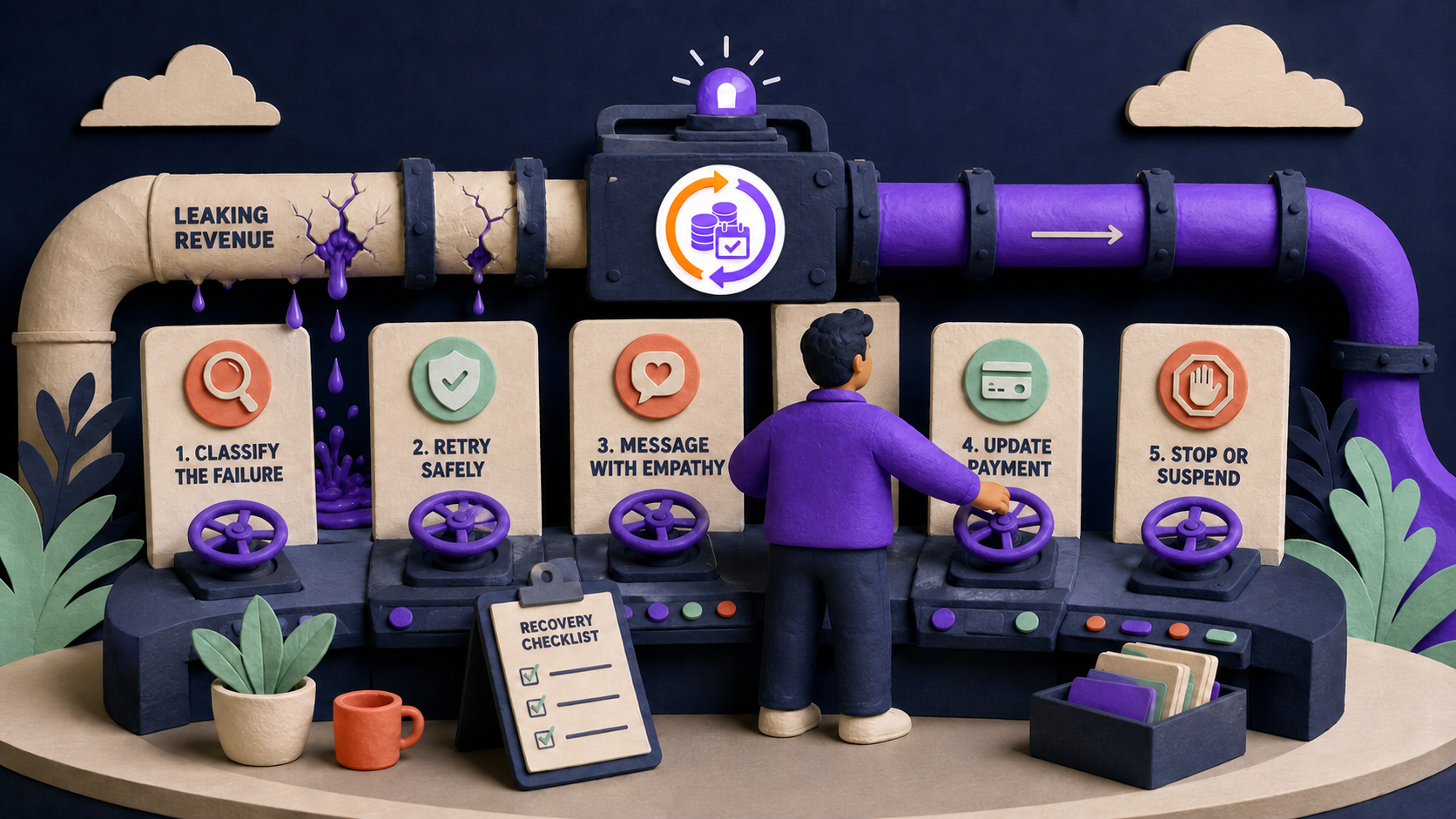
Auto-downgrade can beat cancellation when a subscription has a genuinely useful lower or free tier, the reduced entitlement is inexpensive to serve, and customers can later reauthorize payment without losing their work. It is usually a poor fit for shipped goods, costly human services, regulated access, or products whose “free” state creates ongoing fulfillment risk.
In ArraySubs, failure fallback is not meant to happen after the first decline. Retries and grace recovery come first; the configured downgrade is a final entitlement decision at an eligible lifecycle boundary.
Key takeaways
- Keep retry and grace recovery before fallback downgrade.
- Define the exact features, roles, limits, data, support, and fulfillment that change.
- Preserve enough identity and data for reactivation without promising indefinite retention.
- Expect a new payment method or authorization before future automatic billing resumes.
- Judge fallback by later reactivation and retained value minus cost, abuse, leakage, and cannibalization.
What is auto-downgrade after a failed subscription payment?
An auto-downgrade is an automatic move from the unpaid subscription product to a configured fallback subscription product after the recovery policy reaches a defined lifecycle event. It is not a payment retry and it does not make an unpaid renewal successful.
renewal failure
→ eligible retries and customer action
→ active grace
→ on-hold grace
→ configured lifecycle boundary
→ fallback entitlement or cancellation

Use three gates before enabling it:
- Eligibility: Is this customer and source product suitable for a fallback?
- Entitlement safety: Can service be reduced without costly fulfillment, data loss, privacy problems, or paid-feature leakage?
- Recovery path: Can the customer later attach a compatible payment method and clearly return to paid service?
A fallback is successful only when it preserves a worthwhile relationship at an acceptable cost. Moving every failed payer to a nominal “free” product can create support debt, entitlement leakage, duplicate subscriptions, or a remote agreement that keeps charging.
When does downgrade beat cancellation?
Downgrade is strongest when the product already has a coherent low-cost state.
| Business model | Fit | Why | Required guardrail |
|---|---|---|---|
| Freemium SaaS or digital tool | Strong | identity and data can remain while usage is limited | exact limits, reauthorization path, no paid-feature leakage |
| Tiered content/community | Conditional | a free role can preserve participation | test roles, caches, downloads, groups, and posting rights |
| Online course/library | Conditional | previews or an alumni library can remain useful | define completed-course and downloaded-file policy |
| Physical subscription box | Usually weak | “free” does not map cleanly to inventory and shipping | stop fulfillment before fallback; prevent zero-price shipment |
| Coaching, agency, or human service | Usually weak | labor and capacity remain expensive | remove booking/support entitlement and notify staff |
| Regulated or safety-critical service | Weak | ambiguous access changes create material risk | qualified review and explicit termination process |
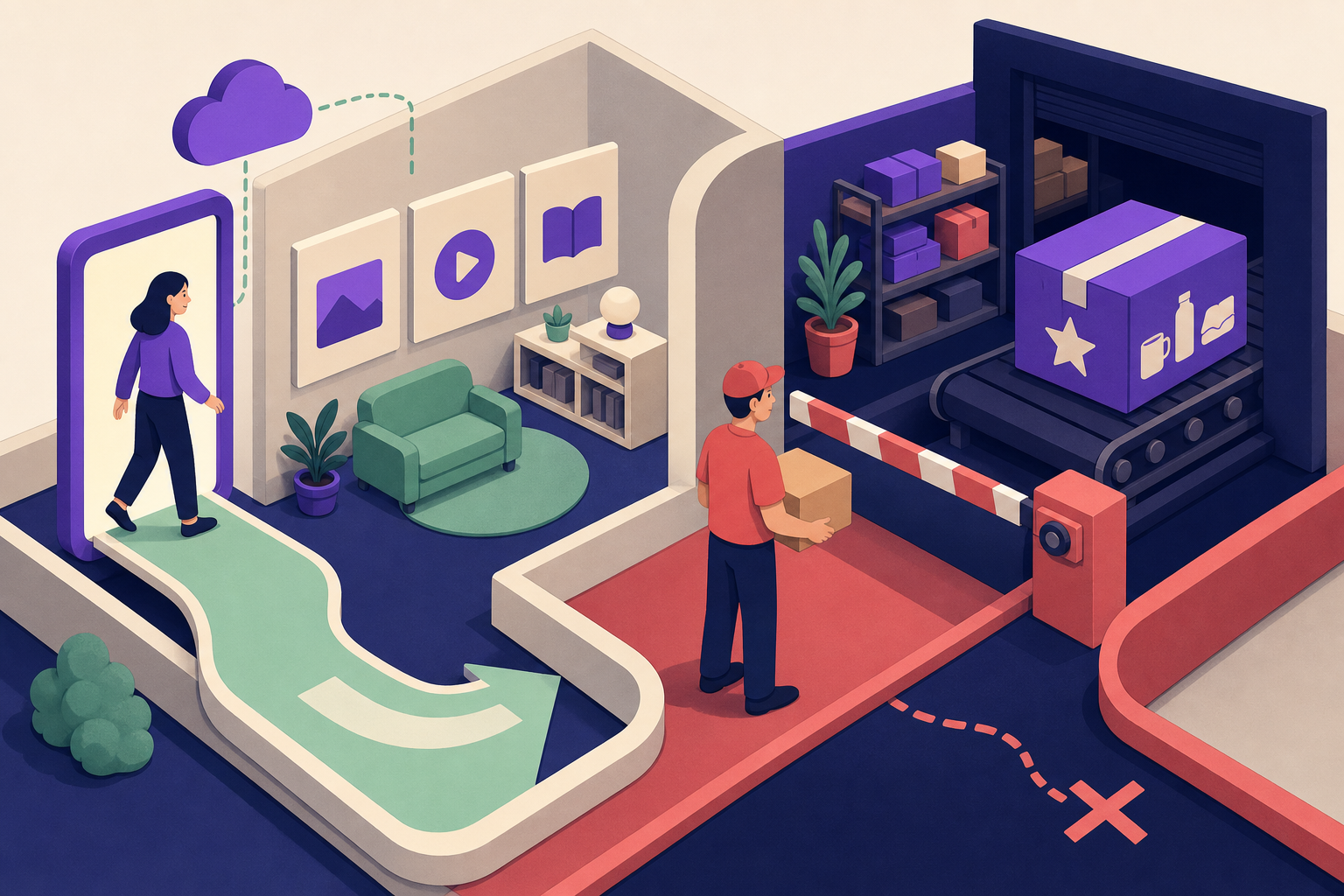
Cancellation can be cleaner when there is no honest lower-value product, when ongoing service costs real money, when the customer has entered dispute or fraud review, or when a remote provider remains the billing system of record.
Why should auto-downgrade happen after recovery, not after one decline?
Many payment failures are temporary, require a customer authentication step, or are caused by local/remote state disagreement. Downgrading after the first failure can revoke paid capabilities while a permitted retry is still pending—or while the gateway already succeeded and a webhook was missed.
WooCommerce's failed-payment retry system illustrates that retry rules can change order and subscription status before a final outcome (WooCommerce failed-payment retry). The exact WooCommerce Subscriptions engine does not control ArraySubs, but the policy principle is the same: verify the recovery window before committing to a fallback.
Before downgrade:
- verify the exact renewal is genuinely unpaid;
- check for successful remote payment and webhook mismatch;
- complete permitted retries and customer-action windows;
- respect the disclosed subscription grace period;
- confirm the provider agreement will not keep collecting after local fallback;
- exclude disputes, fraud, abuse, and manual-review cases.
How does current ArraySubs auto-downgrade work?
Public ArraySubs feature and pricing material identifies Auto-Downgrade as a Pro capability. Its source placement is an implementation detail and should not be used to infer that the public feature is free.
Current plan-switching settings expose three lifecycle trigger strategies:
- on expiration;
- on cancellation;
- on trial expiry.
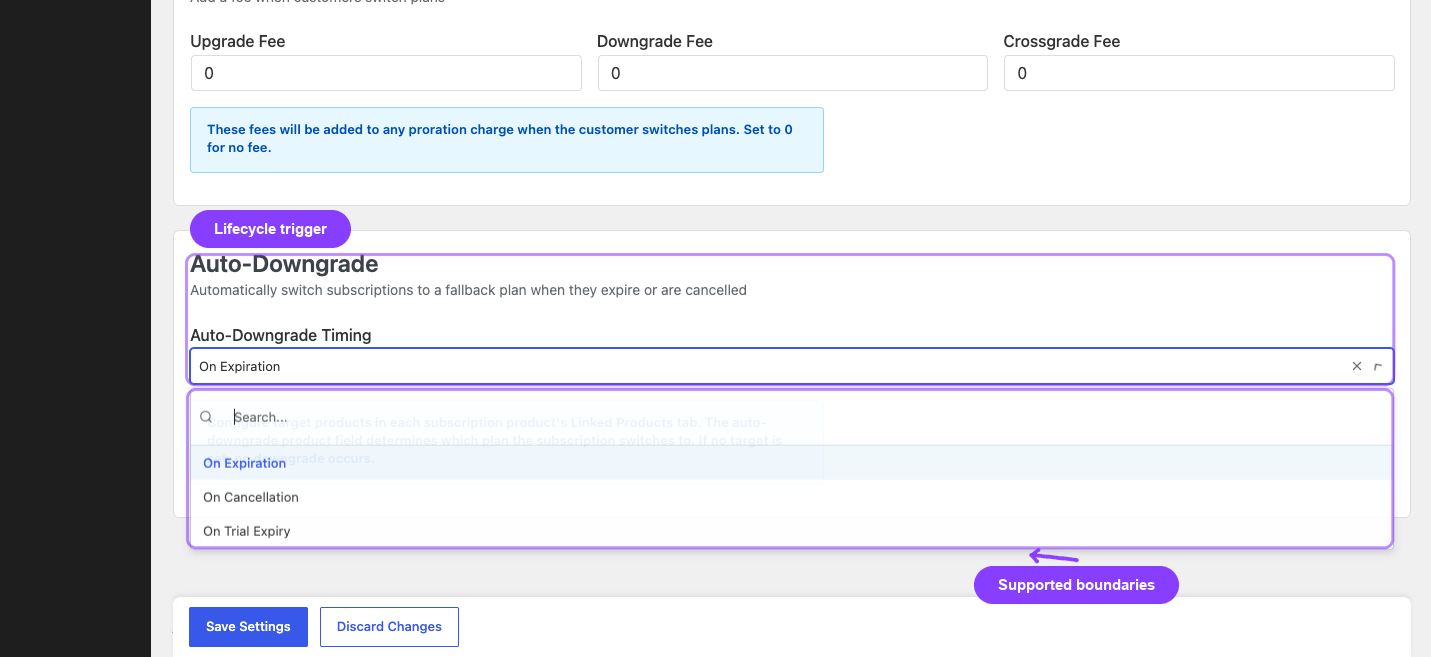
For failed-payment fallback, cancellation is the relevant path. Current source makes that path eligible for overdue on-hold or end-of-period contexts and explicitly excludes immediate cancellation. The sequence is approximately:
payment remains unresolved
→ active grace expires
→ on-hold grace expires
→ overdue cancellation boundary becomes eligible
→ configured fallback product is applied
The fallback target is stored per source subscription product or variation. Current validation requires it to be a published, in-stock subscription product and different from the source. If the customer already has an active subscription to that fallback, the handler can reuse it rather than creating another duplicate relationship.
What changes during the ArraySubs fallback transition?
Source inspection found that the handler can:
- cancel a stale unpaid renewal order;
- cancel supported remote subscription/agreement context;
- reuse an existing active fallback or change the current subscription product;
- apply the fallback without a refund and without a new charge;
- clear ended and failure metadata;
- detach automatic gateway metadata;
- activate and schedule the fallback subscription;
- send an auto-downgrade email and write audit/history evidence.
That last billing detail is critical: when automatic gateway context is detached or cancelled, the fallback behaves as manual renewal until a new compatible method or authorization is attached. Do not promise that the old failed token will automatically fund a future paid fallback renewal.
How should fallback entitlements be designed?
Create an explicit before/after contract. A product name and price are not enough.
| Entitlement area | Paid source | Fallback decision | Verification |
|---|---|---|---|
| Identity and login | full account | normally preserve | customer can sign in safely |
| Customer data | active workspace | preserve, archive, or delete by policy | retention job and customer copy agree |
| Content | premium library | preview, archive, or selected catalog | guest/fallback/paid tests |
| Usage | higher quota | lower quota or read-only | server-side enforcement, not UI alone |
| Downloads/API | included | revoke or reduce | old URLs/tokens stop as intended |
| Roles/groups | paid role | fallback role | role mapping and cache invalidation |
| Support | priority | community/self-service | queues and staff instructions |
| Fulfillment | shipment/service | stop before cost is incurred | warehouse/booking integration evidence |

Current ArraySubs role mapping can connect product eligibility to roles, but arbitrary SaaS quota migration and every third-party feature flag remain merchant/integration responsibilities.
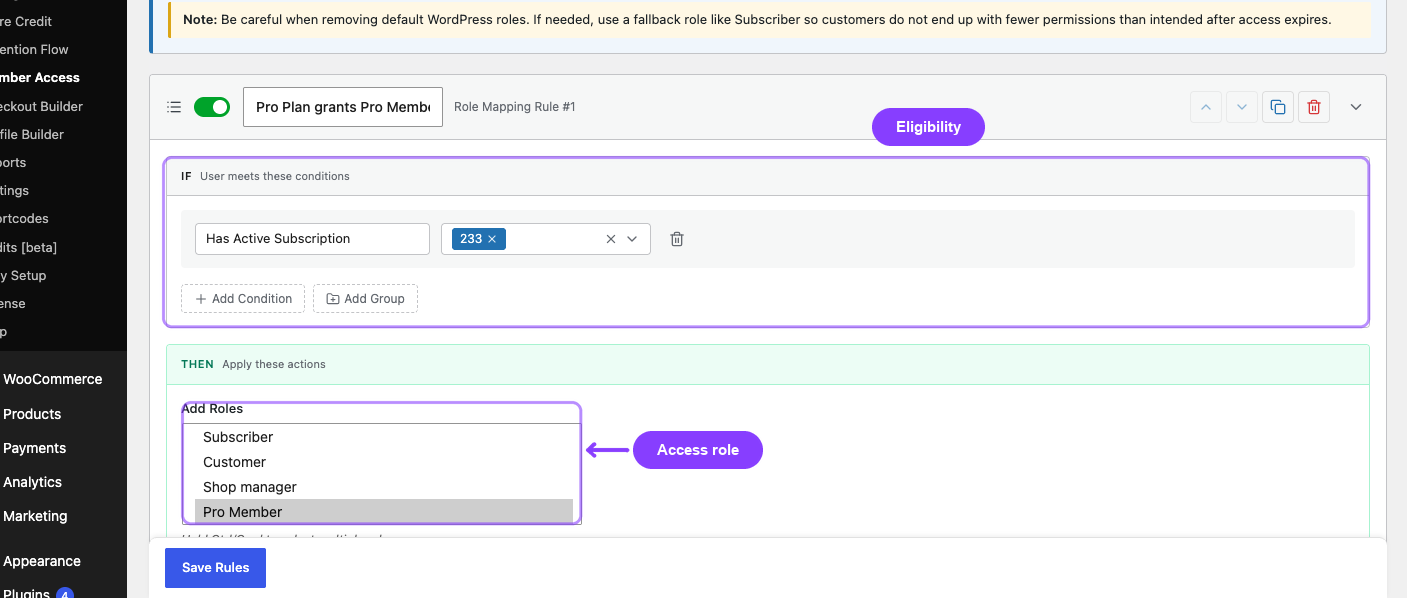
Test a signed-in fallback customer, not only an administrator. Clear relevant caches, try direct file and API URLs, and verify that previously issued downloads, tokens, or group permissions do not bypass the new state.
What customer and account eligibility rules are needed?
Current source did not show built-in customer-value scoring, tenure logic, abuse scoring, or an experiment engine for auto-downgrade. Those are merchant policy layers.
Recommended eligibility controls include:
- exclude fraud, chargeback, policy-violation, and abusive accounts;
- require a valid fallback mapping and tested entitlement difference;
- exclude accounts with unpaid variable usage, shipped goods, or undelivered human work unless reviewed;
- define whether recently upgraded or promotional customers qualify;
- add a cooldown before another trial or introductory upgrade;
- rate-limit repeated paid → fallback → trial loops;
- preserve source product and downgrade reason in audit history;
- reuse an existing fallback subscription instead of stacking duplicates;
- confirm remote automatic billing is cancelled or intentionally retained, never ambiguous.
Use a dry-run report before enabling automation. It should list the source subscription, unpaid renewal, gateway owner, target product, existing target subscription, current roles/features, fulfillment risk, and exclusion reason.
How should the gateway agreement be handled?
Local fallback cannot be considered safe while a remote provider might continue collecting the old paid agreement.
Stripe subscription/payment events, for example, require webhook reconciliation and customer/payment-method recovery when state changes (Stripe subscription overview, Stripe subscription webhooks). PayPal and Paddle can own provider-side retries and suspension/recovery (PayPal payment failure retry, Paddle payment recovery).
The transition should be idempotent:
verify exact unpaid obligation
→ stop or reconcile in-flight payment
→ cancel/detach remote paid agreement once
→ apply fallback entitlement once
→ verify no duplicate charge or subscription
→ record provider and local evidence
If provider cancellation fails, do not silently grant the fallback and hope the agreement stops. Hold for review or roll back to a known state.
Worked example: a $39 analytics plan and a free read-only tier
Consider a fictional analytics product with a $39 monthly paid workspace and a $0 read-only fallback.
Paid service includes new imports, scheduled reports, exports, and priority support. Fallback preserves login, existing dashboards, and account data but stops imports, schedules, exports, and priority support.
expected fallback value
= later reactivation value
 + retained referral or engagement value
 − infrastructure and support cost
 − paid-plan cannibalization
 − entitlement leakage and abuse cost
For a 60-day closed cohort, record:
- eligible failed subscriptions;
- completed fallback transitions;
- customers still using allowed fallback features;
- customers who attached new authorization and returned to paid;
- infrastructure and support cost;
- paid-feature leakage or enforcement failures;
- duplicate subscriptions, charges, or remote agreement errors.
Do not declare victory based only on the number downgraded. A high fallback rate with no reactivation and costly support may be worse than clean cancellation.
What should the downgrade email say?
State that payment was not recovered, identify the new plan, name retained and removed capabilities, explain data/fulfillment behavior, and provide a tested path back to paid service. Also disclose that future automatic billing may require a new payment method or authorization.
Avoid “your payment was recovered” and avoid implying the fallback is a penalty. The customer should understand the current state and control the next step. Adapt the message and stop rules from the failed-payment email sequence playbook.
Auto-downgrade launch and rollback checklist
- Confirm the renewal is unresolved and not waiting for reconciliation.
- Confirm retry and grace policy is exhausted.
- Validate the fallback product, price, interval, stock, tax, and availability.
- Map every role, feature, quota, download, API, group, support, and fulfillment change.
- Exclude fraud, disputes, abuse, variable-cost debt, and unsafe products.
- Verify remote gateway cancellation/detachment idempotently.
- Confirm stale renewal-order behavior and duplicate-charge protection.
- Test existing-fallback reuse and duplicate-subscription prevention.
- Verify paid entitlements disappear and fallback entitlements appear.
- Match customer data retention to published policy.
- Explain the new-authorization/manual-renewal caveat.
- Test upgrade/reactivation end to end.
- Record audit evidence and assign a manual rollback owner.
- Roll back if target mapping, entitlement enforcement, provider cancellation, or audit writing fails.
For the product-specific flow, use the auto-downgrade-on-failed-payment recipe after the preceding lenient grace or strict grace policy is documented.
When should a store choose cancellation instead?
Choose cancellation when there is no coherent fallback product; when ongoing service has high marginal cost; when physical fulfillment cannot be stopped reliably; when a legal or safety duty requires an explicit termination; when a dispute or fraud review is active; or when external billing ownership cannot be safely detached.
ArraySubs is a practical fit for a WooCommerce-owned tiered product with testable roles/access and a clean gateway transition. It is not a replacement for arbitrary feature-flag migration, value scoring, abuse detection, data-retention policy, or every fulfillment integration.
Final recommendation
Use auto-downgrade as a deliberate final lifecycle policy, never as a reflex after one decline. Require eligibility, entitlement safety, and a credible path back to paid. Test the remote agreement, fallback access, manual-renewal caveat, customer message, economics, and rollback before allowing automation to change real accounts.
After those controls pass, review ArraySubs Pro pricing and the wider subscription operations feature set.
Frequently asked questions
Does ArraySubs auto-downgrade after the first failed payment?
No. For the failed-payment cancellation path, current behavior is designed around the overdue lifecycle boundary after retries and the two grace phases, not the first decline.
Will the old card automatically bill the fallback subscription?
Do not assume so. Current transition behavior detaches or cancels automatic gateway context, so a compatible new method or authorization may be required before automatic billing can resume.
Can the fallback plan be free?
Yes, if it is a valid published subscription product and the entitlement and renewal behavior are intentional. A free price does not remove the need to stop paid features and costly fulfillment.
Does ArraySubs decide which customers are valuable enough to downgrade?
Current source review did not find customer-value, tenure, abuse-scoring, or experimentation rules for this feature. Eligibility is a merchant policy responsibility.
Is auto-downgrade suitable for subscription boxes?
Usually not. A free or lower plan does not naturally map to inventory and shipping. If used, fulfillment must stop before the transition and zero-price shipments must be prevented.
What is the biggest auto-downgrade risk?
State disagreement: the remote paid agreement continues charging while local access falls back, or local paid entitlements remain available after the fallback. Test both sides and keep a rollback path.
Author, technical review, and verification environment
Author: Emran, ArrayHash — product and editorial work across WooCommerce subscription operations.
Technical reviewer: ArraySubs Engineering Team — review scope includes plan-switching triggers, fallback validation, overdue cancellation, gateway detachment, access mapping, and audit behavior.
Verification environment: Source and UI review of ArraySubs 1.8.11 and ArraySubs Pro 1.1.2 on July 16, 2026. No live gateway-backed subscription was advanced from failed renewal through overdue cancellation into fallback.
Disclosure, limitations, and update log
- Commercial disclosure: Auto-Downgrade is identified as an ArraySubs Pro capability in public product material. Strategy guidance is educational and limitations are stated explicitly.
- Limitations: Third-party gateways, membership plugins, feature flags, caches, fulfillment systems, and data-retention policy can change the result.
- July 16, 2026: First publication. Verified current trigger strategies, on-cancel timing, fallback validation/reuse, gateway detachment, manual-renewal consequence, and non-native eligibility/abuse responsibilities.
Continue from strategy to setup
Use a recipe when the model is settled
These articles own the decision and operating model. The ArraySubs feature map and recipes cover the exact product, billing, and customer-workflow configuration.
Written by
Emran // ArrayHash
Research and practical guidance for WooCommerce subscription operators and implementation teams.
Technical review
ArraySubs Engineering Team
Reviewed against current ArraySubs code, product documentation, and the linked primary platform sources.