
A failed-payment email sequence should explain the problem immediately, provide one secure recovery action, increase specificity as the access deadline approaches, and stop as soon as payment succeeds or the lifecycle changes. Each message must match the actual retry, grace, and access policy; a persuasive email cannot fix an incorrect token, webhook, or renewal state.
The adaptable templates below are a policy framework, not a benchmark-backed promise that every subscription business should send four messages. Send only when the customer has a meaningful new fact, action, or deadline.
Key takeaways
- Trigger emails from verified payment and lifecycle states, not a blind calendar.
- Put one secure action, the exact consequence, and a support route before promotional content.
- Never invent a retry date or access deadline the system does not enforce.
- Stop or branch after payment, manual resolution, cancellation, downgrade, dispute, or superseding gateway communication.
- Measure task completion and verified recovery separately from opens and clicks.
Why should a failed-payment sequence be state-driven?
A calendar says “send on day 0, day 2, and day 5.” A state-driven sequence asks what changed and what the customer can do now.
failure verified
→ immediate notice
→ reminder before next meaningful boundary
→ access or final-state warning
→ post-failure branch

At every step:
paid / manually resolved / cancelled / downgraded / disputed
→ stop or enter a different branch

That difference prevents several common mistakes:
- telling a customer another retry will run when none is scheduled;
- sending “payment failed” after the gateway already collected;
- warning that access ends on a date when the access rule does something else;
- sending both merchant and gateway notices that prescribe conflicting actions;
- continuing urgent dunning after cancellation, fallback downgrade, or manual resolution.
WooCommerce Subscriptions' own retry rules can coordinate order/subscription status and customer/store emails at retry boundaries (WooCommerce failed recurring payment retry). ArraySubs has its own lifecycle and email hooks; do not assume the WooCommerce Subscriptions engine controls an ArraySubs renewal.
What should every failed-payment email contain?
Every message should answer six questions in plain language:
- Who is writing? Use a recognizable store and From identity.
- What failed? Name the subscription and renewal date.
- What is the current state? Say failed, active during grace, on hold, or another verified state.
- What should the customer do? Pay, update a method, authenticate, reauthorize, or contact support.
- What happens next? State a real retry, access change, fulfillment cutoff, or final outcome.
- How can the customer verify safety? Use an authenticated account or provider-hosted route and warn against replying with card details.
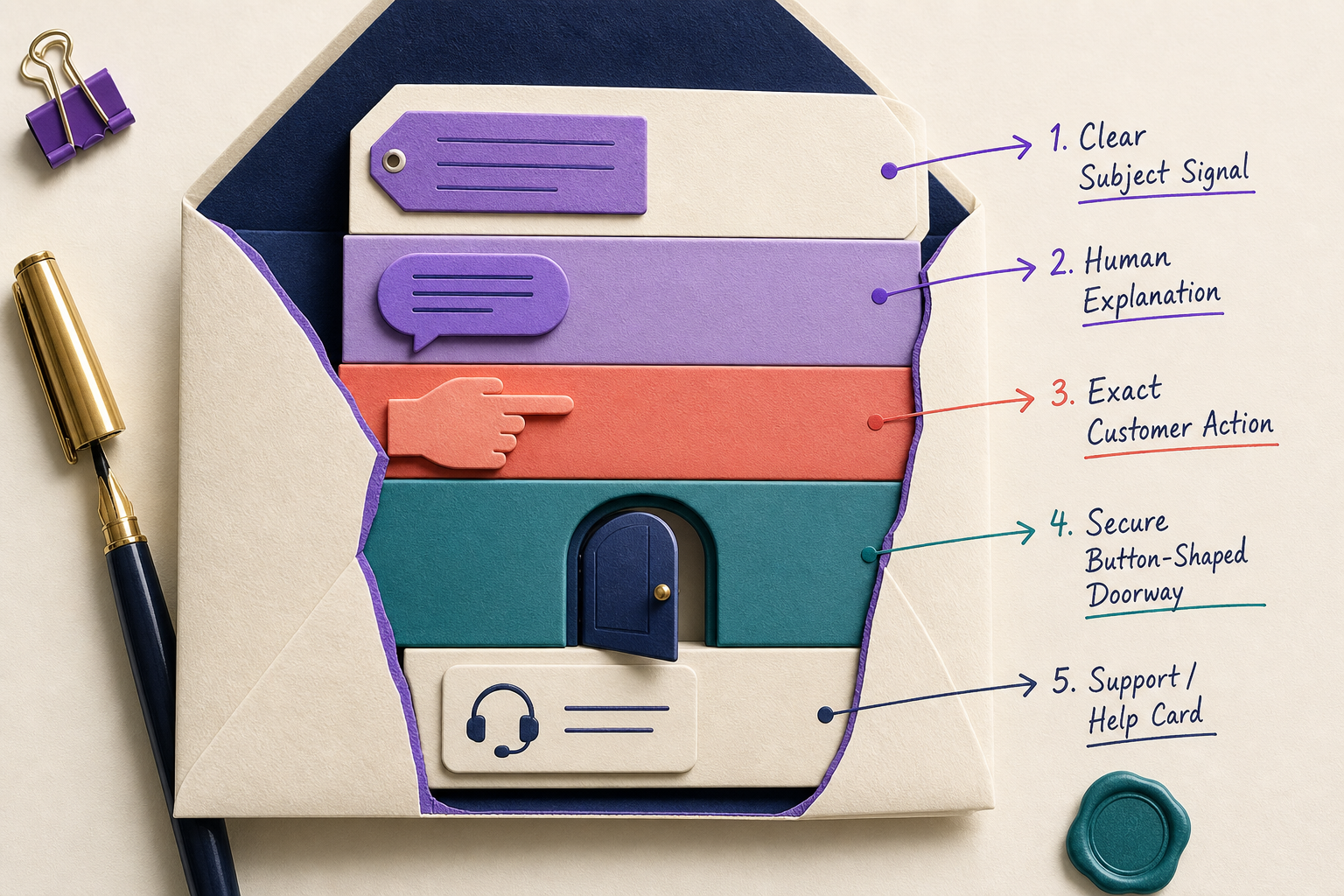
Use the exact amount only when the renewal order is authoritative. Use a customer-safe failure explanation, not a raw processor payload. State dates with timezone when a cutoff is material.
Failed-payment email sequence at a glance
| Message | Trigger | Job to be done | Must include | Stop or skip when |
|---|---|---|---|---|
| 1. Payment needs attention | first verified failure | explain and enable immediate recovery | subscription, safe reason, amount when reliable, one action, support | payment succeeded; provider owns the sole notice |
| 2. Recovery reminder | before a real retry or halfway to access change | add a new event without pressure theater | what happens next, secure path, retry time if known | there is no new information; duplicate attempt; dispute review |
| 3. Access deadline | before on-hold, restriction, or fulfillment cutoff | explain exact consequence | date/timezone, affected entitlement or shipment, recovery route | policy does not change access then |
| 4. Final outcome | before cancellation or fallback | explain the final state and last valid route | exact outcome, deadline, retained data/credit only when true | already paid, cancelled, or downgraded |
| Recovery confirmation | after verified reconciliation | close the loop | payment receipt, current status, next renewal, receipt/order link | local and remote state still disagree |
| Post-failure | after final lifecycle action | preserve trust and provide an honest next step | current state, restart/fallback/support path | no lawful or operational reason to continue |
The exact number is secondary. A short grace window may need only an immediate notice and a deadline message. A longer, high-value service may justify more state updates. Repetition without new information trains customers to ignore the sequence.
Message 1: explain the failure and provide one safe action
Send after the failure is verified and before local state can be contradicted by an in-flight webhook or provider recovery event.
Subject
Action needed: we could not renew [subscription name]
Preheader
Pay securely or update your payment method from your account.
Adaptable body
We could not process the [date] renewal for [subscription].
[Customer-safe reason, when verified.]

Your subscription is currently [actual state].
[Actual access or fulfillment consequence and date.]

[Pay renewal] OR [Update payment method]

For security, do not send card details by email. We will never
ask you to reply with your card security code.

Need help? Contact [support route] and include subscription [safe ID].
Choose one primary button. If an expired card needs replacement before payment can succeed, “Update payment method” may be the primary action and “Pay renewal” the next step. If the method is valid but the order is simply unpaid, reverse that order.
Avoid blame. “Your card was bad” adds shame without improving task completion. “Your bank or payment provider did not complete the payment” is both safer and more accurate when no specific customer action is known.
Message 2: add the next meaningful recovery event
The reminder should not be Message 1 with “URGENT” added. It should introduce a fact the customer can use.
Subject
Reminder: [subscription] payment is still unresolved
Include one of the following only when it is true:
- “We will try the payment again on [date/timezone].”
- “Your payment provider may continue its recovery process.”
- “Your current card expires before the next renewal.”
- “Please complete authentication from your secure account.”
- “The shipment will be held after [warehouse cutoff].”
If timing is controlled by PayPal, Paddle, Stripe Billing, or another remote provider, do not manufacture a local retry timestamp. Coordinate provider-owned messages so the customer does not receive one email saying “wait” and another saying “pay now.” Stripe, for example, can send failed-payment and upcoming-renewal emails in Stripe Billing, and its Smart Retries belong to that provider-owned invoice architecture (Stripe customer emails, Stripe Smart Retries).
Message 3: state the access or fulfillment deadline exactly
This message is about consequences, not fear.
Subject
[Subscription] access changes on [date]
Adaptable body block
We have not received payment for [renewal].

At [date, time, timezone], [specific entitlement] will [actual action].
[Account identity, data, progress, or support access] will [verified behavior].

To avoid this change, [pay/update/authenticate] securely before the deadline.
Name the affected surface: premium downloads, API requests, community posting, the next shipment, or a scheduled service. Do not say “your account will be deleted” unless deletion is a real, documented, reviewed action.
For physical subscriptions, billing grace and warehouse release are separate. A box may need to stop before the subscription reaches on hold. For digital access, the store may preserve login and progress while restricting paid capabilities. Build the wording from the actual subscription grace-period policy.
Message 4: explain the final outcome without a fake countdown
The final notice should state what the system will actually do: cancel, remain on hold, move to a fallback tier, or enter manual review.
Subject
Final payment notice for [subscription]
Adaptable body block
Payment for [renewal] remains unresolved.

On [date/timezone], the subscription will [cancel / move to fallback /
remain on hold for manual review].

[Verified statement about data, credits, content, bookings, or reactivation.]

[Complete payment] [Choose fallback, if available] [Contact support]
If an auto-downgrade after payment failure is the chosen final state, name the fallback plan and lost/retained entitlements. Do not describe a downgrade as successful payment recovery; it is a retention and access outcome after the paid plan could not be collected.
Recovery confirmation: close the loop only after reconciliation
Subject
Payment received — [subscription] is active
The confirmation should include:
- the paid renewal and receipt/order link;
- the current subscription status;
- the restored entitlement or fulfillment state;
- the next renewal date and timezone;
- a support route for anything that still looks wrong.
Do not send “everything is restored” merely because a method was updated or a remote payment appears successful. Verify the WooCommerce renewal order, transaction reference, subscription status, access rules, retry state, scheduled actions, and next date first.
What does current ArraySubs send?
Current ArraySubs core includes customer and administrator payment-failed emails. The customer template follows WooCommerce email conventions and can show a safe failure reason, amount/status, a Pay Now action, and Manage Subscription. Subject, heading, and additional content can be customized through WooCommerce's email system, which documents these standard settings and template controls (WooCommerce email settings).
Failure hooks coordinate generic and gateway-backed paths so both are not intentionally fired for the same event. Related lifecycle emails exist for on-hold, cancelled, card-expiring, and auto-downgrade events.
However, current source inspection did not find a native visual builder for the timed multi-message sequence in this article, a built-in A/B test engine, or a proven independent delayed scheduler for a three- or four-message campaign. The playbook may require WooCommerce email customization, an external automation tool, or custom development.
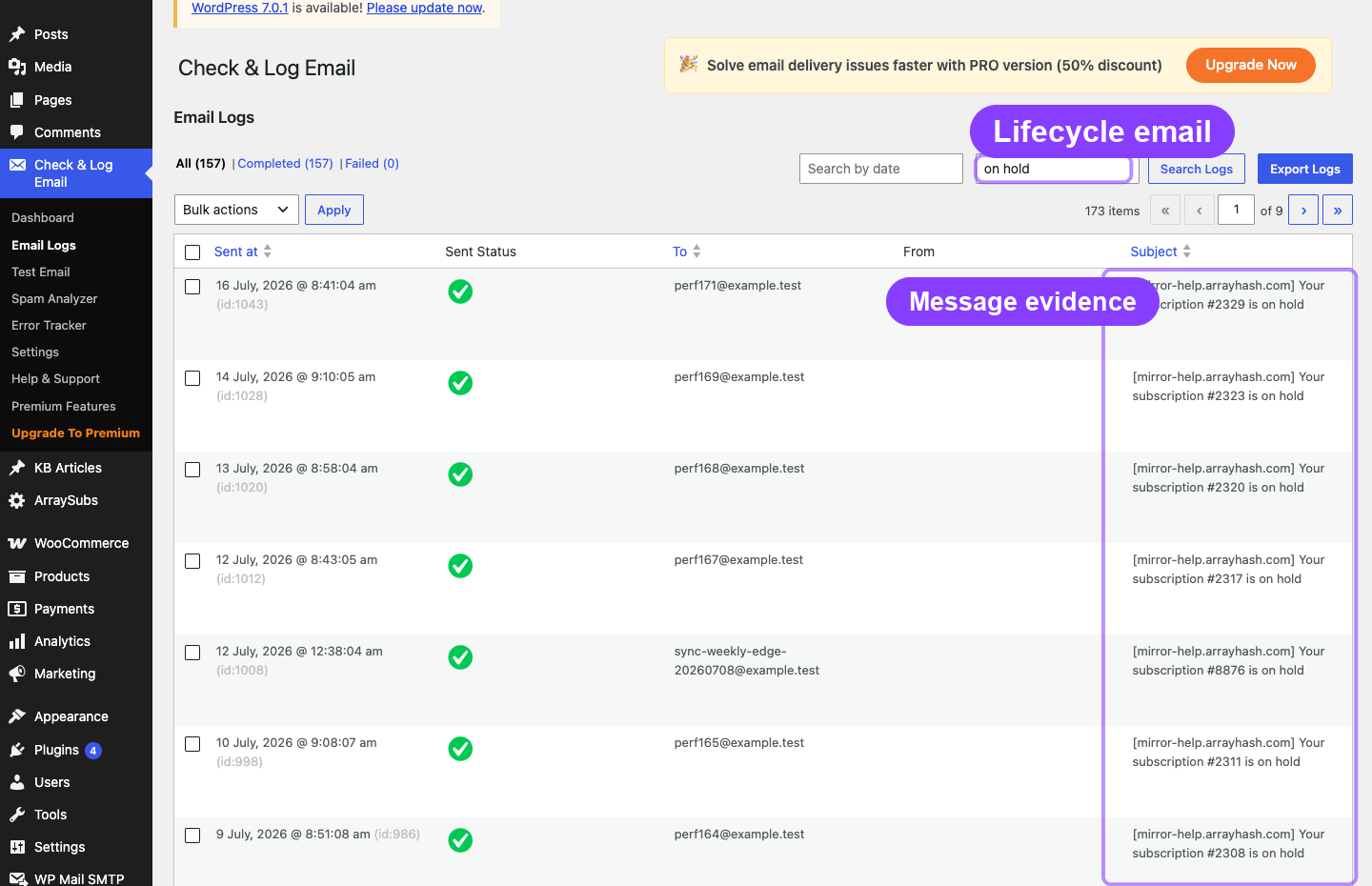
A failure email can also be triggered after another genuine attempt. Deduplicate at the renewal/event level and ensure each message adds a new state or deadline.
How should support verify state before sending urgent copy?
The operator needs a single reconstruction of the renewal:
- first and latest failure time;
- renewal order, amount, gateway, and provider reason;
- last attempt, attempt count, and real next retry;
- subscription status and grace boundary;
- payment-method update, authentication, or Pay Now events;
- gateway payment/webhook evidence;
- access and fulfillment state;
- messages already sent and final resolution.
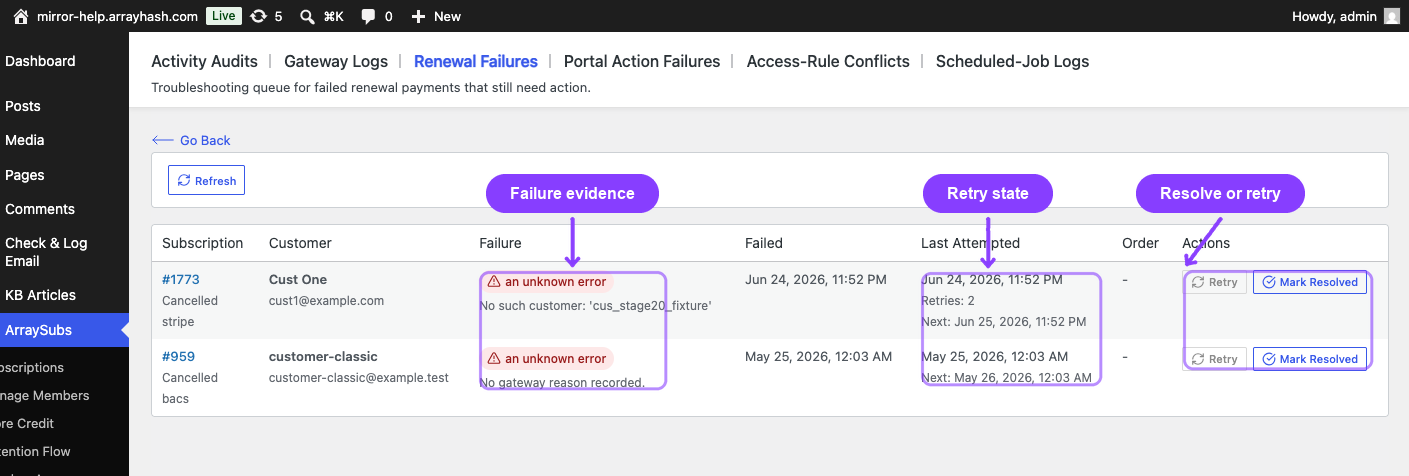
Do not use “Mark Resolved” as a substitute for collecting payment. A resolution control can close an operational record, but the order and subscription still need the intended financial and lifecycle outcome.
Accessibility, security, and deliverability checklist
- Use a clear From name and authenticated sending domain.
- Align SPF, DKIM, and DMARC with the sending setup.
- Keep one primary action and expose the destination domain nearby.
- Use descriptive links rather than repeated “click here.”
- Do not communicate urgency or status using color alone.
- Use readable type, sufficient contrast, responsive buttons, meaningful alt text, and a plain-text alternative.
- State deadlines with date, time, and timezone.
- Never request PAN, CVC, raw tokens, or authentication data in replies.
- Remove promotional banners that compete with the recovery task.
- Coordinate merchant, WooCommerce, and gateway messages.
- Test from address, reply handling, bounces, links, mobile layout, and dark mode.
Google's Gmail sender guidelines require authentication and set additional requirements for higher-volume senders (Google email sender guidelines). Meeting those requirements does not guarantee inbox placement. Monitor delivered, bounced, delayed, blocked, and spam-complaint signals rather than treating “send succeeded” as delivery.
Stop rules for a failed-payment email sequence
Evaluate stop rules immediately before every send.
STOP if the exact renewal is paid
STOP if the subscription is voluntarily cancelled
STOP or BRANCH if the subscription is downgraded
STOP if an administrator resolved it through a verified path
STOP and ESCALATE for dispute, fraud, or security review
SKIP if a provider notice is the designated single source
SKIP if the message adds no new action, state, or deadline
Also stop when the link would no longer work. A “Pay Now” button for a cancelled order, an update link for a pending-cancellation subscription, or a deadline after access already changed destroys trust.
How should recovery email performance be measured?
Use closed, comparable cohorts and separate delivery from recovery.
delivered rate
= delivered eligible messages ÷ attempted eligible messages

secure-action completion rate
= customers who complete payment/update/authentication
  ÷ unique customers who reach the secure action

observed post-email recovery rate
= recovered failed renewals after an eligible email
  ÷ delivered eligible failed-renewal emails

time to recovery
= verified successful recovery time − first verified failure time
Call the third measure “observed post-email recovery,” not automatically “email-attributed recovery.” Automatic retries, support contact, network account updates, and provider messages are confounders.
Track duplicate sends, support contacts, method updates, paid renewals, access errors, bounces, complaints, refunds, and disputes beside clicks. An email can earn a click and still send the customer into a broken payment route.
Controlled A/B test plan
- Keep retry, grace, access, and fulfillment policy constant.
- Choose one eligible closed cohort and one message position.
- Change one variable: subject specificity, action label, reason wording, or deadline presentation.
- Predefine task completion and verified recovery windows.
- Exclude known provider duplicates and already-paid renewals.
- Monitor harm signals, not just uplift.
- Do not publish a winner until the sample and uncertainty support it.
No open-rate or revenue-lift benchmark is claimed here.
Final recommendation
Build the failed-payment email sequence around verified state changes. Send the first notice quickly, make every later message add a real event or deadline, provide one secure task, and stop the moment the branch changes. Fix token, gateway, webhook, scheduler, and order-state problems before trying to write around them.
Use the lenient dunning recipe or strict dunning recipe to align implementation with the policy, then review ArraySubs Pro pricing for supported payment-recovery capabilities.
Frequently asked questions
How many failed-payment emails should a subscription business send?
There is no universal number. Send only when the customer has a new action, state, retry, access consequence, or final deadline. A short grace policy may need fewer messages than this framework.
When should the first failed-payment email be sent?
After the failure is verified and the local state is unlikely to be contradicted by an in-flight payment or webhook. It should provide the safest current recovery action immediately.
Should every reminder say “urgent”?
No. Specificity is more useful than escalating adjectives. State the exact action, date, timezone, entitlement, and consequence.
Does ArraySubs include a four-email dunning automation?
Current source review did not find a native visual timed-sequence builder or built-in A/B testing. ArraySubs provides lifecycle emails and hooks; the proposed sequence may need customization or another automation layer.
Should an email be sent after the payment method is updated?
Only if it adds the next required step or confirms verified recovery. A method update alone may leave the renewal order unpaid.
What should stop the sequence?
Verified payment, manual resolution, voluntary cancellation, completed downgrade, a dispute/fraud branch, superseding provider communication, or any state in which the promised action is no longer valid.
Author, technical review, and verification environment
Author: Emran, ArrayHash — product and editorial work across WooCommerce subscription operations.
Technical reviewer: ArraySubs Engineering Team — review scope includes payment-failure hooks, WooCommerce email templates, lifecycle emails, retry state, and stop-condition evidence.
Verification environment: Source and settings review of ArraySubs 1.8.11 and ArraySubs Pro 1.1.2 on July 16, 2026, plus current official WooCommerce, Stripe, and Google sender documentation. No production sequence or deliverability experiment was run.
Disclosure, limitations, and update log
- Commercial disclosure: ArraySubs is an ArrayHash product. The playbook is educational and explicitly distinguishes current product emails from a custom timed sequence.
- Limitations: Delivery providers, gateway notices, retry ownership, grace timing, and access behavior vary. Verify every template against the deployed store.
- July 16, 2026: First publication. Verified current email classes/hooks, configurable WooCommerce fields, related lifecycle emails, the lack of a native sequence/A-B builder, and live email-log evidence.
Continue from strategy to setup
Use a recipe when the model is settled
These articles own the decision and operating model. The ArraySubs feature map and recipes cover the exact product, billing, and customer-workflow configuration.
Written by
Emran // ArrayHash
Research and practical guidance for WooCommerce subscription operators and implementation teams.
Technical review
ArraySubs Engineering Team
Reviewed against current ArraySubs code, product documentation, and the linked primary platform sources.